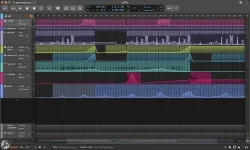
Bitwig's automation system just got its biggest rework ever, and the whole interface got a fresh coat of paint to match.
Bitwig Studio 6 automation revamp
Bitwig Studio 6 automation revamp
- Bitwig Studio 6 drops a dedicated Automation Mode toggled by the A key.
- Every track gets overlaid with the last-touched parameter's lane.
- A Detail Editor Panel bundles all track automation neatly.
- Drawing behavior got retooled for quicker line adjustments.
- Operator-inspired spread functionality injects variation into existing curves.
- A Spray Can tool paints held points at the grid interval.
- Automation clips inherit drag-and-drop, looping, and stretching features.
- Editing tools sit in a palette docked on the right side.
- Project-wide visual tweaks live behind a right-click menu up top.
- Track headers resize more dynamically than before.
- Arranger Auto Zoom locks non-selected tracks while adjusting chosen ones.
- Clip Launcher shows loop count and position visually per track.
- Arranger clips render beat grid lines behind them.
- Projects carry a Key Signature with a scale shown in the Piano Roll.
- Snap to Key locks edits in tune and links to the Arpeggiator.
- An Audition tool previews any track or clip directly.
- Step Input handles fast note entry with multi-note support.
- Four Grid modules manage scale quantizing and pitch-class selection.
- Windows 10 or higher and macOS 12 or above are required.
- Bitwig Studio 6 lands on 11 March 2026 as a free upgrade plan update.
- Legacy projects get a permanent backup file when opened.