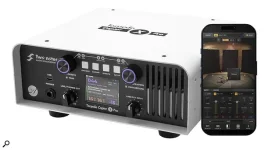
Captor X Pro accepts 4, 8, and 16-ohm amplifier outputs and handles up to 150 watts through its load section. The first job is not choosing a cabinet simulation. It is matching the amp-facing impedance before the amplifier comes on, then deciding whether a real speaker cabinet will remain in the chain.
The 150W Captor X Pro load box can replace the cabinet load for silent work or sit between the amp and a physical cabinet for attenuation. Use proper speaker cable between the amplifier, Captor X Pro, and any passive cabinet. An instrument cable is not a substitute on the speaker-level side.
Setting up the Two Notes Captor X Pro gets easier once you treat its speaker path and processed direct path as separate systems. The cabinet output carries the amp signal toward a real speaker, while the stereo XLR outputs and headphones can carry DynIR cabinets, microphones, routing, and effects.
Older Captor models make some setup advice easy to misread because they were sold in fixed-impedance versions. True Stereo DynIR on the Captor X+ expanded direct routing, while the Pro adds switchable 4, 8, and 16-ohm loading plus 13 passive attenuation steps, mute, and full speaker level.
To connect Captor X Pro to a combo amp, you still need access to the combo's speaker-level connection. Run the amp's speaker output into the Speaker Input. If you want the combo speaker active, route Speaker Output back to it with the correct speaker cable and matching impedance.
The Captor X Pro attenuator controls what reaches the physical cabinet. Natural, Presence, and Resistive load voicings change how the amplifier interacts with the load, while the Virtual Load Shaper affects the processed direct signal and headphones rather than the connected cabinet. Those controls solve different jobs.
A direct amp signal still needs a believable speaker stage before it sounds finished. The same principle appears when an amp-only capture is paired with a cabinet IR. Captor X Pro virtual cabinets handle that job internally, with two microphone or static IR paths available for Captor X Pro stereo routing or separate Dual Mono outputs.
Pick one cabinet, place the microphones, set the interface input below clipping, then compare alternatives at matched loudness. Continuous cabinet IR auditioning helps for the same reason. Fast switching exposes tonal differences more clearly when level jumps are not deciding for you.
Two Notes: Captor X Pro software control runs through Torpedo Remote, and the Captor X Pro app gives mobile access to deeper editing. The hardware remains usable without Remote. For recording, use the balanced XLR outputs. USB-C is listed for Torpedo Remote connectivity, so it should not be treated as the stated audio-output path.
Captor X Pro with a preamp or modeler uses the Pre-FX Return as a line input feeding Torpedo processing and the stereo outputs. The Pre-FX Send can provide an unprocessed amp DI. Time-based pedals fit the stereo post-FX loop when you want delays or reverbs after the cabinet simulation.
For Captor X Pro live use, Dual Mono can give front of house and monitoring separate feeds while a physical cabinet remains available on stage. MIDI Program Change in guitar rigs becomes useful once those presets are dependable, especially when a playback rig needs repeatable scene changes.
The included GENOME edition can extend the computer-side rig, and GENOME standalone and MIDI control fit beside a preset-driven hardware setup. Keep one simple hardware preset working before adding automation, external effects, or elaborate stereo routing.
The Two Notes Captor X Pro power supply is specified at 12V DC, 2A, center negative. Use the supplied adapter unless a replacement matches the required specification. Once power, impedance, speaker wiring, and XLR routing are correct, the interesting choices become musical instead of electrical.
The 150W Captor X Pro load box can replace the cabinet load for silent work or sit between the amp and a physical cabinet for attenuation. Use proper speaker cable between the amplifier, Captor X Pro, and any passive cabinet. An instrument cable is not a substitute on the speaker-level side.
Setting up the Two Notes Captor X Pro gets easier once you treat its speaker path and processed direct path as separate systems. The cabinet output carries the amp signal toward a real speaker, while the stereo XLR outputs and headphones can carry DynIR cabinets, microphones, routing, and effects.
Match the amp, load, and speaker first
Start every Captor X Pro setup with the impedance beside the amp output you are actually using. Set the Pro for the same value, whether you are running the Two Notes Captor X Pro at 8 ohms, using Captor X Pro at 16 ohms, or working from a 4-ohm tap. Two Notes does not present impedance mismatch as the normal operating method.Older Captor models make some setup advice easy to misread because they were sold in fixed-impedance versions. True Stereo DynIR on the Captor X+ expanded direct routing, while the Pro adds switchable 4, 8, and 16-ohm loading plus 13 passive attenuation steps, mute, and full speaker level.
To connect Captor X Pro to a combo amp, you still need access to the combo's speaker-level connection. Run the amp's speaker output into the Speaker Input. If you want the combo speaker active, route Speaker Output back to it with the correct speaker cable and matching impedance.
The Captor X Pro attenuator controls what reaches the physical cabinet. Natural, Presence, and Resistive load voicings change how the amplifier interacts with the load, while the Virtual Load Shaper affects the processed direct signal and headphones rather than the connected cabinet. Those controls solve different jobs.
Build the direct and cabinet paths separately
Using Captor X Pro without a cab is the cleanest silent-recording route. Leave Speaker Output unused, keep the amplifier connected to Speaker Input, and monitor through headphones or the balanced XLR outputs. Captor X Pro for recording can send a processed stereo feed to an interface rather than raw speaker-level output.A direct amp signal still needs a believable speaker stage before it sounds finished. The same principle appears when an amp-only capture is paired with a cabinet IR. Captor X Pro virtual cabinets handle that job internally, with two microphone or static IR paths available for Captor X Pro stereo routing or separate Dual Mono outputs.
Pick one cabinet, place the microphones, set the interface input below clipping, then compare alternatives at matched loudness. Continuous cabinet IR auditioning helps for the same reason. Fast switching exposes tonal differences more clearly when level jumps are not deciding for you.
Two Notes: Captor X Pro software control runs through Torpedo Remote, and the Captor X Pro app gives mobile access to deeper editing. The hardware remains usable without Remote. For recording, use the balanced XLR outputs. USB-C is listed for Torpedo Remote connectivity, so it should not be treated as the stated audio-output path.
Captor X Pro with a preamp or modeler uses the Pre-FX Return as a line input feeding Torpedo processing and the stereo outputs. The Pre-FX Send can provide an unprocessed amp DI. Time-based pedals fit the stereo post-FX loop when you want delays or reverbs after the cabinet simulation.
Save routing only after the rig is stable
Captor X Pro presets can store load settings, cabinets, microphone choices, routing, and post effects across 128 locations. Save them after the impedance, physical wiring, and output destinations are confirmed. A recalled rig should never replace checking what amplifier and cabinet are physically plugged in.For Captor X Pro live use, Dual Mono can give front of house and monitoring separate feeds while a physical cabinet remains available on stage. MIDI Program Change in guitar rigs becomes useful once those presets are dependable, especially when a playback rig needs repeatable scene changes.
The included GENOME edition can extend the computer-side rig, and GENOME standalone and MIDI control fit beside a preset-driven hardware setup. Keep one simple hardware preset working before adding automation, external effects, or elaborate stereo routing.
The Two Notes Captor X Pro power supply is specified at 12V DC, 2A, center negative. Use the supplied adapter unless a replacement matches the required specification. Once power, impedance, speaker wiring, and XLR routing are correct, the interesting choices become musical instead of electrical.