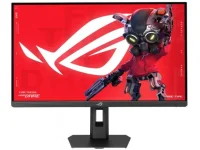
ASUS has a new 640 Hz gaming monitor, but that top speed comes with a big cut in screen detail. The 27-inch ROG Strix XG27ACMSR uses a Fast IPS panel and lets gamers pick from three modes, each with a different mix of sharpness and speed.
At full 2560 × 1440, the screen runs at 360 Hz. Dropping to 1080p gets it to 420 Hz, while the 640 Hz option uses basic HD. That last mode is a clear trade-off. Gamers who want crisp detail may get more use from the native WQHD setting.
And no, those speeds do not run at once. Each mode has its specific resolution, while the GPU still has to push enough frames to make the extra Hz count. For fast-paced esports, that could be worth a look. For other games, the drop in detail may be a dealbreaker.
One trick ASUS has added is Smart Pixel Technology. Its job is to help low-res content look cleaner on the panel. Whether it does much in real use remains an open question, as there are no independent test results for it yet.
Motion handling gets a fair bit of attention. ELMB Sync aims to cut blur while keeping variable refresh active, and Variable Overdrive 2.0 adjusts pixel behavior. Dynamic Shadow Boost helps with dark areas, while DisplayWidget Center offers AI Visual tips.
Beyond sheer speed, the panel has some decent specs. ASUS rates it at 0.3 ms for response, 400 nits for light output, and 1,100:1 for contrast. Color coverage hits 95% of DCI-P3 and 120% of sRGB, with support for roughly 1.07 billion shades.
Viewing angles reach 178 degrees in both directions. Those figures give a basic idea of what the IPS screen can do, though real-world tests will need to check how well the claims hold up.
For ports, gamers get DisplayPort 1.4, HDMI 2.1, USB-C with video input, and a jack for audio. The Type-C connection can send 15 W of power, which is fine for small gear but not much use as a main laptop charger.
Desk setup has a few perks. The stand can tilt, turn, rise by 110 mm, or rotate into portrait mode. A 100 × 100 mm VESA pattern gives arm users another option. At 6.1 kg, the unit also needs a mount with a suitable load rating.
Its listed size is 614.2 × 187.9 × 503.2 mm. That wide base deserves a quick desk check, mainly for anyone with limited space.
Still, two bits of info are missing. ASUS has yet to give a price or confirm when stores will get it. The claimed pixel response also lacks third-party test data. Actual motion clarity, color output, and low-res image quality remain unverified.
At full 2560 × 1440, the screen runs at 360 Hz. Dropping to 1080p gets it to 420 Hz, while the 640 Hz option uses basic HD. That last mode is a clear trade-off. Gamers who want crisp detail may get more use from the native WQHD setting.
And no, those speeds do not run at once. Each mode has its specific resolution, while the GPU still has to push enough frames to make the extra Hz count. For fast-paced esports, that could be worth a look. For other games, the drop in detail may be a dealbreaker.
One trick ASUS has added is Smart Pixel Technology. Its job is to help low-res content look cleaner on the panel. Whether it does much in real use remains an open question, as there are no independent test results for it yet.
Motion handling gets a fair bit of attention. ELMB Sync aims to cut blur while keeping variable refresh active, and Variable Overdrive 2.0 adjusts pixel behavior. Dynamic Shadow Boost helps with dark areas, while DisplayWidget Center offers AI Visual tips.
Beyond sheer speed, the panel has some decent specs. ASUS rates it at 0.3 ms for response, 400 nits for light output, and 1,100:1 for contrast. Color coverage hits 95% of DCI-P3 and 120% of sRGB, with support for roughly 1.07 billion shades.
Viewing angles reach 178 degrees in both directions. Those figures give a basic idea of what the IPS screen can do, though real-world tests will need to check how well the claims hold up.
For ports, gamers get DisplayPort 1.4, HDMI 2.1, USB-C with video input, and a jack for audio. The Type-C connection can send 15 W of power, which is fine for small gear but not much use as a main laptop charger.
Desk setup has a few perks. The stand can tilt, turn, rise by 110 mm, or rotate into portrait mode. A 100 × 100 mm VESA pattern gives arm users another option. At 6.1 kg, the unit also needs a mount with a suitable load rating.
Its listed size is 614.2 × 187.9 × 503.2 mm. That wide base deserves a quick desk check, mainly for anyone with limited space.
Still, two bits of info are missing. ASUS has yet to give a price or confirm when stores will get it. The claimed pixel response also lacks third-party test data. Actual motion clarity, color output, and low-res image quality remain unverified.