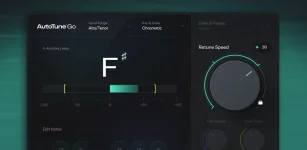
AutoTune Go gives FL Studio users four Retune Speed choices, while AutoTune 2026 adds continuous control, Humanize, Flex Tune, and selectable processing modes. Both use Antares pitch correction, but they stop giving you control at very different points.
For a lot of vocals, the free plugin is enough. AutoTune Go in FL Studio lets you set the key, choose Major, Minor, or Chromatic, select a vocal range or detect it automatically, and hear the correction in real time without buying another tuner.
The paid version starts earning its keep when one global correction behavior stops working for the whole performance. Long notes, slides, intentionally loose entrances, custom scale notes, and tracking latency are where AutoTune 2026 begins doing things Go simply does not expose.
Its main compromise is choice. Retune Speed comes in four fixed positions, so you choose among prepared correction rates rather than dialing an exact value. AutoTune 2026 opens the control fully, including the 0 millisecond setting Antares documents for the abrupt hard-tuned effect and slower values for more transparent correction.
Scale control is also broader in AutoTune 2026. Go gives you Major, Minor, and Chromatic targeting, while the paid plugin lets you add or remove individual notes from the selected scale. A melody that deliberately avoids one scale degree can therefore be protected without changing the entire key setup.
This matters most on performances that sit near more than one plausible target note. If a singer repeatedly approaches a note from below, a custom target map can stop the correction engine from grabbing a neighboring pitch you never wanted in the phrase.
The basic idea behind the process has not changed much. The original Antares pitch-correction patent describes detecting an incoming pitch, determining a desired pitch, and shifting the signal toward that target. Modern controls decide how aggressively, selectively, and transparently that correction happens.
Flex Tune solves a different problem. It creates room around correct scale notes so expressive pitch movement can pass without being pulled immediately toward dead center. A singer with decent control can keep small bends, scoops, and vibrato while clearly off-pitch material still receives correction.
Go has no equivalent pair of controls. Slowing its Retune Speed can make the entire performance less aggressive, but it cannot separately tell sustained notes to relax or give intentional pitch gestures their own tolerance zone.
Modern and Classic modes add another decision. Modern mode provides Flex Tune and an HQ option aimed at cleaner, more transparent processing, while Classic mode recreates the older AutoTune 5 behavior with sharper transitions and very low latency. Go gives you no algorithm switch between those characters.
AutoTune 2026 also separates tracking from final-quality processing more deliberately. Antares documents low-latency operation for recording and live use, then HQ mode for mixing when extra latency is acceptable. Go works in real time, but Image-Line has not published the same selectable low-latency and HQ workflow for it.
The upgrade becomes practical when you keep fighting the same limitations. A held chorus note turns stiff at the speed needed for the verse, a slide gets corrected too early, one legal scale note keeps attracting the wrong phrase, or you need a repeatable low-latency tracking mode before switching to a higher-quality mix setting.
AutoTune 2026 also fits sessions that need the same correction system outside FL Studio. It supports the common VST3, AU, and AAX plugin formats, while AutoTune Go was created specifically for FL Cloud and FL Studio. Moving projects or vocal chains between different DAWs changes the value of that portability.
Neither version replaces detailed offline note editing. AutoTune 2026 is still centered on automatic real-time correction rather than the Graph Mode editing found in AutoTune Pro 11, so paying for it should not be confused with buying Antares' deepest editor.
For an FL Studio-only setup, the sharpest dividing line is control rather than sound branding. Keep Go when its fixed-speed choices and simple scale targeting already behave properly. Move up when Humanize, Flex Tune, custom target notes, Classic versus Modern processing, or a dedicated tracking-to-mix quality switch solves something you can actually hear.
For a lot of vocals, the free plugin is enough. AutoTune Go in FL Studio lets you set the key, choose Major, Minor, or Chromatic, select a vocal range or detect it automatically, and hear the correction in real time without buying another tuner.
The paid version starts earning its keep when one global correction behavior stops working for the whole performance. Long notes, slides, intentionally loose entrances, custom scale notes, and tracking latency are where AutoTune 2026 begins doing things Go simply does not expose.
The free version already covers the ordinary job
AutoTune Go is not a demo with a timer attached. It is available through FL Cloud Free, and its stripped control set can handle the basic job of steering a monophonic vocal toward notes in the selected key and scale.Its main compromise is choice. Retune Speed comes in four fixed positions, so you choose among prepared correction rates rather than dialing an exact value. AutoTune 2026 opens the control fully, including the 0 millisecond setting Antares documents for the abrupt hard-tuned effect and slower values for more transparent correction.
Scale control is also broader in AutoTune 2026. Go gives you Major, Minor, and Chromatic targeting, while the paid plugin lets you add or remove individual notes from the selected scale. A melody that deliberately avoids one scale degree can therefore be protected without changing the entire key setup.
This matters most on performances that sit near more than one plausible target note. If a singer repeatedly approaches a note from below, a custom target map can stop the correction engine from grabbing a neighboring pitch you never wanted in the phrase.
The basic idea behind the process has not changed much. The original Antares pitch-correction patent describes detecting an incoming pitch, determining a desired pitch, and shifting the signal toward that target. Modern controls decide how aggressively, selectively, and transparently that correction happens.
Humanize and Flex Tune separate difficult vocal phrases
Humanize is useful when fast tuning sounds good on short notes but makes held notes unnaturally rigid. AutoTune 2026 can apply slower correction during the sustained portion of a note while keeping the quicker Retune Speed behavior elsewhere, so one setting does not have to compromise both kinds of phrase.Flex Tune solves a different problem. It creates room around correct scale notes so expressive pitch movement can pass without being pulled immediately toward dead center. A singer with decent control can keep small bends, scoops, and vibrato while clearly off-pitch material still receives correction.
Go has no equivalent pair of controls. Slowing its Retune Speed can make the entire performance less aggressive, but it cannot separately tell sustained notes to relax or give intentional pitch gestures their own tolerance zone.
Modern and Classic modes add another decision. Modern mode provides Flex Tune and an HQ option aimed at cleaner, more transparent processing, while Classic mode recreates the older AutoTune 5 behavior with sharper transitions and very low latency. Go gives you no algorithm switch between those characters.
AutoTune 2026 also separates tracking from final-quality processing more deliberately. Antares documents low-latency operation for recording and live use, then HQ mode for mixing when extra latency is acceptable. Go works in real time, but Image-Line has not published the same selectable low-latency and HQ workflow for it.
Paying makes sense when the missing controls solve a real problem
A clean lead that only needs ordinary scale correction does not suddenly become better because the plugin has more parameters. If Go keeps the vocal in tune without flattening the phrasing, the extra controls may sit untouched for most of the session.The upgrade becomes practical when you keep fighting the same limitations. A held chorus note turns stiff at the speed needed for the verse, a slide gets corrected too early, one legal scale note keeps attracting the wrong phrase, or you need a repeatable low-latency tracking mode before switching to a higher-quality mix setting.
AutoTune 2026 also fits sessions that need the same correction system outside FL Studio. It supports the common VST3, AU, and AAX plugin formats, while AutoTune Go was created specifically for FL Cloud and FL Studio. Moving projects or vocal chains between different DAWs changes the value of that portability.
Neither version replaces detailed offline note editing. AutoTune 2026 is still centered on automatic real-time correction rather than the Graph Mode editing found in AutoTune Pro 11, so paying for it should not be confused with buying Antares' deepest editor.
For an FL Studio-only setup, the sharpest dividing line is control rather than sound branding. Keep Go when its fixed-speed choices and simple scale targeting already behave properly. Move up when Humanize, Flex Tune, custom target notes, Classic versus Modern processing, or a dedicated tracking-to-mix quality switch solves something you can actually hear.