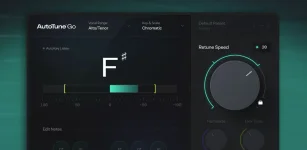
AutoTune Go corrects pitch in real time, while NewTone edits recorded audio note by note after FL Studio has analyzed the take. One belongs on the live signal path, while the other becomes useful when a finished performance needs selective repair.
The distinction matters more than which interface looks easier. Real-time AutoTune Go correction can keep a singer inside the chosen key while tracking, but it applies one correction strategy across the incoming vocal. NewTone waits until audio exists, then exposes individual notes, pitch movement, transitions, vibrato, formants, and timing for separate decisions.
The cleanest workflow is often to use both stages for what they are good at. Let AutoTune Go handle broad correction when you want the tuned sound during recording, then open only the takes that still contain distracting notes in NewTone instead of rebuilding the whole performance by hand.
NewTone starts from recorded evidence instead. Open a vocal with FL Studio's Pitch correct sample command, and NewTone analyzes the file into note blocks with an underlying pitch trace. You can then hear where the singer sat inside each note rather than treating an entire phrase as one correction target.
Calling NewTone purely manual undersells it. Its Center control can pull all notes toward their nearest pitch, Variation can reduce pitch drift and vibrato globally, and Transition changes how quickly pitch moves between notes. A rough vocal can therefore receive broad cleanup first, followed by individual edits only where the automatic pass sounds wrong.
Selective edits are where the two tools really separate. NewTone can snap a single note to a semitone, move it without snapping, alter pitch variation, change ramp-in and ramp-out behavior, edit vibrato, and shift formants on individual notes. AutoTune Go does not expose that level of phrase-by-phrase intervention.
Preserving expression sits at the center of smooth pitch correction across expressive contours, where continuous correction is designed to retain pitch bends and vibrato instead of treating all deviation as an error. NewTone gives you a practical version of that decision because its pitch center, variation, transitions, and vibrato controls can be changed independently.
Use your ears before straightening the orange pitch line. A note that begins below pitch and settles naturally may only need its center nudged, while another note may have the correct center but excessive wobble. Those are different faults, and NewTone lets you fix them differently.
Timing adds another layer. NewTone lets you move detected notes and adjust their boundaries, so a phrase that feels wrong because a syllable lands late does not have to be solved with more aggressive pitch correction. AutoTune Go cannot make that distinction because it works on the signal as it arrives.
Once a clip is chosen, FL Studio can send it directly into NewTone from the Playlist. After editing, NewTone can return the corrected audio to the Playlist, save it as a new file, or drag a selected region into another compatible FL Studio location. Keeping the corrected render separate from the original also makes later comparison much easier.
NewTone can also send its detected notes to the Piano Roll as MIDI. This is useful when a sung idea becomes the starting point for a synth line, doubled instrument, or harmony part, and it gives the editor a second job that AutoTune Go simply does not perform.
Stop editing once the remaining pitch movement sounds intentional. If the vocal already works with AutoTune Go alone, opening NewTone adds labor rather than quality. Reach for the editor when a specific word, note, transition, vibrato shape, formant shift, or timing problem needs a decision the live tuner cannot make.
The distinction matters more than which interface looks easier. Real-time AutoTune Go correction can keep a singer inside the chosen key while tracking, but it applies one correction strategy across the incoming vocal. NewTone waits until audio exists, then exposes individual notes, pitch movement, transitions, vibrato, formants, and timing for separate decisions.
The cleanest workflow is often to use both stages for what they are good at. Let AutoTune Go handle broad correction when you want the tuned sound during recording, then open only the takes that still contain distracting notes in NewTone instead of rebuilding the whole performance by hand.
Real-time correction and offline editing solve different problems
AutoTune Go starts with musical boundaries. You choose the key, Major, Minor, or Chromatic scale, set the vocal range or use Auto Detect, then pick one of four Retune Speed values. Once those choices are made, the plugin keeps processing whatever arrives at the insert.NewTone starts from recorded evidence instead. Open a vocal with FL Studio's Pitch correct sample command, and NewTone analyzes the file into note blocks with an underlying pitch trace. You can then hear where the singer sat inside each note rather than treating an entire phrase as one correction target.
Calling NewTone purely manual undersells it. Its Center control can pull all notes toward their nearest pitch, Variation can reduce pitch drift and vibrato globally, and Transition changes how quickly pitch moves between notes. A rough vocal can therefore receive broad cleanup first, followed by individual edits only where the automatic pass sounds wrong.
Selective edits are where the two tools really separate. NewTone can snap a single note to a semitone, move it without snapping, alter pitch variation, change ramp-in and ramp-out behavior, edit vibrato, and shift formants on individual notes. AutoTune Go does not expose that level of phrase-by-phrase intervention.
NewTone lets you preserve mistakes that sound musical
Perfectly centered notes are not automatically better vocals. Slides into a note, controlled drift, vibrato, and slightly loose transitions can carry the personality of a take, so forcing every detected pitch toward the middle can make a performance feel smaller even when the tuning display looks cleaner.Preserving expression sits at the center of smooth pitch correction across expressive contours, where continuous correction is designed to retain pitch bends and vibrato instead of treating all deviation as an error. NewTone gives you a practical version of that decision because its pitch center, variation, transitions, and vibrato controls can be changed independently.
Use your ears before straightening the orange pitch line. A note that begins below pitch and settles naturally may only need its center nudged, while another note may have the correct center but excessive wobble. Those are different faults, and NewTone lets you fix them differently.
Timing adds another layer. NewTone lets you move detected notes and adjust their boundaries, so a phrase that feels wrong because a syllable lands late does not have to be solved with more aggressive pitch correction. AutoTune Go cannot make that distinction because it works on the signal as it arrives.
The handoff works best after the performance is chosen
Do not send every raw take into NewTone before deciding which performance you actually want. Comp the vocal first, keep the phrases with the best tone and delivery, then use detailed correction on the selected material. Editing rejected takes is precise work with no payoff.Once a clip is chosen, FL Studio can send it directly into NewTone from the Playlist. After editing, NewTone can return the corrected audio to the Playlist, save it as a new file, or drag a selected region into another compatible FL Studio location. Keeping the corrected render separate from the original also makes later comparison much easier.
NewTone can also send its detected notes to the Piano Roll as MIDI. This is useful when a sung idea becomes the starting point for a synth line, doubled instrument, or harmony part, and it gives the editor a second job that AutoTune Go simply does not perform.
Stop editing once the remaining pitch movement sounds intentional. If the vocal already works with AutoTune Go alone, opening NewTone adds labor rather than quality. Reach for the editor when a specific word, note, transition, vibrato shape, formant shift, or timing problem needs a decision the live tuner cannot make.