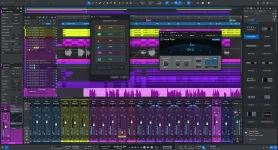
Fender Studio Pro 8.2 has landed with a bunch of new tools for mixing and music production. The update brings finer audio control, more ways to edit tracks, and some handy fixes aimed at making life easier for artists, beatmakers, and video creators.
First up, Trim Automation lets producers tweak volume levels without messing with the curves they made before. No need for extra Mixtool or VCA steps. It works on channel levels and sends, which should make small mix tweaks far less of a chore.
Then there is Dim Solo, a feature users have been asking for. Instead of cutting out the rest of a song, it turns other active tracks down by a chosen level. Muted tracks stay silent. Pretty handy when someone needs to check a vocal or drum part while still hearing the mix.
Marker Tracks get more freedom as well. A project can have several of them, placed across the song. Each one can use clock-based cues or musical beats. Video editors get a neat perk here, as their cue spots can stay fixed even when the song speeds up or slows down.
Guitar and piano parts are fair game for the stem tool at last. That gives users more room to pull apart recordings, swap out performances, turn audio into MIDI, or grab bits for samples. A welcome upgrade for anyone who likes to rework old sessions.
Vocal Tune gets a pair of useful changes. Its Follow setting checks the song's scale and key without making key shifts on its own. Meanwhile, Low Latency mode cuts the plug-in delay to less than 3 milliseconds. Singers can track and hear their vocals with far less lag.
Swapping Audio FX is less of a hassle as well. A menu option can replace effects on inserts or sends, rather than making users drag one plug-in over another. Small change, sure, but it cuts a few clicks from a task that comes up a lot.
Composers get a neat MIDI editing trick. Each note can have its own Sound Variation, and that choice sticks even if the note moves. It gives writers more control over how each part plays without having to redo the setup after an edit.
MIDI 2.0 joins the feature set, with finer detail from gear that supports it. The Note Editor can show richer velocity, aftertouch, and automation data. Mac and Linux users can use it already, while Windows users must await Microsoft's official rollout for Windows 11 25H2 or newer.
Track freezing gets a practical fix, which should please anyone with a busy session. Users can print insert effects into frozen tracks or channels while keeping their volume and pan choices intact. Less need to fix settings after a freeze.
Arnd Kaiser, who heads Fender Studio Software, says the team took user feedback into account. His point is that new tools should help people make music without adding needless work. The focus here is on useful changes rather than flashy extras.
As for hardware and OS needs, Windows 10 or newer will do on a PC. Macs need at least macOS 13.5, while Linux users need Ubuntu 24.04 LTS or a later release.
And the price is a nice bit of news. Eligible users get version 8.2 at no cost. That covers those with qualifying lifetime licenses as well as Fender Studio Pro+ subscribers.
First up, Trim Automation lets producers tweak volume levels without messing with the curves they made before. No need for extra Mixtool or VCA steps. It works on channel levels and sends, which should make small mix tweaks far less of a chore.
Then there is Dim Solo, a feature users have been asking for. Instead of cutting out the rest of a song, it turns other active tracks down by a chosen level. Muted tracks stay silent. Pretty handy when someone needs to check a vocal or drum part while still hearing the mix.
Marker Tracks get more freedom as well. A project can have several of them, placed across the song. Each one can use clock-based cues or musical beats. Video editors get a neat perk here, as their cue spots can stay fixed even when the song speeds up or slows down.
Guitar and piano parts are fair game for the stem tool at last. That gives users more room to pull apart recordings, swap out performances, turn audio into MIDI, or grab bits for samples. A welcome upgrade for anyone who likes to rework old sessions.
Vocal Tune gets a pair of useful changes. Its Follow setting checks the song's scale and key without making key shifts on its own. Meanwhile, Low Latency mode cuts the plug-in delay to less than 3 milliseconds. Singers can track and hear their vocals with far less lag.
Swapping Audio FX is less of a hassle as well. A menu option can replace effects on inserts or sends, rather than making users drag one plug-in over another. Small change, sure, but it cuts a few clicks from a task that comes up a lot.
Composers get a neat MIDI editing trick. Each note can have its own Sound Variation, and that choice sticks even if the note moves. It gives writers more control over how each part plays without having to redo the setup after an edit.
MIDI 2.0 joins the feature set, with finer detail from gear that supports it. The Note Editor can show richer velocity, aftertouch, and automation data. Mac and Linux users can use it already, while Windows users must await Microsoft's official rollout for Windows 11 25H2 or newer.
Track freezing gets a practical fix, which should please anyone with a busy session. Users can print insert effects into frozen tracks or channels while keeping their volume and pan choices intact. Less need to fix settings after a freeze.
Arnd Kaiser, who heads Fender Studio Software, says the team took user feedback into account. His point is that new tools should help people make music without adding needless work. The focus here is on useful changes rather than flashy extras.
As for hardware and OS needs, Windows 10 or newer will do on a PC. Macs need at least macOS 13.5, while Linux users need Ubuntu 24.04 LTS or a later release.
And the price is a nice bit of news. Eligible users get version 8.2 at no cost. That covers those with qualifying lifetime licenses as well as Fender Studio Pro+ subscribers.