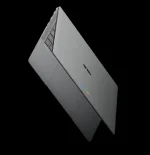
Googlebook ships with Gemini features tied directly to the cursor, voice input, desktop widgets, Chrome, and background task handling. Magic Pointer gets most of the attention, but it is only one piece of a broader setup that tries to make AI feel less like a separate website you have to visit.
Across the new Googlebook laptop family, Google is putting those tools into places you already touch all day. Some still need an internet connection and have account or age requirements, so the experience is not a magic offline brain living entirely on the laptop.
The useful part is not the wiggle. It is the context. A normal chatbot usually needs you to explain what you are looking at or paste the relevant material into the conversation. Magic Pointer can start from the thing under your cursor, which cuts out a surprisingly annoying bit of setup when the task is small.
Google also says the feature stays inactive until you summon it and can be switched off. Its public Googlebook page notes that Gemini responses still need checking, an internet connection is required, and the feature is limited to users aged 18 or older. So the pointer is a convenient front end to Gemini, not permission to stop paying attention to what Gemini returns.
A contextual assistant patent assigned to Google describes a related idea where mouse or touch location helps an assistant identify the exact object a person means on screen. The filing predates Googlebook and should not be read as a specification for Magic Pointer, but it shows why pointing can remove ambiguity from an otherwise vague request.
Plain dictation normally preserves the mess. Say "um," restart a sentence twice, wander into another point, and traditional speech-to-text faithfully hands all of it back to you. Rambler is designed to interpret the intended structure instead of treating every sound as sacred.
Multilingual speech is part of the pitch as well. Google says you can switch languages during the same spoken input without breaking the flow. For anyone who already thinks faster aloud than they type, this matters more than another generic text-generation button because the starting material can stay rough.
Rambler also sits next to the Quick Insert key, which makes it easier to drop the cleaned-up result into whatever you are doing. It is less about asking Gemini a big question and more about getting words out of your head without spending the next ten minutes repairing the transcript.
Gemini Spark goes further because it can manage tasks and workflows in the background. Google says Spark can keep working after you close the laptop, and its broader Gemini documentation describes tasks that can use connected apps, websites you are signed into, uploaded files, reusable skills, and schedules.
Spark is not an unlimited autonomous worker. Google currently requires a personal Google Account and an age of at least 18, while scheduled work can be delayed and concurrent task limits apply. Those details matter because "works in the background" sounds much more absolute than the service really is.
Proactive suggestions and Gemini Live round out the built-in set. Suggestions can react to what is on screen and surface a likely next move, while Gemini Live handles the more conversational back-and-forth people already know from Gemini on other devices. Googlebook is basically giving Gemini several doors into the same work session instead of expecting every job to begin with opening a chatbot tab.
Across the new Googlebook laptop family, Google is putting those tools into places you already touch all day. Some still need an internet connection and have account or age requirements, so the experience is not a magic offline brain living entirely on the laptop.
Magic Pointer uses whatever is already on your screen
Magic Pointer wakes up when you wiggle the cursor. From there, it can use selected text, images, and nearby screen context as input for Gemini instead of making you copy something into a separate prompt box. Google shows it handling jobs such as turning a training schedule into Calendar events, checking a suspicious email, translating text, and combining selected images into a new visual.The useful part is not the wiggle. It is the context. A normal chatbot usually needs you to explain what you are looking at or paste the relevant material into the conversation. Magic Pointer can start from the thing under your cursor, which cuts out a surprisingly annoying bit of setup when the task is small.
Google also says the feature stays inactive until you summon it and can be switched off. Its public Googlebook page notes that Gemini responses still need checking, an internet connection is required, and the feature is limited to users aged 18 or older. So the pointer is a convenient front end to Gemini, not permission to stop paying attention to what Gemini returns.
A contextual assistant patent assigned to Google describes a related idea where mouse or touch location helps an assistant identify the exact object a person means on screen. The filing predates Googlebook and should not be read as a specification for Magic Pointer, but it shows why pointing can remove ambiguity from an otherwise vague request.
Rambler cleans up speech instead of merely transcribing it
Rambler takes a different route. You talk, it turns the speech into usable writing, and it can clean up filler words, mistakes, loose structure, and the kind of half-finished sentences people produce when they are thinking aloud. Google says it can organize spoken material into headers, checklists, action items, and formatted takeaways.Plain dictation normally preserves the mess. Say "um," restart a sentence twice, wander into another point, and traditional speech-to-text faithfully hands all of it back to you. Rambler is designed to interpret the intended structure instead of treating every sound as sacred.
Multilingual speech is part of the pitch as well. Google says you can switch languages during the same spoken input without breaking the flow. For anyone who already thinks faster aloud than they type, this matters more than another generic text-generation button because the starting material can stay rough.
Rambler also sits next to the Quick Insert key, which makes it easier to drop the cleaned-up result into whatever you are doing. It is less about asking Gemini a big question and more about getting words out of your head without spending the next ten minutes repairing the transcript.
Widgets and Spark push Gemini beyond one-off prompts
Create My Widget is almost absurdly literal. Describe the widget you want in normal language, and Googlebook can build one for the desktop. Google uses examples such as a sports score tracker and a travel countdown, so the feature is aimed at small bits of live information rather than forcing you to hunt through an app every time.Gemini Spark goes further because it can manage tasks and workflows in the background. Google says Spark can keep working after you close the laptop, and its broader Gemini documentation describes tasks that can use connected apps, websites you are signed into, uploaded files, reusable skills, and schedules.
Spark is not an unlimited autonomous worker. Google currently requires a personal Google Account and an age of at least 18, while scheduled work can be delayed and concurrent task limits apply. Those details matter because "works in the background" sounds much more absolute than the service really is.
Proactive suggestions and Gemini Live round out the built-in set. Suggestions can react to what is on screen and surface a likely next move, while Gemini Live handles the more conversational back-and-forth people already know from Gemini on other devices. Googlebook is basically giving Gemini several doors into the same work session instead of expecting every job to begin with opening a chatbot tab.