Intel kept the LGA 1851 cooler mounting geometry mechanically compatible with LGA 1700 even though the processors themselves use different sockets. For a Z890 build, this means a CPU cooler may carry over even though an older LGA 1700 motherboard cannot.
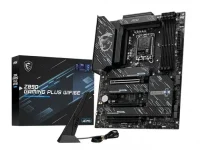
MSI's Z890 Gaming Plus WiFi 6E platform uses the LGA 1851 socket for Core Ultra 200S processors. If your current cooler already has proper LGA 1700 mounting hardware, there is a good chance the same hardware is usable on the new board.
LGA1851 cooler compatibility is still model-specific rather than a blanket promise for every heatsink ever sold. The sensible check is whether the cooler maker lists LGA 1700 support, whether the correct bracket is actually in your box, and whether the manufacturer has published any LGA 1851-specific mounting note.
A compatible LGA 1851 cooler mount does not make the two CPU sockets interchangeable. Core Ultra 200S chips need an LGA 1851 motherboard, while the cooler is simply reusing familiar mechanical attachment points above the socket.
The distinction also applies to liquid cooling. MSI MAG CoreLiquid A13 AIOs support both Intel sockets, so an LGA 1851 AIO cooler does not necessarily need a newly designed pump block or radiator just because the motherboard socket changed.
LGA 1851 cooler installation should therefore start with the exact cooler model and revision, not a visual guess based on hole spacing. A bracket from another model can alter standoff height or mounting pressure, so mixing random hardware is a poor shortcut even when the screws seem to line up.
Brand compatibility also needs to be read at model level. A newer revision carrying LGA 1851 support does not prove an older revision shipped with the same hardware, and a separate LGA 1851 cooler bracket may still be required when the heatsink predates LGA 1700 support.
The same rule matters for an LGA1851 air cooler in a compact case. Socket support says nothing about case height, memory clearance, motherboard heatsinks, or fan position, all of which can stop an otherwise compatible cooler from fitting the completed system.
Some high-core-count LGA 1851 processors place their hottest area away from the geometric center of the package. Noctua's NM-IMB8 offset mounting approach shifts compatible heatsinks toward that hotspot, showing why a standard LGA 1851 cooler bracket can be mechanically correct without being the final word on thermal optimization.
An LGA 1851 contact frame or offset mount is therefore a tuning part, not a requirement for ordinary socket compatibility. Use one only when it is designed for your exact cooler and board arrangement, especially because changing pressure or mounting position can also affect clearances around memory, VRM heatsinks, and the first PCIe slot.
Liquid coolers follow the same basic logic. The ARCTIC Liquid Freezer III Pro supports LGA 1700 and LGA 1851, but radiator space, pump orientation, tubing reach, and the supplied mounting set remain separate checks from LGA 1851 socket compatibility.
A successful POST is not proof of good cooler contact. After the first boot, check temperatures under a sustained CPU load and watch for an immediate thermal limit, unusually high idle temperatures, or uneven mounting tension, since those signs can point to the wrong spacers or bracket. Power down and verify the hardware before trying to hide a mounting problem with higher fan speeds.
For an LGA1851 Z890 build, reuse the old cooler when its maker explicitly supports LGA 1700 or LGA 1851, and you have the correct hardware revision. A Core Ultra 200S cooler does not need to be new simply because the CPU socket is new, but the bracket, pressure, clearance, and installation instructions still need to match the cooler you actually own.
MSI's Z890 Gaming Plus WiFi 6E platform uses the LGA 1851 socket for Core Ultra 200S processors. If your current cooler already has proper LGA 1700 mounting hardware, there is a good chance the same hardware is usable on the new board.
LGA1851 cooler compatibility is still model-specific rather than a blanket promise for every heatsink ever sold. The sensible check is whether the cooler maker lists LGA 1700 support, whether the correct bracket is actually in your box, and whether the manufacturer has published any LGA 1851-specific mounting note.
The mounting geometry stays familiar
The practical answer to whether an LGA 1700 cooler will fit LGA 1851 is usually yes for coolers with a proper LGA 1700 kit. LGA 1851 mounting holes keep the same cooler mounting pattern, which is why current products such as Akasa's VIPER, SOHO, and ALUCIA coolers can list both LGA 1700 and LGA 1851 support without separate heatsink bodies.A compatible LGA 1851 cooler mount does not make the two CPU sockets interchangeable. Core Ultra 200S chips need an LGA 1851 motherboard, while the cooler is simply reusing familiar mechanical attachment points above the socket.
The distinction also applies to liquid cooling. MSI MAG CoreLiquid A13 AIOs support both Intel sockets, so an LGA 1851 AIO cooler does not necessarily need a newly designed pump block or radiator just because the motherboard socket changed.
Older coolers still need the correct hardware
An older heatsink can be physically capable of cooling a Core Ultra chip and still fail the LGA 1851 CPU cooler compatibility check because its original box predates LGA 1700 mounting hardware. In that case, the missing part is usually the bracket, backplate, spacers, or screws rather than the heatsink itself.LGA 1851 cooler installation should therefore start with the exact cooler model and revision, not a visual guess based on hole spacing. A bracket from another model can alter standoff height or mounting pressure, so mixing random hardware is a poor shortcut even when the screws seem to line up.
Brand compatibility also needs to be read at model level. A newer revision carrying LGA 1851 support does not prove an older revision shipped with the same hardware, and a separate LGA 1851 cooler bracket may still be required when the heatsink predates LGA 1700 support.
The same rule matters for an LGA1851 air cooler in a compact case. Socket support says nothing about case height, memory clearance, motherboard heatsinks, or fan position, all of which can stop an otherwise compatible cooler from fitting the completed system.
Contact and hotspot placement can change thermals
Mechanical compatibility only gets the cooler onto the CPU. Contact pressure, base shape, thermal paste spread, and hotspot location can still change how well an LGA1851 CPU cooler performs once the processor is under sustained load.Some high-core-count LGA 1851 processors place their hottest area away from the geometric center of the package. Noctua's NM-IMB8 offset mounting approach shifts compatible heatsinks toward that hotspot, showing why a standard LGA 1851 cooler bracket can be mechanically correct without being the final word on thermal optimization.
An LGA 1851 contact frame or offset mount is therefore a tuning part, not a requirement for ordinary socket compatibility. Use one only when it is designed for your exact cooler and board arrangement, especially because changing pressure or mounting position can also affect clearances around memory, VRM heatsinks, and the first PCIe slot.
Liquid coolers follow the same basic logic. The ARCTIC Liquid Freezer III Pro supports LGA 1700 and LGA 1851, but radiator space, pump orientation, tubing reach, and the supplied mounting set remain separate checks from LGA 1851 socket compatibility.
A successful POST is not proof of good cooler contact. After the first boot, check temperatures under a sustained CPU load and watch for an immediate thermal limit, unusually high idle temperatures, or uneven mounting tension, since those signs can point to the wrong spacers or bracket. Power down and verify the hardware before trying to hide a mounting problem with higher fan speeds.
For an LGA1851 Z890 build, reuse the old cooler when its maker explicitly supports LGA 1700 or LGA 1851, and you have the correct hardware revision. A Core Ultra 200S cooler does not need to be new simply because the CPU socket is new, but the bracket, pressure, clearance, and installation instructions still need to match the cooler you actually own.