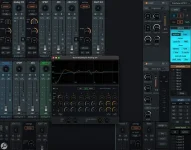
TotalMix FX 2.0 just dropped, and it slaps with slick visuals and next-level scaling, while keeping old-school interfaces alive for anyone stuck on legacy setups.
TotalMix graphics overhaul
TotalMix graphics overhaul
- RME launched TotalMix FX 2.0 with a GPU-powered interface.
- The UI stretches from tiny windows to massive screens.
- Mixer and Matrix views zoom smoothly without pixel freak-outs.
- Legacy UI stays switchable for low-res or picky setups.
- Mixer and Matrix zoom react to wheel and trackpad swipes.
- Scrollbars pop up automatically when the content overflows the window.
- Users hit one button to snap back to full-window scale.
- Control Strip scales separately for sidebar customization.
- RME added a Light Theme plus brightness tweaks in Preferences.
- Hover highlights and channel focus got way clearer.
- Channels now tint fully to match the layout colors.
- Dialogs appear right next to the UI element being used.
- TotalMix lets Room EQ, Groups, and Record/Play load separately.
- Volume peaks can auto-drop when loading Snapshots.
- Ctrl-Z and Ctrl-Y now handle Undo/Redo like a charm.
- Peak meters reset fast with the R key.
- Presets show names and highlight changes on load.
- Snapshots include volume calibration and delay settings.
- ARM processors like Snapdragon now play nice with the software.
- Expanded hardware support includes DirectOut USB.MADI SFP.
- Matrix and Room EQ windows behave more smoothly than before.
- Multi-user file handling got tightened up.
- MIDI and ARC USB issues fixed, including Windows 11 MIDI 2.0.
- Background processes cut down, recovery from graphics errors improved.
- TotalMix FX 2.0 runs on Windows 10+ and macOS 10.15+.
- Older Intel GPUs might not handle the new graphics engine.
- Mac machines must have Metal-capable graphics cards.
- Download is live on RME’s official site.