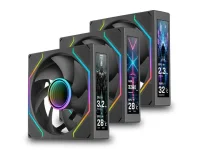
Thermaltake SWAFAN ULTRA 120 EX RGB fans have 4-inch IPS screens built right into their frames. Each unit gets a 1,020 × 240 display, and the new three-pack lets PC builders show custom art, stats, or other visuals through TT RGB PLUS 3.0.
And the screens can work as a group. Thermaltake says users can sync the content across each fan for one long visual. Pretty neat for a glass case where nearly every part is on show.
The blade design has a more useful trick. Users can switch between regular and reverse blades to change airflow without flipping the whole fan. That helps keep the good-looking side in view, whether the setup pulls cool air in or pushes hot air out.
Wiring gets some love as well. MagForce 2.0 uses magnets to link the fans, which should cut down on cable clutter. Each fan runs from 500 to 2,000 rpm, with the final speed set by the cooling demand.
As for raw specs, regular blades can push up to 68 CFM at 3.0 mmH₂O of pressure. Reverse blades drop to 58 CFM at 2.8 mmH₂O. Noise levels range from 8 to 30 dBA for the first setup and 9.5 to 31 dBA for the other.
One detail worth a check is the size. Each unit takes up 124 × 120 × 30 mm, which is a bit more space than a basic 120 mm model. That could matter near a thick radiator, a large CPU cooler, or a tight case wall.
There's also the software side to deal with. Those screens need TT RGB PLUS 3.0, while the extra hardware can add USB and cable needs inside the PC. Builders who just want strong cooling may find basic fans a better fit.
Thermaltake has not shared the cost yet, and there is no clear word on single-fan sales. The airflow and noise claims still need real tests as well. For anyone keen on a flashy build, the screen setup is the main draw, but cooling value remains an open question.
And the screens can work as a group. Thermaltake says users can sync the content across each fan for one long visual. Pretty neat for a glass case where nearly every part is on show.
The blade design has a more useful trick. Users can switch between regular and reverse blades to change airflow without flipping the whole fan. That helps keep the good-looking side in view, whether the setup pulls cool air in or pushes hot air out.
Wiring gets some love as well. MagForce 2.0 uses magnets to link the fans, which should cut down on cable clutter. Each fan runs from 500 to 2,000 rpm, with the final speed set by the cooling demand.
As for raw specs, regular blades can push up to 68 CFM at 3.0 mmH₂O of pressure. Reverse blades drop to 58 CFM at 2.8 mmH₂O. Noise levels range from 8 to 30 dBA for the first setup and 9.5 to 31 dBA for the other.
One detail worth a check is the size. Each unit takes up 124 × 120 × 30 mm, which is a bit more space than a basic 120 mm model. That could matter near a thick radiator, a large CPU cooler, or a tight case wall.
There's also the software side to deal with. Those screens need TT RGB PLUS 3.0, while the extra hardware can add USB and cable needs inside the PC. Builders who just want strong cooling may find basic fans a better fit.
Thermaltake has not shared the cost yet, and there is no clear word on single-fan sales. The airflow and noise claims still need real tests as well. For anyone keen on a flashy build, the screen setup is the main draw, but cooling value remains an open question.