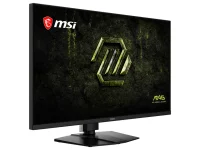
MSI’s MAG 321UPD E14 runs its 31.5-inch IPS panel at 3840×2160 and 144Hz, then switches to 1920×1080 and 288Hz in Dual Mode.
The useful 4K vs 1080p gaming difference is not simply sharp versus fast. UHD contains 8,294,400 source pixels, while Full HD contains 2,073,600, so the faster mode asks the GPU to render one quarter as many pixels per frame before any game-specific bottlenecks enter the picture. On a screen this large, the 4K image works out to about 140 pixels per inch, while a 1080p source carries detail comparable to roughly 70 pixels per inch before scaling.
Refresh timing moves in the opposite direction. A 144Hz refresh starts every 6.94ms, while 288Hz cuts the interval to 3.47ms. A 4K monitor for gaming performance therefore has two very different personalities here, one built around detail and one built around giving the display twice as many opportunities to present a newer frame.
A high refresh rate gaming monitor at 1080p makes most sense when the game can actually feed the faster mode. If your system is producing 280fps with stable frame times, 288Hz can display far more unique updates than 144Hz. If the same game sits around 130fps, switching the monitor to 288Hz does not create another 150-plus game frames. Goldmidi’s 720Hz refresh timing breakdown gets at the same practical limit at a much higher refresh rate.
Lower resolution also changes what you see. Fine text, distant geometry, foliage, HUD lines, and texture detail have fewer source pixels to work with at 1080p, which matters more on a 31.5-inch screen than on a smaller esports monitor. A native 1080p high-refresh OLED avoids the extra step of feeding a lower-resolution signal into a higher-resolution panel, even though it gives up the option of native 4K.
The best use of an IPS 4K 144Hz monitor is not necessarily locking every game to one mode. A 4K monitor for gaming and work gets its desktop advantage from native resolution, so leaving Windows, editing software, browsers, and text-heavy applications at 1080p throws away much of what the panel can display. MSI’s current specification also identifies the panel signal format as 8-bit plus FRC for 1.07 billion displayed colors, which is more specific than simply calling it a 10-bit-class display.
Dual-mode designs are becoming a recognizable category rather than a one-off trick. Goldmidi has covered a ViewSonic model with the same 4K 144Hz and 1080p 288Hz split, an AOC 31.5-inch model running 4K 160Hz or Full HD 320Hz, and an LG option reaching 4K 180Hz or Full HD 360Hz. The common idea is simple. Resolution becomes a setting you change around the workload instead of a permanent property of the monitor.
Variable refresh also matters during the middle ground. MSI lists FreeSync Premium operating from 48 to 144Hz in normal mode and 48 to 288Hz in Dual Mode, so neither setting requires perfectly fixed frame delivery to remain useful.
The MSI MAG 321UPD E14 4K144 and 1080p288 specifications make the hardware trade clear. The better setting changes with the game. Use 4K 144Hz when detail matters and your frame rate does not outrun it, then move to 1080p 288Hz when the PC can deliver enough frames for the shorter refresh window to become useful.
The useful 4K vs 1080p gaming difference is not simply sharp versus fast. UHD contains 8,294,400 source pixels, while Full HD contains 2,073,600, so the faster mode asks the GPU to render one quarter as many pixels per frame before any game-specific bottlenecks enter the picture. On a screen this large, the 4K image works out to about 140 pixels per inch, while a 1080p source carries detail comparable to roughly 70 pixels per inch before scaling.
Refresh timing moves in the opposite direction. A 144Hz refresh starts every 6.94ms, while 288Hz cuts the interval to 3.47ms. A 4K monitor for gaming performance therefore has two very different personalities here, one built around detail and one built around giving the display twice as many opportunities to present a newer frame.
The faster mode trades source detail for timing
A 3840×2160 panel is exactly twice 1920×1080 in each dimension, so Full HD can map cleanly to a 4K grid using a 2× integer scale. Integer scaling preserves each source pixel as an equal block, but ordinary interpolation can soften edges, and MSI does not specify which scaling method the MAG 321UPD E14 uses internally. Intel’s technical explanation of integer scaling confirms the clean whole-number relationship, not MSI’s particular scaler behavior.A high refresh rate gaming monitor at 1080p makes most sense when the game can actually feed the faster mode. If your system is producing 280fps with stable frame times, 288Hz can display far more unique updates than 144Hz. If the same game sits around 130fps, switching the monitor to 288Hz does not create another 150-plus game frames. Goldmidi’s 720Hz refresh timing breakdown gets at the same practical limit at a much higher refresh rate.
Lower resolution also changes what you see. Fine text, distant geometry, foliage, HUD lines, and texture detail have fewer source pixels to work with at 1080p, which matters more on a 31.5-inch screen than on a smaller esports monitor. A native 1080p high-refresh OLED avoids the extra step of feeding a lower-resolution signal into a higher-resolution panel, even though it gives up the option of native 4K.
4K mode is the better default outside esports
For slower shooters, racing games, RPGs, strategy games, and general desktop use, 4K at 144Hz is already a high-refresh experience. A 32-inch 4K gaming monitor has enough physical size for the extra pixel density to remain obvious at normal desk distances, while 144Hz still gives a 6.94ms refresh interval.The best use of an IPS 4K 144Hz monitor is not necessarily locking every game to one mode. A 4K monitor for gaming and work gets its desktop advantage from native resolution, so leaving Windows, editing software, browsers, and text-heavy applications at 1080p throws away much of what the panel can display. MSI’s current specification also identifies the panel signal format as 8-bit plus FRC for 1.07 billion displayed colors, which is more specific than simply calling it a 10-bit-class display.
Dual-mode designs are becoming a recognizable category rather than a one-off trick. Goldmidi has covered a ViewSonic model with the same 4K 144Hz and 1080p 288Hz split, an AOC 31.5-inch model running 4K 160Hz or Full HD 320Hz, and an LG option reaching 4K 180Hz or Full HD 360Hz. The common idea is simple. Resolution becomes a setting you change around the workload instead of a permanent property of the monitor.
Switch modes by game, not by the spec sheet
Start with the frame rate your PC can sustain in the game you actually play. Competitive titles that stay well above 200fps are where the 1080p 288Hz mode has room to matter, especially if you already lower visual settings for consistency. Games hovering around or below 144fps gain much less from the doubled refresh ceiling, so 4K can buy noticeably more image detail without giving up a refresh rate the game was using.Variable refresh also matters during the middle ground. MSI lists FreeSync Premium operating from 48 to 144Hz in normal mode and 48 to 288Hz in Dual Mode, so neither setting requires perfectly fixed frame delivery to remain useful.
The MSI MAG 321UPD E14 4K144 and 1080p288 specifications make the hardware trade clear. The better setting changes with the game. Use 4K 144Hz when detail matters and your frame rate does not outrun it, then move to 1080p 288Hz when the PC can deliver enough frames for the shorter refresh window to become useful.