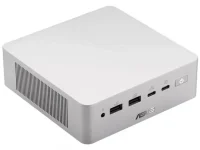
The ASUS Ascent QN10 can run Phi and Llama 3 text generation entirely on its 80 TOPS Hexagon NPU. In measured local-AI testing, Phi reached about 35.7 tokens per second while Llama 3 managed roughly 25.2, with first-token latency below 0.6 seconds. Those are useful numbers because they describe an actual workload instead of repeating the 80 TOPS figure on the box.
The interesting bit is what the CPU was doing during those runs. Almost nothing. The text-generation tests stayed on Qualcomm's QNN path, which means the NPU was doing the job it was built for rather than acting as a badge while the CPU quietly carried the load.
You still should not read those results as proof that any local model will run well. The ASUS Ascent QN10 Snapdragon X2 hardware gives developers a fast NPU, an integrated Adreno GPU, and either 16GB or 32GB of soldered LPDDR5X memory. Your model, runtime, precision, and memory footprint decide whether those parts line up nicely or start stepping on each other.
The QN10 makes this pretty obvious. Stable Diffusion 1.5 running in an INT8 NPU test posted a score of 5,457, while Phi and Llama 3 also ran cleanly through the NPU path. Computer vision behaved differently, with the Windows ML path scoring 2,161 while Qualcomm's SNPE path scored 1,897 on the same machine.
So the fastest route is not automatically the most vendor-specific route. Even a powerful NPU can lose time to graph setup, unsupported operators, memory movement, or work falling back to another processor. The broader point lines up with mobile NPU execution limits documented in recent work on CPU and NPU scheduling, where offloading more of a language model did not automatically produce a faster or more efficient result.
Qualcomm's AI Hub already lists Snapdragon X2 Elite as a target for optimized models across text generation, image tasks, audio, computer vision, and multimodal work. It also exposes several runtime routes, including Qualcomm AI Runtime, ONNX Runtime, GenieX, and llama.cpp-based options. Good support exists, but it is still support you have to check rather than assume.
A normal desktop AI app can therefore give you a very different experience from a benchmark built specifically around QNN. One app may hit the NPU properly, another may use the Adreno GPU, and another may fall back to the CPU because its Windows on Arm build lacks the right backend. Same QN10. Completely different result.
One benchmark even found the hybrid HTP plus CPU route slightly slower than letting the NPU handle text generation by itself. More processors did not mean more speed. Clean execution mattered more than throwing extra silicon into the job. For anyone testing their own models, backend selection deserves the same attention as model size, because a bad execution path can waste capable hardware.
The 32GB configuration therefore makes far more sense for serious local-AI tinkering than the 16GB model. Windows, background apps, model weights, context, caches, and whatever development environment you have open all want memory at the same time. A workload that technically starts can still leave very little room for everything around it.
Storage is easier to expand, but extra SSD capacity does not turn into working memory. The QN10 looks strongest when the model is already optimized for Qualcomm's stack, fits comfortably inside the available RAM, and can stay on the NPU without awkward fallback. Push outside those conditions, and the headline 80 TOPS number becomes much less useful.
The interesting bit is what the CPU was doing during those runs. Almost nothing. The text-generation tests stayed on Qualcomm's QNN path, which means the NPU was doing the job it was built for rather than acting as a badge while the CPU quietly carried the load.
You still should not read those results as proof that any local model will run well. The ASUS Ascent QN10 Snapdragon X2 hardware gives developers a fast NPU, an integrated Adreno GPU, and either 16GB or 32GB of soldered LPDDR5X memory. Your model, runtime, precision, and memory footprint decide whether those parts line up nicely or start stepping on each other.
80 TOPS only describes one part of the workload
TOPS is a throughput rating for certain low-precision operations. It is not a universal speed score for chatbots, image generators, speech models, computer vision, and every other AI workload you can throw at a PC. Different models spend their time doing different kinds of work, and some operations simply map onto an NPU better than others.The QN10 makes this pretty obvious. Stable Diffusion 1.5 running in an INT8 NPU test posted a score of 5,457, while Phi and Llama 3 also ran cleanly through the NPU path. Computer vision behaved differently, with the Windows ML path scoring 2,161 while Qualcomm's SNPE path scored 1,897 on the same machine.
So the fastest route is not automatically the most vendor-specific route. Even a powerful NPU can lose time to graph setup, unsupported operators, memory movement, or work falling back to another processor. The broader point lines up with mobile NPU execution limits documented in recent work on CPU and NPU scheduling, where offloading more of a language model did not automatically produce a faster or more efficient result.
The software path decides whether the NPU matters
This is where local AI on Windows gets less tidy than the marketing page. A model being small enough to fit in memory does not guarantee that your favorite app knows how to send it to the Hexagon NPU. The runtime has to support the model, the operators, the precision being used, and the Qualcomm execution path.Qualcomm's AI Hub already lists Snapdragon X2 Elite as a target for optimized models across text generation, image tasks, audio, computer vision, and multimodal work. It also exposes several runtime routes, including Qualcomm AI Runtime, ONNX Runtime, GenieX, and llama.cpp-based options. Good support exists, but it is still support you have to check rather than assume.
A normal desktop AI app can therefore give you a very different experience from a benchmark built specifically around QNN. One app may hit the NPU properly, another may use the Adreno GPU, and another may fall back to the CPU because its Windows on Arm build lacks the right backend. Same QN10. Completely different result.
One benchmark even found the hybrid HTP plus CPU route slightly slower than letting the NPU handle text generation by itself. More processors did not mean more speed. Clean execution mattered more than throwing extra silicon into the job. For anyone testing their own models, backend selection deserves the same attention as model size, because a bad execution path can waste capable hardware.
32GB memory is the hard ceiling
The other limit is brutally simple. ASUS sells the QN10 with 16GB or 32GB of LPDDR5X, and the memory is soldered. You cannot decide six months later that local models have become larger and drop another 32GB into the box.The 32GB configuration therefore makes far more sense for serious local-AI tinkering than the 16GB model. Windows, background apps, model weights, context, caches, and whatever development environment you have open all want memory at the same time. A workload that technically starts can still leave very little room for everything around it.
Storage is easier to expand, but extra SSD capacity does not turn into working memory. The QN10 looks strongest when the model is already optimized for Qualcomm's stack, fits comfortably inside the available RAM, and can stay on the NPU without awkward fallback. Push outside those conditions, and the headline 80 TOPS number becomes much less useful.