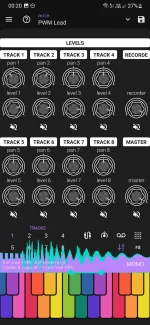
Digitron’s iOS release can run as an AUv3 instrument inside compatible music-production hosts instead of living only as a standalone synth. It still brings the same sequencer, patching, and synthesis ideas, but the working context changes once another app owns the session.
Standalone use is straightforward because Digitron carries the whole job itself. You open it, build sounds, sequence parts, mix inside the app, and use its recorder when you want audio captured. Digitron’s iOS synth and sequencer setup becomes more interesting when the synth sits inside a larger project instead.
The useful distinction is ownership. Digitron still makes the sound and runs its own internal synthesis features, but the host decides where the instrument sits in the project and what reaches it. Track order, surrounding effects, recording destinations, and the wider arrangement belong to the host rather than to Digitron’s standalone workspace.
This matters if you already build songs in an iPad or iPhone host. You do not need to create a Digitron part somewhere else, record it, export the file, and then import it just to hear the synth beside the rest of the track. The instrument can stay available while the arrangement changes around it.
AUv3 also makes duplication of jobs easier to spot. Digitron has its own mixer, effects, XY controls, sequencer, and recording tools, while a host may offer another mixer, more effects, automation, and its own recording system. Using everything because it exists usually makes the project harder to read.
A knob assigned to the host mixer is not automatically controlling Digitron’s filter. A transport button aimed at the host is doing a different job from a CC message routed into the instrument. Treat host control and synth control as separate paths even when both originate from the same keyboard or pad controller.
This distinction prevents a common mobile-rig headache. “MIDI support” is broad wording, and hosts differ in how they route, learn, filter, or expose incoming messages. Digitron’s own MIDI CC support does not mean every host can remap every internal parameter through its own MIDI Learn system.
Start with notes only. Once the keyboard reliably reaches Digitron, add one hardware control for one obvious parameter and test it before building a larger mapping. A controller with sixteen knobs is not useful if half the assignments are aimed at the wrong layer.
You do not need to turn this into a CPU-monitoring hobby. Just avoid assuming an iPhone or iPad session behaves the same after several instruments and effects are stacked around Digitron. Crackles, late response, or unstable playback can come from the wider project rather than from the patch you were editing.
The cleanest setup gives each layer one obvious responsibility. Let the host handle the song structure, track routing, and project-level recording. Let Digitron handle its synthesis, internal sequencing when you actually need it, and the parameter movement that belongs to the sound.
Digitron’s standalone recorder still has value when you want a quick capture without building a host session. Inside AUv3, though, recording the host’s track or arrangement is usually the cleaner move because the result lands where the rest of the song already lives. Fewer parallel workflows means fewer mystery files later.
The same rule applies to sequencing. Digitron’s internal patterns make sense when their probability, retrigger, Parameter Locks, and pattern chains are part of the instrument’s character. If the part only needs fixed notes placed against a larger arrangement, the host timeline may be easier to edit than maintaining another sequence inside the plug-in.
Standalone use is straightforward because Digitron carries the whole job itself. You open it, build sounds, sequence parts, mix inside the app, and use its recorder when you want audio captured. Digitron’s iOS synth and sequencer setup becomes more interesting when the synth sits inside a larger project instead.
AUv3 puts Digitron inside the session
An AUv3 host gives Digitron a place beside other instruments, effects, recorded audio, and whatever arrangement tools the host provides. A compatible host can then keep those parts in one project instead of treating the synth as a separate recording stop.The useful distinction is ownership. Digitron still makes the sound and runs its own internal synthesis features, but the host decides where the instrument sits in the project and what reaches it. Track order, surrounding effects, recording destinations, and the wider arrangement belong to the host rather than to Digitron’s standalone workspace.
This matters if you already build songs in an iPad or iPhone host. You do not need to create a Digitron part somewhere else, record it, export the file, and then import it just to hear the synth beside the rest of the track. The instrument can stay available while the arrangement changes around it.
AUv3 also makes duplication of jobs easier to spot. Digitron has its own mixer, effects, XY controls, sequencer, and recording tools, while a host may offer another mixer, more effects, automation, and its own recording system. Using everything because it exists usually makes the project harder to read.
MIDI control needs a clear destination
Digitron supports external MIDI keyboards and MIDI CC controllers, which gives hardware a direct role beyond tapping the screen. Notes can play the synth, while controller messages can change supported parameters. The important part inside a host is knowing which layer is listening.A knob assigned to the host mixer is not automatically controlling Digitron’s filter. A transport button aimed at the host is doing a different job from a CC message routed into the instrument. Treat host control and synth control as separate paths even when both originate from the same keyboard or pad controller.
This distinction prevents a common mobile-rig headache. “MIDI support” is broad wording, and hosts differ in how they route, learn, filter, or expose incoming messages. Digitron’s own MIDI CC support does not mean every host can remap every internal parameter through its own MIDI Learn system.
Start with notes only. Once the keyboard reliably reaches Digitron, add one hardware control for one obvious parameter and test it before building a larger mapping. A controller with sixteen knobs is not useful if half the assignments are aimed at the wrong layer.
Hosted projects change the performance trade-offs
Running a synth inside a host adds convenience, but it also puts more work into one live audio system. The host, Digitron, other instruments, effects, meters, and recording processes all compete for processing time while audio keeps moving. Real-time audio processing can require work to be shifted away from playback when a project becomes computationally heavy.You do not need to turn this into a CPU-monitoring hobby. Just avoid assuming an iPhone or iPad session behaves the same after several instruments and effects are stacked around Digitron. Crackles, late response, or unstable playback can come from the wider project rather than from the patch you were editing.
The cleanest setup gives each layer one obvious responsibility. Let the host handle the song structure, track routing, and project-level recording. Let Digitron handle its synthesis, internal sequencing when you actually need it, and the parameter movement that belongs to the sound.
Digitron’s standalone recorder still has value when you want a quick capture without building a host session. Inside AUv3, though, recording the host’s track or arrangement is usually the cleaner move because the result lands where the rest of the song already lives. Fewer parallel workflows means fewer mystery files later.
The same rule applies to sequencing. Digitron’s internal patterns make sense when their probability, retrigger, Parameter Locks, and pattern chains are part of the instrument’s character. If the part only needs fixed notes placed against a larger arrangement, the host timeline may be easier to edit than maintaining another sequence inside the plug-in.