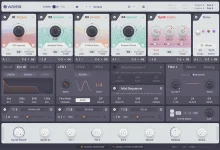
Flite Play remains free, while the Create editor runs as a 20-minute trial before its deeper editing access locks again. Saving presets and importing samples are also disabled during that trial, so the free version is not a time-limited copy of the complete instrument.
Both modes live inside the same plug-in and installer. Play is built around using the supplied presets and bundled sample library, while Create opens the instrument-building controls behind them. Moving from one to the other does not mean installing a separate synth or rebuilding your preset browser.
The distinction matters more in Flite V2 because the editor now reaches much further into sampling, FM, modulation, sequencing, effects, and MIDI. Flite V2's deeper editing controls are therefore only part of the picture if you are using Play, because some of the most useful V2 changes sit behind Create access.
Play is strongest when you want finished sounds rather than a blank construction kit. You can load the supplied library and treat Flite as a ready-to-play instrument, but the deeper sound-design layer is intentionally restricted. Full parameter editing, patch creation, preset saving, sample import, and complete DAW automation belong to Create.
Time and feature restrictions are common enough to have their own field experiment on free-trial software, which separates limited time from limited functionality instead of treating every trial as the same experience. Flite uses both ideas at once. Create gives you a temporary look inside the full editor, while Play remains available when that editing window closes.
The important practical detail is what you should test during those 20 minutes. Do not spend the session auditioning factory presets you can already play in the free mode. Open filters, effects, modulation assignments, note and parameter sequencers, and the sampler controls instead, because those are the areas that tell you whether Create changes how you actually work.
Preset saving creates a similar line. You can explore deeper controls during the Create trial, but a patch you intend to keep needs saving access. It is worth treating the trial as an evaluation space rather than beginning a long sound-design session and expecting the finished instrument to survive as a reusable preset.
Create also unlocks the controls that make Flite more than a preset player. Filters can be edited properly, full effect parameters become available, modulation and note sequencers can be configured, samples can be imported, and original patches can be built around those choices. Full DAW automation access belongs on the same side of the boundary.
Flite V2 makes this split more noticeable because its expanded editor has more worth editing. Custom LFO shapes, deeper FM controls, additional sequencing behavior, multisample tools, MIDI output, and broader modulation assignments are most useful when you can save the result and return to it later. A temporary editor session can demonstrate those features, but it cannot replace a persistent creation workflow.
The installation path also stays unified. Play and Create use the same plug-in, and purchasing Create removes the trial limitations after you sign in with the relevant Wavea account. There is no need to migrate projects to a second edition of Flite simply because you decide later that sample import or full editing has become necessary.
This makes the choice less about whether Flite produces sound for free and more about what you expect to do after loading one. Preset browsing and expansion playback fit Play comfortably, while saving original patches, importing your own material, deep parameter editing, sequencer programming, and automation push the job into Create. The boundary is functional rather than cosmetic, and V2 has made the Create side considerably larger.
Both modes live inside the same plug-in and installer. Play is built around using the supplied presets and bundled sample library, while Create opens the instrument-building controls behind them. Moving from one to the other does not mean installing a separate synth or rebuilding your preset browser.
The distinction matters more in Flite V2 because the editor now reaches much further into sampling, FM, modulation, sequencing, effects, and MIDI. Flite V2's deeper editing controls are therefore only part of the picture if you are using Play, because some of the most useful V2 changes sit behind Create access.
Play stays useful after the Create trial ends
The 20-minute limit applies to the Create editing session, not to the existence of Flite Play itself. Once deeper editing locks, Play still serves as the free preset instrument, so you can continue using the included sounds rather than losing access to the plug-in completely. This is the practical difference between a permanent free tier and a conventional demo that simply stops working.Play is strongest when you want finished sounds rather than a blank construction kit. You can load the supplied library and treat Flite as a ready-to-play instrument, but the deeper sound-design layer is intentionally restricted. Full parameter editing, patch creation, preset saving, sample import, and complete DAW automation belong to Create.
Time and feature restrictions are common enough to have their own field experiment on free-trial software, which separates limited time from limited functionality instead of treating every trial as the same experience. Flite uses both ideas at once. Create gives you a temporary look inside the full editor, while Play remains available when that editing window closes.
The important practical detail is what you should test during those 20 minutes. Do not spend the session auditioning factory presets you can already play in the free mode. Open filters, effects, modulation assignments, note and parameter sequencers, and the sampler controls instead, because those are the areas that tell you whether Create changes how you actually work.
Create is required when a preset becomes your raw material
Sample import is one of the clearest boundaries. Play can use the supplied material, but bringing in your own samples requires Create, and the trial does not let you save imported work. A serious multisample, custom drum instrument, or personal sample library therefore needs the paid editor rather than a clever workaround inside Play.Preset saving creates a similar line. You can explore deeper controls during the Create trial, but a patch you intend to keep needs saving access. It is worth treating the trial as an evaluation space rather than beginning a long sound-design session and expecting the finished instrument to survive as a reusable preset.
Create also unlocks the controls that make Flite more than a preset player. Filters can be edited properly, full effect parameters become available, modulation and note sequencers can be configured, samples can be imported, and original patches can be built around those choices. Full DAW automation access belongs on the same side of the boundary.
Flite V2 makes this split more noticeable because its expanded editor has more worth editing. Custom LFO shapes, deeper FM controls, additional sequencing behavior, multisample tools, MIDI output, and broader modulation assignments are most useful when you can save the result and return to it later. A temporary editor session can demonstrate those features, but it cannot replace a persistent creation workflow.
Expansions do not require a Create purchase
Expansion packs are the useful exception to the Play-versus-Create divide. Wavea allows expansions to run in both modes, so buying or installing an expansion does not force a separate Create purchase just to play its patches. For someone who mainly wants a growing preset library, Play can remain the permanent home for those sounds.The installation path also stays unified. Play and Create use the same plug-in, and purchasing Create removes the trial limitations after you sign in with the relevant Wavea account. There is no need to migrate projects to a second edition of Flite simply because you decide later that sample import or full editing has become necessary.
This makes the choice less about whether Flite produces sound for free and more about what you expect to do after loading one. Preset browsing and expansion playback fit Play comfortably, while saving original patches, importing your own material, deep parameter editing, sequencer programming, and automation push the job into Create. The boundary is functional rather than cosmetic, and V2 has made the Create side considerably larger.