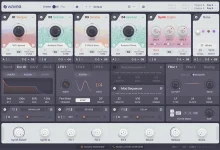
Flite V2 can import SFZ, SF2, and Decent Sampler instruments with multisample, velocity-layer, and layered-instrument support. It also accepts WAV, AIFF, FLAC, and MP3 files, so you are not locked into ready-made instrument formats when building your own patch. Sample import belongs to Flite Create, while the free Play mode keeps that part of the editor restricted.
The useful change is not simply a longer list of extensions. Flite V2 gives imported material a route through mapping, zone editing, looping, and instrument storage, which makes Flite V2's expanded sampling system more interesting than a basic file loader. You can start with a mapped multisample patch or a folder of loose recordings and finish with a playable instrument inside the same synth.
Importing a format is not the same thing as cloning every behavior from its original player. Wavea explicitly calls out multisamples, velocity layers, and layered instruments, so those are the parts you can rely on from the current V2 changelog. If a source patch depends on format-specific effects, scripting, or interface behavior, audition the imported result instead of assuming those extras came with it.
Raw audio takes a different route. Flite can load common audio formats and auto-map samples by pitch and velocity, while the mapping editor provides multi-zone editing and root-note movement when the result needs correction. Missing-file feedback matters too, because a multisample can fail for a boring reason such as a referenced recording being moved or renamed.
Four multi-samplers sit inside Flite, each with individual sound and group controls. You can adjust gain, pan, tuning, sample start and end positions, and loop boundaries, then combine the result with the rest of Flite's synthesis and modulation engine. Imported material is not stuck behaving like a sealed preset.
A loop still deserves your ears. Sustained recordings can contain vibrato, noise, stereo movement, beating, or a changing harmonic balance, so a technically clean join may still sound obvious after several seconds. The spectral-similarity approach to automatic audio looping is useful context because convincing repetition depends on compatible regions of a sound, not merely convenient timestamps.
Flite's broader drag-and-drop support helps when the first result needs work. Audio can be dropped across the waveform, mapping editor, and instrument slot, so replacing or reorganizing material does not require as much menu hopping. Multi-zone editing becomes especially useful once a patch carries several pitches and velocity layers, since related regions can be handled together instead of repaired one at a time.
The practical order is simple. Import an SFZ, SF2, or Decent Sampler instrument when you already have a mapped library, or bring in raw audio when you want to create the mapping yourself. Play across the keyboard at different velocities, correct root notes or zones where needed, then hold sustained notes long enough to expose an obvious loop.
Auto-mapping should shorten setup, not replace listening. A zone can sit on the expected key yet still change tone too sharply at its boundary, while a velocity layer can feel abrupt even when it triggers at the intended range. Fix those transitions before exporting the monolith, because a tidy container preserves the instrument you built, including the decisions you did not bother to correct.
The useful change is not simply a longer list of extensions. Flite V2 gives imported material a route through mapping, zone editing, looping, and instrument storage, which makes Flite V2's expanded sampling system more interesting than a basic file loader. You can start with a mapped multisample patch or a folder of loose recordings and finish with a playable instrument inside the same synth.
Imported patches arrive as playable maps, not loose audio
SFZ, SF2, and Decent Sampler files already contain information about how samples belong on a keyboard. Flite V2 can bring in multisample layouts, velocity layers, and layered instruments rather than treating every source file as an isolated one-shot. Older SoundFonts and small third-party libraries can therefore reach the keyboard without making you rebuild every zone first.Importing a format is not the same thing as cloning every behavior from its original player. Wavea explicitly calls out multisamples, velocity layers, and layered instruments, so those are the parts you can rely on from the current V2 changelog. If a source patch depends on format-specific effects, scripting, or interface behavior, audition the imported result instead of assuming those extras came with it.
Raw audio takes a different route. Flite can load common audio formats and auto-map samples by pitch and velocity, while the mapping editor provides multi-zone editing and root-note movement when the result needs correction. Missing-file feedback matters too, because a multisample can fail for a boring reason such as a referenced recording being moved or renamed.
Four multi-samplers sit inside Flite, each with individual sound and group controls. You can adjust gain, pan, tuning, sample start and end positions, and loop boundaries, then combine the result with the rest of Flite's synthesis and modulation engine. Imported material is not stuck behaving like a sealed preset.
Auto-looping removes one of the slowest sampling chores
A sustained sample needs a convincing section it can repeat after the attack. Flite V2 adds Simple and Complex Auto Loop modes, plus clear failure messaging when the software cannot produce a suitable result. Anyone who has manually hunted stable loop boundaries across a large keyboard map will recognize the time saved here.A loop still deserves your ears. Sustained recordings can contain vibrato, noise, stereo movement, beating, or a changing harmonic balance, so a technically clean join may still sound obvious after several seconds. The spectral-similarity approach to automatic audio looping is useful context because convincing repetition depends on compatible regions of a sound, not merely convenient timestamps.
Flite's broader drag-and-drop support helps when the first result needs work. Audio can be dropped across the waveform, mapping editor, and instrument slot, so replacing or reorganizing material does not require as much menu hopping. Multi-zone editing becomes especially useful once a patch carries several pitches and velocity layers, since related regions can be handled together instead of repaired one at a time.
Monolith export makes custom instruments easier to keep
Building a good map is only half the job if the instrument later depends on a fragile folder tree. Flite can export mapped multisamples as monoliths, giving custom instruments a cleaner recall path after their samples, zones, and edits have been assembled. Flite's monolith workflow lets a finished multisampled instrument be recalled without rebuilding the map from its loose source files each time. V2 keeps that practical storage step while broadening the kinds of mapped material that can enter the sampler.The practical order is simple. Import an SFZ, SF2, or Decent Sampler instrument when you already have a mapped library, or bring in raw audio when you want to create the mapping yourself. Play across the keyboard at different velocities, correct root notes or zones where needed, then hold sustained notes long enough to expose an obvious loop.
Auto-mapping should shorten setup, not replace listening. A zone can sit on the expected key yet still change tone too sharply at its boundary, while a velocity layer can feel abrupt even when it triggers at the intended range. Fix those transitions before exporting the monolith, because a tidy container preserves the instrument you built, including the decisions you did not bother to correct.