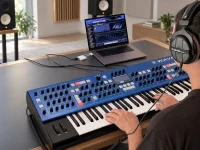
3rd Wave Terminal is free for registered 3rd Wave users, and Groove Synthesis has released the finished app after its Superbooth preview. The desktop tool gives players far more room to manage sounds, change synth settings, and work with audio files.
Composer Pedro Macedo Camacho made the app to speed up his work with the synth. His game credits span Star Citizen, World of Warcraft Shadowlands, and Call of Duty Black Ops 6 and 7. Groove Synthesis cofounder Bob Coover later learned of the project and gave it official support.
Pretty neat for a tool that began as a personal project. Camacho had long wanted a faster way to work with his gear, and the app grew from that need.
The patch manager uses two panes to show banks from the synth or a computer. Local files can hold bought sounds, custom patches, favorites, and sample sets. A simple drag moves or swaps patches, and changes saved to the synth stay there when it is unplugged.
Better yet, users can try patches live without writing them to the synth. A rescan checks that both libraries match, while the factory sounds stay safe in a locked bank. Players can even set up banks for gigs or studio work without the hardware nearby.
Editing gets far more detailed. The app can show all three oscillators, four LFOs, and the synth's envelopes at once. Each of the three wave envelopes also has a clear view of its wavetable scan. Oscillator pages give direct access to waves, samples, and modulation settings.
Even the stronger effects get easier access. Shimmer Reverb has controls for bloom rate, damping, delay before the reverb, and feedback right on its panel. No need to dig through the synth's Extras menu for those settings.
Modulation fans get three ways to make routes. The Mod Table keeps the hardware layout, while the Mod Matrix shows a grid of inputs and targets. A third view uses virtual cables that users can drag into place.
And the step sequencer gets a piano roll. Notes can be placed and changed one by one on a grid, much like a DAW. That gives the synth's built-in patterns a more visual way to work.
Wavetable editing is quite packed as well. The app can fill the synth's 64 custom table slots with waves made from common audio files. WAV, AIFF, MP3, and MP4 are fair game. It skips the old need to start with a WAV at 96 kHz.
Once a file loads, users can pick a section and make wave frames through pitch tracking or slices of fixed length. There are also tools to draw waves, blend frames, smooth changes, mix in static shapes, and set levels. The results can make audible tones or act as silent modulation data.
Samples get a similar treatment. The app reads WAV, MP3, M4A, AAC, MP4, and .bin files, with no manual format change needed. Audio files can come in at any bitrate, which cuts out quite a bit of prep work.
For multisamples, as many as eight recordings can share the keyboard. Each has settings for note range, root pitch, start and stop points, loops, fades, level, and trim. Finished sets can live in a local library before being sent to a hardware sample slot for use by the oscillators.
Coover sees the app as a way to make four key areas of the synth easier and more capable. The hardware can still work by itself, but the desktop view gives players far more space to manage complex tasks.
Composer Pedro Macedo Camacho made the app to speed up his work with the synth. His game credits span Star Citizen, World of Warcraft Shadowlands, and Call of Duty Black Ops 6 and 7. Groove Synthesis cofounder Bob Coover later learned of the project and gave it official support.
Pretty neat for a tool that began as a personal project. Camacho had long wanted a faster way to work with his gear, and the app grew from that need.
The patch manager uses two panes to show banks from the synth or a computer. Local files can hold bought sounds, custom patches, favorites, and sample sets. A simple drag moves or swaps patches, and changes saved to the synth stay there when it is unplugged.
Better yet, users can try patches live without writing them to the synth. A rescan checks that both libraries match, while the factory sounds stay safe in a locked bank. Players can even set up banks for gigs or studio work without the hardware nearby.
Editing gets far more detailed. The app can show all three oscillators, four LFOs, and the synth's envelopes at once. Each of the three wave envelopes also has a clear view of its wavetable scan. Oscillator pages give direct access to waves, samples, and modulation settings.
Even the stronger effects get easier access. Shimmer Reverb has controls for bloom rate, damping, delay before the reverb, and feedback right on its panel. No need to dig through the synth's Extras menu for those settings.
Modulation fans get three ways to make routes. The Mod Table keeps the hardware layout, while the Mod Matrix shows a grid of inputs and targets. A third view uses virtual cables that users can drag into place.
And the step sequencer gets a piano roll. Notes can be placed and changed one by one on a grid, much like a DAW. That gives the synth's built-in patterns a more visual way to work.
Wavetable editing is quite packed as well. The app can fill the synth's 64 custom table slots with waves made from common audio files. WAV, AIFF, MP3, and MP4 are fair game. It skips the old need to start with a WAV at 96 kHz.
Once a file loads, users can pick a section and make wave frames through pitch tracking or slices of fixed length. There are also tools to draw waves, blend frames, smooth changes, mix in static shapes, and set levels. The results can make audible tones or act as silent modulation data.
Samples get a similar treatment. The app reads WAV, MP3, M4A, AAC, MP4, and .bin files, with no manual format change needed. Audio files can come in at any bitrate, which cuts out quite a bit of prep work.
For multisamples, as many as eight recordings can share the keyboard. Each has settings for note range, root pitch, start and stop points, loops, fades, level, and trim. Finished sets can live in a local library before being sent to a hardware sample slot for use by the oscillators.
Coover sees the app as a way to make four key areas of the synth easier and more capable. The hardware can still work by itself, but the desktop view gives players far more space to manage complex tasks.