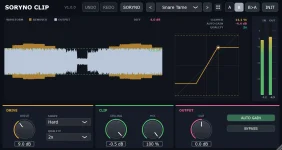
SORYNO Clip installs as a 64-bit VST3 on Windows 10 or 11, with no Visual C++ runtime required. It supports 44.1, 48, 96, and 192 kHz sessions in mono or stereo, so there is not much prerequisite hunting before you start.
The download comes as a ZIP from Pinzu's BOOTH page, and the free edition still requires a free pixiv account because BOOTH handles the delivery. Each product takes roughly 7 MB, so storage is basically a non-issue unless your system drive is already nearly full. Once you have the archive, extract it somewhere normal rather than trying to run the installer from inside the ZIP.
The free SORYNO Clip release is only available as VST3, with no macOS or AAX build. If your DAW cannot host VST3 effects, the installation can finish perfectly, and the plug-in still will not appear.
SORYNO installs into %LOCALAPPDATA%\Programs\Common\VST3. A lot of Windows plug-in guides only mention the system-wide VST3 folder under Program Files. The VST3 specification also defines this per-user location, so Pinzu is not dumping the plug-in into some random homemade directory.
The distinction matters when you go looking for the file manually. Checking only the usual system-wide VST3 folder can make a successful SORYNO install look broken even though the plug-in is sitting exactly where its installer intended.
Pinzu also built a useful cleanup step into the installer. It checks other locations for an older copy and moves one it finds into a backup area. Your DAW is less likely to grab an outdated build first and make a perfectly good update look broken.
Do not manually scatter extra copies around different VST3 folders afterward. Duplicate plug-ins can turn a five-minute install into a dumb troubleshooting session. You keep rescanning the same machine while the host quietly loads the wrong copy.
Use More info and Run anyway only when the archive came from Pinzu's official download route and the file is the one you intended to grab. Code signing helps establish publisher identity. Even code-signing certificates can still be abused, so a valid signature is not proof of safety by itself.
If Run anyway is missing, do not start switching off Windows security features just to make the button appear. Managed PCs and some Windows 11 security configurations can block unsigned software more firmly, and forcing past somebody else's policy is a lousy installation strategy.
The boring safety check is the useful one. Confirm the source, keep Windows security enabled, and treat an unexpected download path, renamed archive, or random mirror as a reason to stop rather than a puzzle to defeat.
Do not waste time searching the Windows Start menu for a normal desktop program. SORYNO Clip is delivered as a plug-in, so the useful test is whether a compatible DAW can scan and load it on an audio track, bus, or master channel.
If it does not appear, verify the host actually supports 64-bit VST3 effects before moving files around. Check %LOCALAPPDATA%\Programs\Common\VST3 for the installed SORYNO package next. Trigger a fresh scan instead of pointing the DAW at a pile of unrelated VST2 folders.
The per-user folder is especially handy on a machine where you do not have admin access. Your install stays tied to your Windows account instead of becoming a system-wide change. The official VST3 location is built for exactly this kind of per-user setup.
A failed scan does not automatically mean the installer failed. Some hosts keep blocklists or cached scan results after a plug-in crashes. Clearing the failed-plug-in entry or forcing a full rescan can matter more than reinstalling the same file repeatedly.
Removal is pleasantly uneventful. Delete the SORYNO .vst3 folder from its per-user VST3 location. Pinzu says no separate settings files are left behind, so uninstalling does not require another utility or manual registry cleanup.
The download comes as a ZIP from Pinzu's BOOTH page, and the free edition still requires a free pixiv account because BOOTH handles the delivery. Each product takes roughly 7 MB, so storage is basically a non-issue unless your system drive is already nearly full. Once you have the archive, extract it somewhere normal rather than trying to run the installer from inside the ZIP.
The free SORYNO Clip release is only available as VST3, with no macOS or AAX build. If your DAW cannot host VST3 effects, the installation can finish perfectly, and the plug-in still will not appear.
SORYNO uses a valid Windows VST3 install path
Open the extracted folder and run Install.bat. You do not need administrator rights, which is a nice change from installers that immediately demand elevation before telling you what they plan to do.SORYNO installs into %LOCALAPPDATA%\Programs\Common\VST3. A lot of Windows plug-in guides only mention the system-wide VST3 folder under Program Files. The VST3 specification also defines this per-user location, so Pinzu is not dumping the plug-in into some random homemade directory.
The distinction matters when you go looking for the file manually. Checking only the usual system-wide VST3 folder can make a successful SORYNO install look broken even though the plug-in is sitting exactly where its installer intended.
Pinzu also built a useful cleanup step into the installer. It checks other locations for an older copy and moves one it finds into a backup area. Your DAW is less likely to grab an outdated build first and make a perfectly good update look broken.
Do not manually scatter extra copies around different VST3 folders afterward. Duplicate plug-ins can turn a five-minute install into a dumb troubleshooting session. You keep rescanning the same machine while the host quietly loads the wrong copy.
SmartScreen is the awkward part
Windows may show the familiar protected-your-PC screen when you run the batch installer. Pinzu says the current build is not code-signed. The warning is expected, but it is not evidence by itself that the ZIP is infected.Use More info and Run anyway only when the archive came from Pinzu's official download route and the file is the one you intended to grab. Code signing helps establish publisher identity. Even code-signing certificates can still be abused, so a valid signature is not proof of safety by itself.
If Run anyway is missing, do not start switching off Windows security features just to make the button appear. Managed PCs and some Windows 11 security configurations can block unsigned software more firmly, and forcing past somebody else's policy is a lousy installation strategy.
The boring safety check is the useful one. Confirm the source, keep Windows security enabled, and treat an unexpected download path, renamed archive, or random mirror as a reason to stop rather than a puzzle to defeat.
A rescan should finish the job
Start your DAW after installation and run its plug-in rescan. SORYNO should then appear in the VST3 effect list. There is no separate Visual C++ package, license manager, activation utility, or extra runtime to install first.Do not waste time searching the Windows Start menu for a normal desktop program. SORYNO Clip is delivered as a plug-in, so the useful test is whether a compatible DAW can scan and load it on an audio track, bus, or master channel.
If it does not appear, verify the host actually supports 64-bit VST3 effects before moving files around. Check %LOCALAPPDATA%\Programs\Common\VST3 for the installed SORYNO package next. Trigger a fresh scan instead of pointing the DAW at a pile of unrelated VST2 folders.
The per-user folder is especially handy on a machine where you do not have admin access. Your install stays tied to your Windows account instead of becoming a system-wide change. The official VST3 location is built for exactly this kind of per-user setup.
A failed scan does not automatically mean the installer failed. Some hosts keep blocklists or cached scan results after a plug-in crashes. Clearing the failed-plug-in entry or forcing a full rescan can matter more than reinstalling the same file repeatedly.
Removal is pleasantly uneventful. Delete the SORYNO .vst3 folder from its per-user VST3 location. Pinzu says no separate settings files are left behind, so uninstalling does not require another utility or manual registry cleanup.