Pinzu positions SORYNO LIMIT as the final stage before export, while SORYNO Clip is built to shave and reshape peaks earlier. They can sit next to each other in the same chain, but treating them as interchangeable wastes what each one is good at.
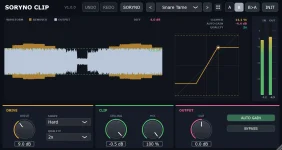
The SORYNO Clip processing stage gives you Drive, Ceiling, Hard, Soft, and Round clipping shapes, plus a Mix control and 1x or 2x oversampling. SORYNO LIMIT Free instead gives you Gain, Ceiling, Release, lookahead, loudness metering, and presets aimed at finishing a master rather than choosing how a waveform bends.
You can use either one alone when the job is small. Once a master needs both peak shaping and a firm final ceiling, though, the difference stops being nerd trivia and starts affecting how hard each processor has to work.
LIMIT works differently. It watches level, anticipates peaks with lookahead, then turns the signal down as needed to keep the output under its ceiling. Release controls how quickly that gain reduction lets go, so the body of a kick, vocal, or full mix can react differently from a brief clipped spike.
This is why a clipper can feel punchy when it only catches the tallest transients, while a limiter can sound smoother when the problem lasts longer than a few samples. Neither behavior is automatically better. The source decides which damage is easier to hide.
Pinzu also gives the two plug-ins different meters because the decisions are different. Clip keeps clipped percentage, gain reduction, waveform removal, and oversampling visible. LIMIT Free adds loudness information and shows how far the master sits from a selected target, which is much more useful when you are judging the finished output instead of one isolated peak.
Keep the split modest. If Clip is audibly flattening every transient, LIMIT receives an already damaged signal and cannot rebuild the original attack. If LIMIT is still clamping hard after the clipper, the mix may have a broader balance problem instead of a peak problem.
Clip's 2x Quality mode also should not be read as a true-peak guarantee. Pinzu documents true-peak limiting as a SORYNO LIMIT Pro feature, while Clip's Quality switch changes its oversampling mode. Similar words, different job.
The practical wrinkle comes from reconstructed peaks between stored samples. True-peak overload measurements show why a file can stay below its sample ceiling and still create a higher peak during playback. A clipper that controls sample values is therefore not automatically doing the final delivery check a true-peak limiter is designed to handle.
True-peak mode matters most when you care about what happens after the samples leave the DAW. Reconstructed peaks can rise above the highest stored sample, and later sample-rate conversion or encoding can change peak behavior again. A final limiter built to watch those peaks has a different responsibility from a creative clipper sitting earlier in the chain.
Dither is another clean dividing line. Clip is there to shape peaks, not manage the final reduction in word length. LIMIT Pro puts dithering and noise shaping beside the final level controls, which makes sense when the processor is genuinely the last stage before a fixed-bit-depth export.
The character controls also do not turn LIMIT Pro into Clip. A limiter character changes how the limiting action behaves, while Clip gives you explicit Hard, Soft, and Round clipping curves designed around waveform bending. You can still prefer one limiter character after a soft clipping stage because the two choices happen at different points in the process.
A sensible chain is boring on purpose. Let Clip catch only the peaks you actually want reshaped, feed the result into LIMIT, then set the final ceiling and loudness without chasing a bigger number for its own sake. If LIMIT barely moves afterward, the clipper probably did most of the peak work. If LIMIT keeps working steadily, it is handling a different problem, exactly as intended.
The SORYNO Clip processing stage gives you Drive, Ceiling, Hard, Soft, and Round clipping shapes, plus a Mix control and 1x or 2x oversampling. SORYNO LIMIT Free instead gives you Gain, Ceiling, Release, lookahead, loudness metering, and presets aimed at finishing a master rather than choosing how a waveform bends.
You can use either one alone when the job is small. Once a master needs both peak shaping and a firm final ceiling, though, the difference stops being nerd trivia and starts affecting how hard each processor has to work.
The two plug-ins solve different peak problems
A clipper changes the waveform when it crosses the clipping boundary. Push a snare peak into SORYNO Clip and the top gets reshaped according to the selected curve, which can trim a short spike without asking a release envelope to recover afterward.LIMIT works differently. It watches level, anticipates peaks with lookahead, then turns the signal down as needed to keep the output under its ceiling. Release controls how quickly that gain reduction lets go, so the body of a kick, vocal, or full mix can react differently from a brief clipped spike.
This is why a clipper can feel punchy when it only catches the tallest transients, while a limiter can sound smoother when the problem lasts longer than a few samples. Neither behavior is automatically better. The source decides which damage is easier to hide.
Pinzu also gives the two plug-ins different meters because the decisions are different. Clip keeps clipped percentage, gain reduction, waveform removal, and oversampling visible. LIMIT Free adds loudness information and shows how far the master sits from a selected target, which is much more useful when you are judging the finished output instead of one isolated peak.
Clip belongs before LIMIT when both are used
Putting Clip first lets it knock down the occasional peak before LIMIT sees the signal. The limiter can then spend less time reacting to one loud snare or kick and more time handling the overall ceiling, which is the useful reason to run the pair rather than simply making the chain louder twice.Keep the split modest. If Clip is audibly flattening every transient, LIMIT receives an already damaged signal and cannot rebuild the original attack. If LIMIT is still clamping hard after the clipper, the mix may have a broader balance problem instead of a peak problem.
Clip's 2x Quality mode also should not be read as a true-peak guarantee. Pinzu documents true-peak limiting as a SORYNO LIMIT Pro feature, while Clip's Quality switch changes its oversampling mode. Similar words, different job.
The practical wrinkle comes from reconstructed peaks between stored samples. True-peak overload measurements show why a file can stay below its sample ceiling and still create a higher peak during playback. A clipper that controls sample values is therefore not automatically doing the final delivery check a true-peak limiter is designed to handle.
LIMIT Pro adds final-delivery controls Clip does not replace
SORYNO LIMIT Free already handles normal limiting with Gain, Ceiling, Release, lookahead, loudness metering, and 14 starting presets. Pro adds true-peak limiting, four character models, dither and noise shaping, stereo link control, Mix, and 24 presets.True-peak mode matters most when you care about what happens after the samples leave the DAW. Reconstructed peaks can rise above the highest stored sample, and later sample-rate conversion or encoding can change peak behavior again. A final limiter built to watch those peaks has a different responsibility from a creative clipper sitting earlier in the chain.
Dither is another clean dividing line. Clip is there to shape peaks, not manage the final reduction in word length. LIMIT Pro puts dithering and noise shaping beside the final level controls, which makes sense when the processor is genuinely the last stage before a fixed-bit-depth export.
The character controls also do not turn LIMIT Pro into Clip. A limiter character changes how the limiting action behaves, while Clip gives you explicit Hard, Soft, and Round clipping curves designed around waveform bending. You can still prefer one limiter character after a soft clipping stage because the two choices happen at different points in the process.
A sensible chain is boring on purpose. Let Clip catch only the peaks you actually want reshaped, feed the result into LIMIT, then set the final ceiling and loudness without chasing a bigger number for its own sake. If LIMIT barely moves afterward, the clipper probably did most of the peak work. If LIMIT keeps working steadily, it is handling a different problem, exactly as intended.