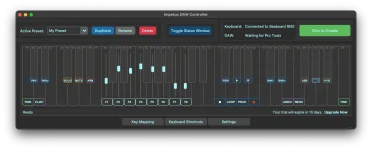
Impetus 1.0 includes a system-wide keyboard shortcut and macro engine that works independently of its HUI and Mackie Control features. The separation is more useful than it first sounds because your MPE keyboard does not have to stop being useful when the mixer disappears from view.
A key can trigger a learned shortcut while another part of Impetus handles faders, transport, banking, mute, solo, and record arm. Those jobs share the same physical controller, but they do not travel through the same control path. One talks to the DAW as a control surface. The other can act on ordinary macOS applications.
With Impetus shortcut control on macOS, the useful distinction is the destination. A learned keyboard shortcut can target an application command, while a control-surface message targets a DAW function exposed through HUI or Mackie Control. MIDI Learn sits earlier in the chain because it tells Impetus which incoming control should trigger the assigned action.
Mixing those three ideas makes setup needlessly confusing. MIDI Learn answers which key or control you pressed. The macro or shortcut layer answers what computer command should follow. HUI or Mackie Control answers how supported mixer and transport functions are presented to the DAW.
The broader principle behind mapping physical gestures to software results is old and practical. A controller becomes useful when the physical action and the software response stay predictable enough to learn. Impetus applies that idea to hardware you may already use for expressive playing instead of demanding another box on the desk.
This matters more with a MIDI keyboard because the trigger may feel detached from the screen. Pressing a learned key is easy, but the command still lands in the software context macOS gives it. A shortcut that is harmless in one application can be irrelevant, unavailable, or assigned differently in another.
Good macro choices therefore start with commands whose context is obvious. Saving, undoing, switching a tool, opening a view, or invoking an application-specific command can make sense when you already know which app has focus. Commands that depend on a hidden dialog, text field, or unusual window state are easier to fire at the wrong moment.
Conflicts deserve the same attention. A shortcut already claimed by macOS or by the active application may not behave the way you expected from another program. Impetus can provide the trigger, but it cannot make two applications agree on what a keystroke means. The operating system and the receiving application still own the final interpretation.
The macro engine then gives those learned triggers a purpose beyond direct mixer control. A key that is useless to HUI or Mackie Control can still become a computer command, and the feature works independently of the control-surface layer. This creates room for workflows around editing, navigation, application commands, and repeated shortcuts without pretending those actions are DAW faders.
Presets add another practical layer because Impetus includes factory presets and unlimited user presets. Public product information does not spell out every item stored inside a user preset, so it is safer not to assume that every macro detail follows a preset until you verify it in the application. The important point is simpler. Impetus has a dedicated preset system alongside MIDI Learn and its shortcut engine rather than forcing every assignment into one permanent layout.
This separation is what keeps the feature from being a novelty. Your MPE keyboard can remain an expressive instrument when you play, a control surface when you mix, and a shortcut source when software expects ordinary computer commands. None of those roles requires the other two to be active for the basic idea to make sense.
A key can trigger a learned shortcut while another part of Impetus handles faders, transport, banking, mute, solo, and record arm. Those jobs share the same physical controller, but they do not travel through the same control path. One talks to the DAW as a control surface. The other can act on ordinary macOS applications.
System-wide shortcuts live outside the control-surface layer
HUI and Mackie Control make sense when a DAW knows what a fader, transport button, or channel bank means. Finder, a text editor, a browser, and most standalone audio tools have no reason to understand either protocol. Keyboard shortcuts give Impetus a second route into software that was never designed around a studio control surface.With Impetus shortcut control on macOS, the useful distinction is the destination. A learned keyboard shortcut can target an application command, while a control-surface message targets a DAW function exposed through HUI or Mackie Control. MIDI Learn sits earlier in the chain because it tells Impetus which incoming control should trigger the assigned action.
Mixing those three ideas makes setup needlessly confusing. MIDI Learn answers which key or control you pressed. The macro or shortcut layer answers what computer command should follow. HUI or Mackie Control answers how supported mixer and transport functions are presented to the DAW.
The broader principle behind mapping physical gestures to software results is old and practical. A controller becomes useful when the physical action and the software response stay predictable enough to learn. Impetus applies that idea to hardware you may already use for expressive playing instead of demanding another box on the desk.
App focus can change what the same shortcut does
System-wide availability does not mean every shortcut has one universal meaning. macOS applications define many of their own commands, and the same key combination can perform a different job depending on which application is active. Keyboard layout and language settings can also affect whether a particular shortcut resolves as expected.This matters more with a MIDI keyboard because the trigger may feel detached from the screen. Pressing a learned key is easy, but the command still lands in the software context macOS gives it. A shortcut that is harmless in one application can be irrelevant, unavailable, or assigned differently in another.
Good macro choices therefore start with commands whose context is obvious. Saving, undoing, switching a tool, opening a view, or invoking an application-specific command can make sense when you already know which app has focus. Commands that depend on a hidden dialog, text field, or unusual window state are easier to fire at the wrong moment.
Conflicts deserve the same attention. A shortcut already claimed by macOS or by the active application may not behave the way you expected from another program. Impetus can provide the trigger, but it cannot make two applications agree on what a keystroke means. The operating system and the receiving application still own the final interpretation.
Macros and MIDI Learn solve different parts of the workflow
MIDI Learn is often described as if it were the feature doing the automation. It is really the assignment mechanism. Impetus can learn controls and shortcut keys, which saves you from manually identifying every incoming note or controller message before attaching it to a function.The macro engine then gives those learned triggers a purpose beyond direct mixer control. A key that is useless to HUI or Mackie Control can still become a computer command, and the feature works independently of the control-surface layer. This creates room for workflows around editing, navigation, application commands, and repeated shortcuts without pretending those actions are DAW faders.
Presets add another practical layer because Impetus includes factory presets and unlimited user presets. Public product information does not spell out every item stored inside a user preset, so it is safer not to assume that every macro detail follows a preset until you verify it in the application. The important point is simpler. Impetus has a dedicated preset system alongside MIDI Learn and its shortcut engine rather than forcing every assignment into one permanent layout.
This separation is what keeps the feature from being a novelty. Your MPE keyboard can remain an expressive instrument when you play, a control surface when you mix, and a shortcut source when software expects ordinary computer commands. None of those roles requires the other two to be active for the basic idea to make sense.