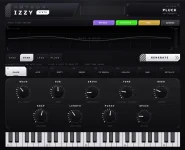
IZZY Synth 0.1.0 gives you eight patch slots, and its GENERATE control fills the next slot instead of replacing one sound repeatedly. The detail sounds small, but it changes how you can audition patches.
The useful part of IZZY Synth’s eight patch slots is not simply having eight places to park sounds. You can build a short run of candidates, hear them against the same notes, and decide which one deserves more attention without trying to remember what disappeared two clicks ago.
IZZY also separates generation into BASS, STAB, LEAD, and PLUCK roles. Pick the role before generating, then judge several candidates for the same job rather than bouncing between unrelated sound types and confusing the comparison.
Start with a bass line, chord stab, lead phrase, or pluck pattern you already understand. Generate a candidate, play the same phrase, move on, and resist touching every control immediately. You are trying to hear the basic character first, not rescue each patch from rejection.
Eight slots are enough to create a proper shortlist without turning the session into preset archaeology. If slot two feels dull and slot six has the right attack, you can return to six directly instead of regenerating and hoping the same character reappears.
Nothing in the 0.1.0 release notes describes automatic ranking, tagging, or a system that picks the strongest patch for you. The slots are therefore most useful when you impose a simple decision rule yourself. Keep two or three contenders, reject the obvious misses quickly, then tweak only the survivors.
Those shortcuts matter when you are cycling through patches quickly. The octave keys work without modifiers, and the on-screen keyboard scrolls as you move, so the visible range follows what your computer keyboard is playing. You can keep one hand near GENERATE and the controls while the other repeats a small note pattern, then shift octaves without reaching for a controller or redrawing MIDI in the DAW.
Keep the audition phrase short. A few notes with different velocities and note lengths will usually expose attack, body, release, and how a generated sound behaves across the range faster than a busy sixteen-bar sequence.
Research on short-term memory for recent timbral differences has shown that recent auditory context can affect sound discrimination. For patch hunting, the practical lesson is modest rather than grand. Compare candidates close together, at similar loudness, with the same notes, so your decision is based on the sound rather than a changing test.
Avoid turning every fresh patch into a repair project. If the core tone feels wrong, generate another one. If the character works but the tail is too long, the attack lacks weight, or the ambience is crowding the part, the macros give you a smaller correction to make.
A disciplined pass can be very quick. Generate several sounds in one role, choose the best two or three, match their output level as closely as you can by ear, then adjust only the controls tied to the problem you actually hear. Loudness alone can make one candidate seem more impressive, so level differences deserve attention before you crown a winner.
The waveform display is useful as feedback, but your ears still decide whether the patch belongs in the track. A dramatic shape on screen does not fix a weak bass note, and a plain-looking waveform can still sit perfectly once drums and other instruments are playing.
Patch slots become most valuable when you treat them as temporary contenders rather than eight presets that all need finishing. Generate freely at the start, cut the weak sounds early, and spend your adjustment time on the few patches that already make sense for the part.
The useful part of IZZY Synth’s eight patch slots is not simply having eight places to park sounds. You can build a short run of candidates, hear them against the same notes, and decide which one deserves more attention without trying to remember what disappeared two clicks ago.
IZZY also separates generation into BASS, STAB, LEAD, and PLUCK roles. Pick the role before generating, then judge several candidates for the same job rather than bouncing between unrelated sound types and confusing the comparison.
GENERATE turns eight slots into a listening workflow
Pressing GENERATE moves the process forward by filling the next patch slot. A useful way to work is to keep the musical phrase fixed while you generate several sounds for one role, because changing the notes and the timbre at the same time makes the comparison needlessly messy.Start with a bass line, chord stab, lead phrase, or pluck pattern you already understand. Generate a candidate, play the same phrase, move on, and resist touching every control immediately. You are trying to hear the basic character first, not rescue each patch from rejection.
Eight slots are enough to create a proper shortlist without turning the session into preset archaeology. If slot two feels dull and slot six has the right attack, you can return to six directly instead of regenerating and hoping the same character reappears.
Nothing in the 0.1.0 release notes describes automatic ranking, tagging, or a system that picks the strongest patch for you. The slots are therefore most useful when you impose a simple decision rule yourself. Keep two or three contenders, reject the obvious misses quickly, then tweak only the survivors.
The built-in keyboard keeps comparisons close
IZZY’s on-screen keyboard covers MIDI notes 24 through 84, which gives you a broad enough span to test low bass material and higher melodic parts without leaving the instrument. The computer keyboard also uses JUCE’s default QWERTY note layout, with Z and X shifting the playable octave down or up.Those shortcuts matter when you are cycling through patches quickly. The octave keys work without modifiers, and the on-screen keyboard scrolls as you move, so the visible range follows what your computer keyboard is playing. You can keep one hand near GENERATE and the controls while the other repeats a small note pattern, then shift octaves without reaching for a controller or redrawing MIDI in the DAW.
Keep the audition phrase short. A few notes with different velocities and note lengths will usually expose attack, body, release, and how a generated sound behaves across the range faster than a busy sixteen-bar sequence.
Research on short-term memory for recent timbral differences has shown that recent auditory context can affect sound discrimination. For patch hunting, the practical lesson is modest rather than grand. Compare candidates close together, at similar loudness, with the same notes, so your decision is based on the sound rather than a changing test.
Macro tweaks work better after the shortlist exists
IZZY 0.1.0 exposes nine patch controls, including output, length, punch, and space. Their value appears after generation, because a promising patch can be shaped without opening a conventional synth panel full of oscillator, filter, envelope, and modulation pages.Avoid turning every fresh patch into a repair project. If the core tone feels wrong, generate another one. If the character works but the tail is too long, the attack lacks weight, or the ambience is crowding the part, the macros give you a smaller correction to make.
A disciplined pass can be very quick. Generate several sounds in one role, choose the best two or three, match their output level as closely as you can by ear, then adjust only the controls tied to the problem you actually hear. Loudness alone can make one candidate seem more impressive, so level differences deserve attention before you crown a winner.
The waveform display is useful as feedback, but your ears still decide whether the patch belongs in the track. A dramatic shape on screen does not fix a weak bass note, and a plain-looking waveform can still sit perfectly once drums and other instruments are playing.
Patch slots become most valuable when you treat them as temporary contenders rather than eight presets that all need finishing. Generate freely at the start, cut the weak sounds early, and spend your adjustment time on the few patches that already make sense for the part.