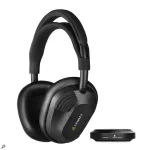
LEWITT rates RealSound latency at 5.8 ms, putting the LW6 in a very different recording category from ordinary Bluetooth headphones. The number sounds simple until you drop the headphones into a real session, where the interface, DAW, plug-ins, buffers, converters, and wireless link all get a turn at slowing things down.
The Lewitt LW6 wireless studio headphones use a dedicated RealSound transmitter for studio work rather than relying on Bluetooth. RealSound carries uncompressed PCM audio and is meant for tracking, monitoring, mixing, and mastering within roughly five metres of the transmitter. Bluetooth is still there for normal wireless listening, but it is not the connection you want when timing matters.
Forget the headline number for a second and follow the signal. A guitar or vocal enters your interface, gets converted, passes through the driver and DAW, hits whatever processing is active, comes back through the output path, then reaches the LW TX transmitter. RealSound only owns the last wireless leg.
At 48 kHz, DAW monitoring latency already grows from about 1.33 ms for a 64-sample buffer in one direction to about 5.33 ms for 256 samples. Those figures still leave conversion, drivers, safety buffers, plug-ins, and hardware behavior outside the calculation.
One independent LW6 test compared the same interface headphone output over cable and through the RealSound transmitter. The measured totals were about 31.1 ms wired and 33.2 ms wireless at a 512-sample buffer, leaving roughly 2.2 ms of additional delay in that particular setup. Repeated checks at distances up to around five metres stayed in the same general 2 to 3 ms region.
The important bit is not treating 2.2 ms as a universal LW6 measurement, since different interfaces, routing, test methods, and system settings change the total. What the comparison does show is more useful for recording. RealSound did not suddenly become the dominant delay in an already slow test chain.
LW6 hands-on reports line up with the practical side of this. Reviewers have tracked guitar, vocals, percussion, saxophone, and keyboard over RealSound without reporting a session-breaking lag. Attack-heavy keyboard sounds appear to be where a sensitive player may notice a little more separation, which makes sense because the complete chain matters more as the performance gets rhythmically precise.
Low-latency wireless headphones for tracking still need a clean session underneath them, so keep the interface buffer low enough to feel responsive without causing crackles. Pull latency-heavy processors from the live monitoring route. Check the master bus too, because one forgotten look-ahead limiter can ruin an otherwise lean record path.
Software monitoring remains useful when you need an amp simulator, vocal effects, live pitch processing, or a software instrument, but RealSound cannot rescue a bloated buffer or a processor that deliberately looks ahead. The sensible test is to compare wired monitoring with RealSound from the same output at the same level and session settings. If both feel late, the wireless link is probably not where the problem started.
On a vocal or guitar session, feed the same interface cue mix you would normally send to wired headphones into LW TX. Keep the transmitter inside its rated five-metre range and avoid turning the monitored DAW path into a mastering chain while someone is performing. If the performer suddenly notices lag after you add a processor, bypass that processor before blaming RealSound.
The Lewitt LW6 wireless studio headphones use a dedicated RealSound transmitter for studio work rather than relying on Bluetooth. RealSound carries uncompressed PCM audio and is meant for tracking, monitoring, mixing, and mastering within roughly five metres of the transmitter. Bluetooth is still there for normal wireless listening, but it is not the connection you want when timing matters.
Forget the headline number for a second and follow the signal. A guitar or vocal enters your interface, gets converted, passes through the driver and DAW, hits whatever processing is active, comes back through the output path, then reaches the LW TX transmitter. RealSound only owns the last wireless leg.
The 5.8 ms figure covers one part of the trip
A 5.8 ms wireless link does not mean your microphone reaches your ears 5.8 ms after you sing. Your complete monitoring path can already have several milliseconds on it before RealSound receives anything. A big buffer, a look-ahead limiter, linear-phase processing, pitch correction, or an overloaded session can make a fast headphone link feel slow.At 48 kHz, DAW monitoring latency already grows from about 1.33 ms for a 64-sample buffer in one direction to about 5.33 ms for 256 samples. Those figures still leave conversion, drivers, safety buffers, plug-ins, and hardware behavior outside the calculation.
One independent LW6 test compared the same interface headphone output over cable and through the RealSound transmitter. The measured totals were about 31.1 ms wired and 33.2 ms wireless at a 512-sample buffer, leaving roughly 2.2 ms of additional delay in that particular setup. Repeated checks at distances up to around five metres stayed in the same general 2 to 3 ms region.
The important bit is not treating 2.2 ms as a universal LW6 measurement, since different interfaces, routing, test methods, and system settings change the total. What the comparison does show is more useful for recording. RealSound did not suddenly become the dominant delay in an already slow test chain.
Playing feel depends on the whole monitoring path
Musicians do not respond to a spec sheet; they respond to the delay between making a movement and hearing the result, especially on drums, piano, picked guitar, and other sounds with a sharp attack. An action-to-sound latency study tested professional percussionists and amateur musicians at very small delay values, including nominal zero, 10 ms, 10 ms with jitter, and 20 ms. Ratings fell more clearly once delay or instability increased, while a steady 10 ms condition was less disruptive than the larger conditions.LW6 hands-on reports line up with the practical side of this. Reviewers have tracked guitar, vocals, percussion, saxophone, and keyboard over RealSound without reporting a session-breaking lag. Attack-heavy keyboard sounds appear to be where a sensitive player may notice a little more separation, which makes sense because the complete chain matters more as the performance gets rhythmically precise.
Low-latency wireless headphones for tracking still need a clean session underneath them, so keep the interface buffer low enough to feel responsive without causing crackles. Pull latency-heavy processors from the live monitoring route. Check the master bus too, because one forgotten look-ahead limiter can ruin an otherwise lean record path.
Direct monitoring changes what RealSound adds
Direct monitoring can cut the DAW round trip out of the performer's cue path. Feed that interface headphone mix into LW TX, and the wireless hop gets added after a much shorter route, which is a more favorable setup than monitoring a vocal through a stuffed mix session.Software monitoring remains useful when you need an amp simulator, vocal effects, live pitch processing, or a software instrument, but RealSound cannot rescue a bloated buffer or a processor that deliberately looks ahead. The sensible test is to compare wired monitoring with RealSound from the same output at the same level and session settings. If both feel late, the wireless link is probably not where the problem started.
On a vocal or guitar session, feed the same interface cue mix you would normally send to wired headphones into LW TX. Keep the transmitter inside its rated five-metre range and avoid turning the monitored DAW path into a mastering chain while someone is performing. If the performer suddenly notices lag after you add a processor, bypass that processor before blaming RealSound.