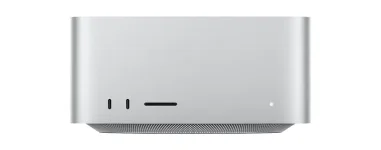
Every 2026 Mac Studio has four rear Thunderbolt 5 ports, while the M5 Ultra adds two more Thunderbolt 5 connections on the front. The M5 Max looks almost identical, but its two front USB-C sockets top out at USB 3 speeds of 10Gb/s instead.
For a music setup, the important bit is not memorizing a port list. It is knowing which gear deserves a direct connection, which devices can live happily on a hub, and which USB-C-shaped socket is actually carrying Thunderbolt.
The M5 Mac Studio audio performance is only half the story once the machine lands on your desk. Interfaces, external SSDs, displays, controllers, license dongles, and network storage all start fighting for physical space long before most of them come close to saturating the available bandwidth.
The M5 Ultra gets Thunderbolt 5 on all six USB-C-shaped ports. None of this means a normal USB audio interface suddenly becomes faster because you plugged it into the quickest socket.
A Scarlett that operates as a USB 2.0 device still behaves as a USB 2.0 interface when connected through USB-C. Focusrite explicitly notes that using a faster USB connection does not improve its signal quality or latency, which is a useful reality check when a spec sheet starts throwing triple-digit gigabit numbers around.
Audio traffic is tiny next to what Thunderbolt 5 can move. A modern interface usually cares more about stable drivers, buffer settings, cable quality, and uninterrupted communication than headline bus bandwidth.
Real-time recording makes the distinction clearer because measured USB audio latency depends on the whole monitoring path, including the interface and processing setup. Buying a 120Gb/s port does not bypass the buffers inside your DAW or the conversion stages inside your interface.
The M5 Mac Studio makes this easier than a laptop because you are not starting with two ports and a prayer. A USB interface can take one rear Thunderbolt port through a suitable USB-C cable, or one of the rear USB-A ports if the interface supports it, while the remaining high-speed ports stay free for storage and displays.
Using a Thunderbolt interface changes the connector requirement but not the basic logic. Genuine Thunderbolt hardware needs a Thunderbolt-capable port rather than any random USB-C socket, which makes the rear ports the safe default on M5 Max.
This also stops the front of the machine from becoming permanent cable spaghetti. Keep temporary drives, card readers, phones, controllers, and other things you plug in for ten minutes on the accessible ports, then leave the critical studio wiring alone at the back.
Powered hubs still have a place. MIDI controllers, dongles, keyboards, mice, and other low-bandwidth peripherals are much better candidates for sharing one connection than the interface you are monitoring through at a 64-sample buffer.
Displays can also consume Thunderbolt connections, but HDMI gives you an easy escape hatch. Running a compatible monitor from HDMI leaves another Thunderbolt port open for an SSD, interface, dock, or PCIe expansion chassis without changing anything about the DAW itself.
The built-in 10Gb Ethernet port is another useful piece of studio plumbing. Large network transfers and shared storage do not need to occupy a USB or Thunderbolt socket at all, which matters more once a room starts using a NAS or another computer for large project files.
A sensible M5 Max desk can therefore be surprisingly simple. Put the audio interface directly on a rear port, use HDMI for a display where practical, reserve another Thunderbolt connection for fast storage, and push low-bandwidth accessories onto a powered hub.
M5 Ultra mainly gives you more freedom at the front. Its extra Thunderbolt 5 ports are genuinely useful for fast temporary drives or other high-bandwidth gear, but they do not make ordinary USB audio sound better or run at magically lower latency.
For a music setup, the important bit is not memorizing a port list. It is knowing which gear deserves a direct connection, which devices can live happily on a hub, and which USB-C-shaped socket is actually carrying Thunderbolt.
The M5 Mac Studio audio performance is only half the story once the machine lands on your desk. Interfaces, external SSDs, displays, controllers, license dongles, and network storage all start fighting for physical space long before most of them come close to saturating the available bandwidth.
USB-C shape does not tell you the connection speed
USB-C is a connector, not a promise about what is running through it. On the M5 Max, the front pair are 10Gb/s USB-C ports, while the four rear USB-C-shaped ports are Thunderbolt 5 connections capable of up to 120Gb/s.The M5 Ultra gets Thunderbolt 5 on all six USB-C-shaped ports. None of this means a normal USB audio interface suddenly becomes faster because you plugged it into the quickest socket.
A Scarlett that operates as a USB 2.0 device still behaves as a USB 2.0 interface when connected through USB-C. Focusrite explicitly notes that using a faster USB connection does not improve its signal quality or latency, which is a useful reality check when a spec sheet starts throwing triple-digit gigabit numbers around.
Audio traffic is tiny next to what Thunderbolt 5 can move. A modern interface usually cares more about stable drivers, buffer settings, cable quality, and uninterrupted communication than headline bus bandwidth.
Real-time recording makes the distinction clearer because measured USB audio latency depends on the whole monitoring path, including the interface and processing setup. Buying a 120Gb/s port does not bypass the buffers inside your DAW or the conversion stages inside your interface.
Your audio interface deserves the boring direct connection
If one device gets its own computer port, make it the audio interface. Focusrite recommends connecting interfaces directly where possible and warns that hubs can contribute to dropouts, disconnections, noise, or detection problems.The M5 Mac Studio makes this easier than a laptop because you are not starting with two ports and a prayer. A USB interface can take one rear Thunderbolt port through a suitable USB-C cable, or one of the rear USB-A ports if the interface supports it, while the remaining high-speed ports stay free for storage and displays.
Using a Thunderbolt interface changes the connector requirement but not the basic logic. Genuine Thunderbolt hardware needs a Thunderbolt-capable port rather than any random USB-C socket, which makes the rear ports the safe default on M5 Max.
This also stops the front of the machine from becoming permanent cable spaghetti. Keep temporary drives, card readers, phones, controllers, and other things you plug in for ten minutes on the accessible ports, then leave the critical studio wiring alone at the back.
Powered hubs still have a place. MIDI controllers, dongles, keyboards, mice, and other low-bandwidth peripherals are much better candidates for sharing one connection than the interface you are monitoring through at a 64-sample buffer.
Thunderbolt bandwidth is better spent on storage and expansion
External storage is where Thunderbolt 5 starts earning its giant bandwidth figure. Sample libraries, active sessions, video assets, backups, and big transfer jobs can actually make use of fast SSDs in a way a two-channel audio interface simply cannot.Displays can also consume Thunderbolt connections, but HDMI gives you an easy escape hatch. Running a compatible monitor from HDMI leaves another Thunderbolt port open for an SSD, interface, dock, or PCIe expansion chassis without changing anything about the DAW itself.
The built-in 10Gb Ethernet port is another useful piece of studio plumbing. Large network transfers and shared storage do not need to occupy a USB or Thunderbolt socket at all, which matters more once a room starts using a NAS or another computer for large project files.
A sensible M5 Max desk can therefore be surprisingly simple. Put the audio interface directly on a rear port, use HDMI for a display where practical, reserve another Thunderbolt connection for fast storage, and push low-bandwidth accessories onto a powered hub.
M5 Ultra mainly gives you more freedom at the front. Its extra Thunderbolt 5 ports are genuinely useful for fast temporary drives or other high-bandwidth gear, but they do not make ordinary USB audio sound better or run at magically lower latency.