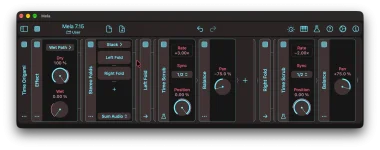
Mela 7.15 can turn a stepped Position signal into beat repeats without changing playback speed between jumps. Each jump moves the read point back inside the buffer, then the audio carries on at normal 1× speed until the next step. Each move relocates playback to an older moment instead of creating a conventional sampler loop.
The new Time Scrub buffer is locked to tempo through Sync, with choices from 1/64 up to four bars. Position decides how far back you read, while 0% follows the live input and −100% reaches the oldest point allowed by Sync. For repeats, you want clean jumps rather than a smooth sweep.
A fixed Position still plays at 1×. Jump backward, let the old audio run forward for a moment, then jump backward again. The repeated fragment gets its rhythm from the step pattern controlling Position.
Start simple. Use four steps at an even rhythmic value and make each successive step point farther back into the buffer. Each time Mod Steps advances, Position jumps to older audio, while the material between jumps keeps moving forward at 1×.
A beat repeat behaves differently from the ramps used for speed changes. Smooth Position movement changes playback rate, while stepped Position movement relocates the read point and then leaves it alone. Continuous motion is the part behind Time Scrub playback rates, while a straight stutter can stay entirely on stepped values.
The basic mechanism has been around for years. A stutter-edit patent describes the core effect as repeatedly retriggering a smaller slice of digitized audio from a buffer. Time Scrub tackles the same musical problem through read-position jumps, so your step sequence decides which older slice gets replayed.
Mod Steps has its own Sync parameter, and this is where the rhythmic grid for the jumps comes from. If its steps advance every sixteenth note, Position can jump every sixteenth even when Time Scrub is holding a much longer buffer. The two timing controls do different jobs, so matching them is optional.
A short Time Scrub buffer works well when you want a tight glitch near the current transient. A longer buffer lets the pattern reach farther back and can turn one drum hit, chord stab, or vocal fragment into a more obvious rearrangement. Longer settings also make each Position change cover more musical time.
Host mode on Mod Steps fits patterns that should stay attached to the DAW transport. Retrig instead restarts the sequencer on note-on, which is useful when you want to fire the repeat pattern deliberately from a keyboard or another note source. Pick the trigger behavior before fine-tuning the step values.
Try leaving two adjacent steps at the same Position before moving farther back. Playback remains at 1× while Position is steady, so the audio keeps running forward until the next jump. Changing only one or two steps can reshape the phrase without rebuilding the pattern.
You can also shorten the active Mod Steps Length instead of filling all 16 steps. A three-, four-, or five-step cycle against a steady song grid can shift its relationship with the bar over time. Keep the Time Scrub buffer long enough to contain every point the sequence asks for.
For a cleaner rhythmic repeat, settle the step timing first and adjust Position second. If the groove feels wrong, changing buffer length will not repair a badly chosen jump rhythm. Once the step clock feels right, move individual Position values until the repeated slice catches the part of the sound you wanted.
The new Time Scrub buffer is locked to tempo through Sync, with choices from 1/64 up to four bars. Position decides how far back you read, while 0% follows the live input and −100% reaches the oldest point allowed by Sync. For repeats, you want clean jumps rather than a smooth sweep.
A fixed Position still plays at 1×. Jump backward, let the old audio run forward for a moment, then jump backward again. The repeated fragment gets its rhythm from the step pattern controlling Position.
Mod Steps gives the repeat a usable grid
Mod Steps is a practical partner because it generates a 16-step Mod signal and can run from tempo-synced step lengths. Put Time Scrub on the audio path, add Mod Steps as a modulator, then target Time Scrub’s Position. Set the Position base value and modulation depth so the steps cover only the part of the buffer you want to revisit.Start simple. Use four steps at an even rhythmic value and make each successive step point farther back into the buffer. Each time Mod Steps advances, Position jumps to older audio, while the material between jumps keeps moving forward at 1×.
A beat repeat behaves differently from the ramps used for speed changes. Smooth Position movement changes playback rate, while stepped Position movement relocates the read point and then leaves it alone. Continuous motion is the part behind Time Scrub playback rates, while a straight stutter can stay entirely on stepped values.
The basic mechanism has been around for years. A stutter-edit patent describes the core effect as repeatedly retriggering a smaller slice of digitized audio from a buffer. Time Scrub tackles the same musical problem through read-position jumps, so your step sequence decides which older slice gets replayed.
Sync sets the look-back window, not the whole rhythm
It is easy to treat Sync as the repeat-rate control, but it sets the Time Scrub buffer length. A short Sync value gives Position a small span of recent audio to revisit. A one-bar or multi-bar setting gives the same control access to a much larger stretch.Mod Steps has its own Sync parameter, and this is where the rhythmic grid for the jumps comes from. If its steps advance every sixteenth note, Position can jump every sixteenth even when Time Scrub is holding a much longer buffer. The two timing controls do different jobs, so matching them is optional.
A short Time Scrub buffer works well when you want a tight glitch near the current transient. A longer buffer lets the pattern reach farther back and can turn one drum hit, chord stab, or vocal fragment into a more obvious rearrangement. Longer settings also make each Position change cover more musical time.
Host mode on Mod Steps fits patterns that should stay attached to the DAW transport. Retrig instead restarts the sequencer on note-on, which is useful when you want to fire the repeat pattern deliberately from a keyboard or another note source. Pick the trigger behavior before fine-tuning the step values.
Small Position patterns sound tighter than random jumps
A usable repeat often needs less movement than you expect. Keeping several steps within a narrow Position range makes the ear lock onto one recognizable fragment, while huge jumps can turn the effect into a rough rearrangement of the buffer. Both approaches work, but they sound very different.Try leaving two adjacent steps at the same Position before moving farther back. Playback remains at 1× while Position is steady, so the audio keeps running forward until the next jump. Changing only one or two steps can reshape the phrase without rebuilding the pattern.
You can also shorten the active Mod Steps Length instead of filling all 16 steps. A three-, four-, or five-step cycle against a steady song grid can shift its relationship with the bar over time. Keep the Time Scrub buffer long enough to contain every point the sequence asks for.
For a cleaner rhythmic repeat, settle the step timing first and adjust Position second. If the groove feels wrong, changing buffer length will not repair a badly chosen jump rhythm. Once the step clock feels right, move individual Position values until the repeated slice catches the part of the sound you wanted.