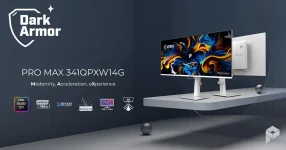
MSI’s PRO MAX 341QPXW14G lets a Mac control the monitor’s brightness and volume through the same keyboard keys used for macOS. M-Sync is doing the practical work here, while M-Color is meant to keep the external screen closer to the MacBook’s color presentation.
The distinction matters because the new 34-inch MSI QD-OLED is still a third-party display as far as macOS is concerned. Apple’s Displays panel remains where you choose resolution, refresh rate, arrangement, mirroring, and the system color profile, while M-Mate reaches into monitor-side controls that would normally live behind buttons and an on-screen menu.
There is an early software wrinkle worth knowing. MSI’s product page already advertises M-Mate for the 341QPXW14G, but the current Mac App Store support list still names four earlier PRO MAX monitors and does not yet list this new 34-inch model. The listings are out of sync just days after launch, so an early buyer should verify recognition rather than assume the store description has caught up. The App Store shows version 1.0.2 dated July 17, while MSI announced this monitor on September 10.
Volume works the same way. The 341QPXW14G has built-in speakers, so the Mac’s normal volume keys can adjust the monitor without treating audio control as a separate little job. It is not a glamorous feature, but it fixes one of the places where external monitors often feel bolted onto macOS instead of integrated with it.
M-Mate also matters when you use more than one supported MSI display. The App Store description includes multi-monitor control, meaning the software is not framed as a single-panel utility. For a desk with several displays, centralized adjustment is more useful than duplicating OSD changes panel by panel.
The app itself currently requires macOS 13.1 or later. Apple’s listing also says MSI declares no data collection through the app, which is a useful detail for a utility that sits around permanently and interacts with connected display hardware.
Profile matching should not be confused with hardware calibration. Two displays can target the same color space and white point yet still look slightly different because their panels, spectra, brightness behavior, viewing conditions, and individual observers are not identical. A 2026 cross-display color consistency experiment recorded meaningful white-point matching differences between display technologies with similar gamut sizes, with the spectral characteristics of the primaries playing a major role.
For everyday photo work, layout, video editing, or moving windows between a MacBook and the ultrawide, reducing an obvious color jump is still valuable. You are less likely to see one screen looking noticeably warmer, cooler, or more saturated simply because the two devices are using mismatched modes. Precision work is different. A controlled workflow can still require measurement, calibration, and a known viewing environment rather than trusting a synchronization button.
The useful part is the division of labor. macOS handles how the computer sends and organizes the picture, while M-Mate gives software access to MSI-specific monitor behavior such as brightness, volume, color synchronization, and other supported display parameters. None of this changes the cable-level relationship between Mac and monitor. M-Mate is a control layer, not a replacement for the video connection or macOS display pipeline. You spend less time poking at hardware controls without pretending the monitor has become an Apple display.
Early adopters should keep the software maturity issue in view. MSI launched the 341QPXW14G with M-Mate positioned as a headline Mac feature, yet the App Store compatibility text has not caught up with the hardware announcement. Firmware maintenance is also built into the monitor’s feature set, so the experience may continue changing after release as MSI updates software and display firmware.
The distinction matters because the new 34-inch MSI QD-OLED is still a third-party display as far as macOS is concerned. Apple’s Displays panel remains where you choose resolution, refresh rate, arrangement, mirroring, and the system color profile, while M-Mate reaches into monitor-side controls that would normally live behind buttons and an on-screen menu.
There is an early software wrinkle worth knowing. MSI’s product page already advertises M-Mate for the 341QPXW14G, but the current Mac App Store support list still names four earlier PRO MAX monitors and does not yet list this new 34-inch model. The listings are out of sync just days after launch, so an early buyer should verify recognition rather than assume the store description has caught up. The App Store shows version 1.0.2 dated July 17, while MSI announced this monitor on September 10.
M-Sync removes the fiddly monitor controls
Brightness keys are deceptively important on a desktop display. Many third-party monitors make a Mac user reach for a joystick, open an OSD, find a brightness submenu, make the change, then back out again. M-Sync maps the familiar Mac brightness controls to the MSI instead, which turns a small irritation into something you stop noticing.Volume works the same way. The 341QPXW14G has built-in speakers, so the Mac’s normal volume keys can adjust the monitor without treating audio control as a separate little job. It is not a glamorous feature, but it fixes one of the places where external monitors often feel bolted onto macOS instead of integrated with it.
M-Mate also matters when you use more than one supported MSI display. The App Store description includes multi-monitor control, meaning the software is not framed as a single-panel utility. For a desk with several displays, centralized adjustment is more useful than duplicating OSD changes panel by panel.
The app itself currently requires macOS 13.1 or later. Apple’s listing also says MSI declares no data collection through the app, which is a useful detail for a utility that sits around permanently and interacts with connected display hardware.
M-Color is useful, but it is not calibration
MSI describes M-Color as a way to sync the monitor’s color profile with a MacBook. In its existing PRO MAX Mac guidance, MSI also tells users to disable True Tone and use Display P3 before matching screens, which makes sense because a dynamically shifting white point would work against a fixed visual match.Profile matching should not be confused with hardware calibration. Two displays can target the same color space and white point yet still look slightly different because their panels, spectra, brightness behavior, viewing conditions, and individual observers are not identical. A 2026 cross-display color consistency experiment recorded meaningful white-point matching differences between display technologies with similar gamut sizes, with the spectral characteristics of the primaries playing a major role.
For everyday photo work, layout, video editing, or moving windows between a MacBook and the ultrawide, reducing an obvious color jump is still valuable. You are less likely to see one screen looking noticeably warmer, cooler, or more saturated simply because the two devices are using mismatched modes. Precision work is different. A controlled workflow can still require measurement, calibration, and a known viewing environment rather than trusting a synchronization button.
M-Mate does not replace macOS display settings
Resolution and refresh rate remain macOS decisions. The same goes for arranging displays, choosing whether the desktop is extended or mirrored, and selecting the system-level color profile exposed in Displays settings. M-Mate sits beside those controls rather than swallowing them.The useful part is the division of labor. macOS handles how the computer sends and organizes the picture, while M-Mate gives software access to MSI-specific monitor behavior such as brightness, volume, color synchronization, and other supported display parameters. None of this changes the cable-level relationship between Mac and monitor. M-Mate is a control layer, not a replacement for the video connection or macOS display pipeline. You spend less time poking at hardware controls without pretending the monitor has become an Apple display.
Early adopters should keep the software maturity issue in view. MSI launched the 341QPXW14G with M-Mate positioned as a headline Mac feature, yet the App Store compatibility text has not caught up with the hardware announcement. Firmware maintenance is also built into the monitor’s feature set, so the experience may continue changing after release as MSI updates software and display firmware.