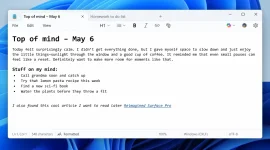
Microsoft released Notepad version 11.2504.50.0 for Windows 11 Insiders using Canary and Dev Channels. Windows Update delivers the upgrade automatically to enrolled devices running compatible builds. Users can check their version through the Help menu and About section. The company focused on adding basic formatting tools without making the app heavy. A new toolbar appears above the text area when users open the updated program.
The toolbar has buttons for bold and italic text formatting. Users can also add hyperlinks and create headings or lists with simple clicks. Markdown syntax works when typed directly into the program. The app shows formatting changes right away as people type. Both .txt and .md files work with the new features.
Files smaller than 1 MB display formatting instantly. Larger files load formatting step by step to prevent slow performance. Users can select text and click toolbar buttons to add Markdown tags automatically. The goal helps people organize content without switching to other programs. A clear formatting button removes all Markdown tags with one click.
People can view raw Markdown code through the View menu or status bar toggle. The Settings menu lets users turn off formatting completely. This option hides the toolbar and stops Markdown rendering. The classic plain-text editor returns when formatting gets disabled. Users regain the original simple notepad experience they remember.
The toolbar has buttons for bold and italic text formatting. Users can also add hyperlinks and create headings or lists with simple clicks. Markdown syntax works when typed directly into the program. The app shows formatting changes right away as people type. Both .txt and .md files work with the new features.
Files smaller than 1 MB display formatting instantly. Larger files load formatting step by step to prevent slow performance. Users can select text and click toolbar buttons to add Markdown tags automatically. The goal helps people organize content without switching to other programs. A clear formatting button removes all Markdown tags with one click.
People can view raw Markdown code through the View menu or status bar toggle. The Settings menu lets users turn off formatting completely. This option hides the toolbar and stops Markdown rendering. The classic plain-text editor returns when formatting gets disabled. Users regain the original simple notepad experience they remember.