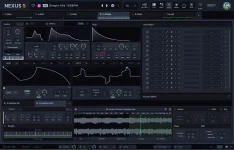
reFX released version 5.2.17 of Nexus for music producers around the world. The software company added several features that make creating sounds easier for musicians. Users can draw envelope shapes directly on screen for better control over their music. The update allows people to import SFZ and SF2 sound files from other programs. Musicians can adjust tuning, stereo position and volume levels for their custom audio samples.
The company made the software open faster when users start working on projects. Sound generators rebuild themselves when musicians copy layers between different presets. This change helps maintain sound quality across different musical arrangements. The update also lets users copy and paste effect groups between sounds. These improvements speed up workflow for busy recording sessions.
reFX fixed several problems that frustrated users during music production. The preset browser displays the correct sound categories without confusion. Bookmarked sounds no longer appear twice in the file manager system. The software handles audio files with special characters in their names properly. Musicians can create new folders even when some folders remain hidden from view.
The update prevents crashes when loading short wavetable samples under 1024 data points. reFX corrected timing calculations when effects change or sample rates shift during playback. The resonance control becomes inactive on filters that cannot use this feature. These fixes make Nexus more stable during live performances and studio recording sessions. Musicians can download the update through their existing reFX accounts.
The company made the software open faster when users start working on projects. Sound generators rebuild themselves when musicians copy layers between different presets. This change helps maintain sound quality across different musical arrangements. The update also lets users copy and paste effect groups between sounds. These improvements speed up workflow for busy recording sessions.
reFX fixed several problems that frustrated users during music production. The preset browser displays the correct sound categories without confusion. Bookmarked sounds no longer appear twice in the file manager system. The software handles audio files with special characters in their names properly. Musicians can create new folders even when some folders remain hidden from view.
The update prevents crashes when loading short wavetable samples under 1024 data points. reFX corrected timing calculations when effects change or sample rates shift during playback. The resonance control becomes inactive on filters that cannot use this feature. These fixes make Nexus more stable during live performances and studio recording sessions. Musicians can download the update through their existing reFX accounts.