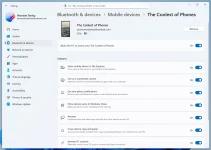
Microsoft adds new features to Windows 11 through recent Insider channel updates. Users can access internet speed testing by right-clicking the network icon in the system tray. The feature opens Bing to perform the actual speed measurement rather than running natively within Windows. Bluetooth settings receive reorganization with mobile devices appearing on separate dedicated pages. The privacy and security sections gain clearer labels and detailed explanations for improved user comprehension.
The company introduces a background AI tasks page that currently remains non-functional due to crashes during testing. This addition suggests Microsoft is preparing new monitoring tools for AI processes within the operating system. Updates appear in builds 26220.6682 and 26120.6682 through KB5065782 for Dev and Beta channels. These preview versions may contain stability issues that make them unsuitable for primary work computers. The modifications represent ongoing efforts to enhance Windows 11 usability before general release.
The company introduces a background AI tasks page that currently remains non-functional due to crashes during testing. This addition suggests Microsoft is preparing new monitoring tools for AI processes within the operating system. Updates appear in builds 26220.6682 and 26120.6682 through KB5065782 for Dev and Beta channels. These preview versions may contain stability issues that make them unsuitable for primary work computers. The modifications represent ongoing efforts to enhance Windows 11 usability before general release.