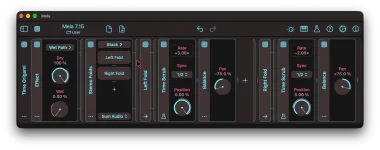
Mela 7.15 can slow incoming audio all the way to 0× by moving Time Scrub’s Position backward through its synced buffer at the right rate. The useful part is not simply dragging Position toward −100%. The ramp duration has to line up with Sync if you want the sound to land on an actual stop instead of merely slowing down or slipping into reverse.
The Mela 7.15 Time Scrub update ships with a Tape Stop factory patch specifically to show this idea in use. Nikolozi also notes that Note Event can trigger the effect, which makes the patch more useful than a one-off automation trick. You can fire the slowdown from a note-driven setup instead of drawing the same move into the host every time.
Keep Position at 0% before the trigger so the output follows the live input. Once the stop begins, move Position downward in one continuous ramp rather than jumping between values. Stepped Position changes are better suited to beat repeats with Time Scrub, while the tape-stop sound depends on the read point continuously falling behind.
Make the same ramp last a half note, and it never reaches a full stop during that sweep. The ratio is smaller, so playback lands at 0.5× instead. Run the move in an eighth note and the math crosses zero into −1×, which means the buffer starts playing backward rather than sitting still.
You only need the basic relationship for this effect. The wider rate behavior, including faster forward motion and reverse cases, is already laid out in Time Scrub playback rates. For a clean stop, the practical target is simpler because you are aiming for the point where the Rate display reaches 0× exactly as the linear ramp finishes.
The current public documentation does not spell out the factory patch’s full internal routing, so there is no reason to invent it. The important verified behavior is the Note Event trigger and the Time Scrub slowdown it starts. Open the factory patch to inspect Nikolozi’s exact routing, then watch Position and Rate while you trigger it.
A triggered design also avoids an awkward problem with manual automation. If you draw Position downward and forget to restore it before the next section, Time Scrub remains parked at the delayed end of the buffer. A note-driven setup can package the slowdown and recovery as one deliberate event, which is much easier to reuse during a live pass or across several transitions.
A linear move spreads the change evenly across its duration, which makes the 1/4 against 1/4 example easy to predict. Curved motion shifts more of the change toward one part of the transition, so the Rate display becomes more useful than mental arithmetic. Apple’s dynamic music authoring patent describes a tape-stop control that modifies playing audio to simulate tape or vinyl being stopped, framing the effect as something you can trigger during playback.
Use a shorter Sync value when you want a quick interruption around a fill or section cut, and use a longer Sync value when the slowdown needs room to sag noticeably before stopping. Watch the Rate display rather than judging from Position alone. If it reaches 0× too early, too late, or crosses into a negative value, the ramp timing or curve no longer matches the stop you intended.
The Mela 7.15 Time Scrub update ships with a Tape Stop factory patch specifically to show this idea in use. Nikolozi also notes that Note Event can trigger the effect, which makes the patch more useful than a one-off automation trick. You can fire the slowdown from a note-driven setup instead of drawing the same move into the host every time.
Keep Position at 0% before the trigger so the output follows the live input. Once the stop begins, move Position downward in one continuous ramp rather than jumping between values. Stepped Position changes are better suited to beat repeats with Time Scrub, while the tape-stop sound depends on the read point continuously falling behind.
The stop happens when ramp time matches Sync
Time Scrub calculates a downward full-range ramp as 1 minus Sync duration divided by ramp duration. Set Sync to 1/4 and move Position from 0% to −100% over one quarter note, and the result reaches 0× playback. The audio slows progressively until the read point stops advancing through the recorded material.Make the same ramp last a half note, and it never reaches a full stop during that sweep. The ratio is smaller, so playback lands at 0.5× instead. Run the move in an eighth note and the math crosses zero into −1×, which means the buffer starts playing backward rather than sitting still.
You only need the basic relationship for this effect. The wider rate behavior, including faster forward motion and reverse cases, is already laid out in Time Scrub playback rates. For a clean stop, the practical target is simpler because you are aiming for the point where the Rate display reaches 0× exactly as the linear ramp finishes.
Note Event makes the slowdown playable
Mela’s Note Event module can generate note-on and note-off events from its Gate parameter. Gate produces a note-on when it reaches 50% or higher and sends the matching note-off after it drops below 50%. The Tape Stop factory patch uses Note Event as the trigger source, so the slowdown can be treated as a performance action instead of permanent timeline automation.The current public documentation does not spell out the factory patch’s full internal routing, so there is no reason to invent it. The important verified behavior is the Note Event trigger and the Time Scrub slowdown it starts. Open the factory patch to inspect Nikolozi’s exact routing, then watch Position and Rate while you trigger it.
A triggered design also avoids an awkward problem with manual automation. If you draw Position downward and forget to restore it before the next section, Time Scrub remains parked at the delayed end of the buffer. A note-driven setup can package the slowdown and recovery as one deliberate event, which is much easier to reuse during a live pass or across several transitions.
The curve changes the feel before the endpoint
A mathematically neat quarter-note stop can still feel too rigid on the wrong material. Mela’s Slew module can make linear, exponential, or blended ramps toward a target value, giving you a way to shape how quickly a modulation move develops. Once you leave a linear ramp, though, the simple full-range rate equation no longer describes every instant of the slowdown.A linear move spreads the change evenly across its duration, which makes the 1/4 against 1/4 example easy to predict. Curved motion shifts more of the change toward one part of the transition, so the Rate display becomes more useful than mental arithmetic. Apple’s dynamic music authoring patent describes a tape-stop control that modifies playing audio to simulate tape or vinyl being stopped, framing the effect as something you can trigger during playback.
Use a shorter Sync value when you want a quick interruption around a fill or section cut, and use a longer Sync value when the slowdown needs room to sag noticeably before stopping. Watch the Rate display rather than judging from Position alone. If it reaches 0× too early, too late, or crosses into a negative value, the ramp timing or curve no longer matches the stop you intended.