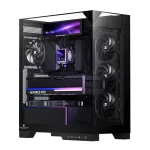
A five-fan layout with three intakes, one rear exhaust, and one top exhaust moves air through a tower from front to back. Most gaming builds do not need every mount filled. Three fans can form a workable intake-to-exhaust path, while four or five give you room to lower speeds without starving the GPU or CPU of fresh air.
The Thermalright TR-A30 ARGB and TR-A30 Vision provide seven 120mm fan positions, but seven available mounts are capacity rather than a requirement. The best PC case fan setup starts with the hottest components and the case vents, then adds fans where they actually improve the airflow path.
If you are deciding how many case fans you need for gaming, start with two intakes and one exhaust in a conventional tower. A fourth or fifth fan becomes useful when the graphics card dumps a lot of heat into the case, the front panel is restrictive, or you want similar cooling at lower RPM.
Proper PC case airflow does not mean matching every empty mounting hole with another fan. Extra units can add noise, wiring, controller load, and competing air streams. Optimizing PC case airflow should happen after the basic route works, preferably by watching CPU and GPU temperatures under the workloads you actually run.
A three-fan PC case airflow setup can outperform a busier layout when its vents are open, and the air crosses the hot hardware cleanly. Larger 140mm fans can move useful airflow at lower speeds in compatible mounts, while 120mm models fit more positions and radiator sizes. Mixing fan sizes is fine when the overall route stays coherent, so buying seven identical units simply because seven mounts exist is unnecessary.
For a standard tower, PC case airflow direction normally means front and lower fans work as intake while rear and upper fans work as exhaust. A case airflow and positive pressure setup also benefits from filtered intake, since drawing slightly more air through controlled intake paths reduces the amount pulled through random unfiltered gaps.
A positive pressure PC case is not created simply by counting three intake fans and two exhaust fans. Filters, radiators, fan curves, blade design, and different RPM limits change how much air each side can actually move. Comparing negative vs positive pressure in a PC is therefore about real airflow balance, not a scoreboard of fan quantities.
Air coolers also affect the ideal route. PC case airflow with an air cooler works best when the cooler's fan and nearby case fans are not fighting each other. A top fan directly ahead of a tower cooler can sometimes disrupt the fresh-air path, while rear exhaust placed behind the cooler usually gives heated air somewhere obvious to go.
A dual-chamber PC case fan setup often replaces traditional front intake with side or bottom intake. The dual-chamber PC case layout leaves more freedom around those positions, but fish tank PC case airflow still needs a deliberate route toward the GPU and CPU rather than fans blowing into one another from every visible surface.
Adding bottom intake can make sense for a hot graphics card, especially when a side radiator is already warming air before it enters the main chamber. More fans become worthwhile when they let you reduce RPM, feed a neglected component, or overcome a restrictive filter or radiator. If temperatures barely change after adding another fan, the empty mount was probably never the problem.
The Thermalright TR-A30 ARGB and TR-A30 Vision provide seven 120mm fan positions, but seven available mounts are capacity rather than a requirement. The best PC case fan setup starts with the hottest components and the case vents, then adds fans where they actually improve the airflow path.
If you are deciding how many case fans you need for gaming, start with two intakes and one exhaust in a conventional tower. A fourth or fifth fan becomes useful when the graphics card dumps a lot of heat into the case, the front panel is restrictive, or you want similar cooling at lower RPM.
Three to five fans cover most gaming towers
Good PC case fan placement gives incoming air a clean route across the graphics card and CPU area before it leaves the chassis. The Fractal Pop 2 Air fan layout ships with three 120mm fans and deliberately directs front intake toward the GPU zone, which is a useful example of placement doing more work than a huge raw fan count.Proper PC case airflow does not mean matching every empty mounting hole with another fan. Extra units can add noise, wiring, controller load, and competing air streams. Optimizing PC case airflow should happen after the basic route works, preferably by watching CPU and GPU temperatures under the workloads you actually run.
A three-fan PC case airflow setup can outperform a busier layout when its vents are open, and the air crosses the hot hardware cleanly. Larger 140mm fans can move useful airflow at lower speeds in compatible mounts, while 120mm models fit more positions and radiator sizes. Mixing fan sizes is fine when the overall route stays coherent, so buying seven identical units simply because seven mounts exist is unnecessary.
For a standard tower, PC case airflow direction normally means front and lower fans work as intake while rear and upper fans work as exhaust. A case airflow and positive pressure setup also benefits from filtered intake, since drawing slightly more air through controlled intake paths reduces the amount pulled through random unfiltered gaps.
Fan direction matters more than filling every mount
You can confirm a PC fan's airflow direction from markings on the frame or the manufacturer's diagram instead of guessing from appearance. Telling PC fan direction gets trickier with reverse-blade models because they are designed to show the cleaner side while moving air in the opposite visual orientation from a conventional fan.A positive pressure PC case is not created simply by counting three intake fans and two exhaust fans. Filters, radiators, fan curves, blade design, and different RPM limits change how much air each side can actually move. Comparing negative vs positive pressure in a PC is therefore about real airflow balance, not a scoreboard of fan quantities.
Air coolers also affect the ideal route. PC case airflow with an air cooler works best when the cooler's fan and nearby case fans are not fighting each other. A top fan directly ahead of a tower cooler can sometimes disrupt the fresh-air path, while rear exhaust placed behind the cooler usually gives heated air somewhere obvious to go.
Radiators and dual-chamber cases change the count
PC case airflow with an AIO needs the radiator fans counted as part of the cooling plan because they occupy fan mounts and move air through a restrictive heat exchanger. With the View 590 360mm AIO layout, a roof radiator preserves side intake, while moving the same radiator to the side rewrites both the fan arrangement and the air path.A dual-chamber PC case fan setup often replaces traditional front intake with side or bottom intake. The dual-chamber PC case layout leaves more freedom around those positions, but fish tank PC case airflow still needs a deliberate route toward the GPU and CPU rather than fans blowing into one another from every visible surface.
Adding bottom intake can make sense for a hot graphics card, especially when a side radiator is already warming air before it enters the main chamber. More fans become worthwhile when they let you reduce RPM, feed a neglected component, or overcome a restrictive filter or radiator. If temperatures barely change after adding another fan, the empty mount was probably never the problem.