At 240Hz, a display begins a new refresh every 4.17 milliseconds, while 144Hz takes 6.94 milliseconds to do the same job. The difference is real, but it is much smaller than the jump from 60Hz to 144Hz, so buying by the biggest refresh number alone can waste money.
For most players deciding how many hertz their gaming monitor should be, 1440p makes the GPU part of the decision more important. QHD is good for gaming because 2560 × 1440 keeps noticeably more image detail than 1080p, yet pushing enough frames to use 240Hz or 360Hz still demands far more from the system than simply owning a fast panel.
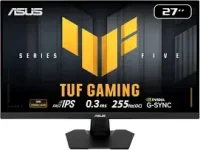
The new ASUS 255Hz QHD monitor is a useful example of the middle ground. Its 255Hz ceiling means a 3.92ms refresh interval, only about a quarter of a millisecond shorter than 240Hz, so the interesting question is whether your games can keep supplying frames quickly and consistently enough to benefit.
The familiar 1440p 144Hz monitor versus 1080p 240Hz choice is really a trade-off between spatial detail and refresh timing. A 144Hz panel updates every 6.94ms, while 240Hz cuts that to 4.17ms, but the 1440p screen has 77.8 percent more pixels to render per frame. Smaller QHD panels can push the clarity side even harder, since 25-inch QHD pixel density reaches about 117.5 pixels per inch.
Resolution itself does not decide how many Hz 2560 × 1440 can run. The panel, scaler, connection, and electronics set the refresh ceiling, which is why you can find the same QHD resolution paired with very different rates. A lower refresh option can still be the better buy when your typical games live near 100 to 160fps.
Pixel response matters too. A 1440p 240Hz monitor advertised at 0.5 ms can still show overshoot or slower transitions in some colors, so a 1440p monitor without ghosting cannot be identified from one manufacturer response-time figure. G-SYNC Pulsar attacks motion clarity from another direction by coordinating LCD backlight behavior with refresh timing instead of relying only on a higher Hz number.
Adaptive sync on a 1440p monitor becomes especially useful when frame rate moves around below the maximum refresh rate. It lets the display vary its refresh timing with the incoming frames, which can reduce visible tearing and stutter during normal fluctuations. The usable variable-refresh range still depends on the monitor, so performance near the bottom of that range is worth checking in independent testing.
A 1440p monitor with backlight strobing may sharpen tracked motion further, although those modes can reduce brightness or impose their own refresh and sync restrictions. High refresh, fast pixel transitions, and blur reduction solve related problems, but they are not interchangeable specs.
Connections can become part of the problem before the panel does. QHD at 360Hz can exceed DisplayPort 1.4 raw payload limits without compression or another bandwidth-saving mode, especially as color depth rises. A 1440p monitor with HDMI 2.1 is not automatically guaranteed to expose every advertised refresh mode on every input either, so the timing table matters more than the port badge.
A 144Hz monitor not showing a 144Hz option is a reminder that the operating system, GPU output, cable, selected port, and monitor menu still have to agree. The same applies at 240Hz, 360Hz, or on a 500Hz 1440p monitor. If your demanding games usually sit below 140fps, extra refresh ceiling spends most of its time unused, while esports workloads that stay above 200fps give 240Hz and faster panels much more room to matter.
For mixed gaming, 144Hz to 180Hz remains practical, while 240Hz makes more sense when your competitive games stay near or above 200fps, and you value motion clarity over extra visual settings. The useful ceiling is the one your system can feed consistently, not the highest frame-rate spike you can catch in a quiet scene or menu.
For most players deciding how many hertz their gaming monitor should be, 1440p makes the GPU part of the decision more important. QHD is good for gaming because 2560 × 1440 keeps noticeably more image detail than 1080p, yet pushing enough frames to use 240Hz or 360Hz still demands far more from the system than simply owning a fast panel.
The new ASUS 255Hz QHD monitor is a useful example of the middle ground. Its 255Hz ceiling means a 3.92ms refresh interval, only about a quarter of a millisecond shorter than 240Hz, so the interesting question is whether your games can keep supplying frames quickly and consistently enough to benefit.
144Hz to 180Hz suits mixed 1440p gaming
A QHD monitor for gaming at 144Hz to 180Hz is still a sensible match for people who split their time between shooters, racing games, RPGs, and heavier single-player titles. Whether 1440p monitors are worth it usually comes down to image detail, desk size, and the frame rates your graphics card can hold without aggressive quality cuts.The familiar 1440p 144Hz monitor versus 1080p 240Hz choice is really a trade-off between spatial detail and refresh timing. A 144Hz panel updates every 6.94ms, while 240Hz cuts that to 4.17ms, but the 1440p screen has 77.8 percent more pixels to render per frame. Smaller QHD panels can push the clarity side even harder, since 25-inch QHD pixel density reaches about 117.5 pixels per inch.
Resolution itself does not decide how many Hz 2560 × 1440 can run. The panel, scaler, connection, and electronics set the refresh ceiling, which is why you can find the same QHD resolution paired with very different rates. A lower refresh option can still be the better buy when your typical games live near 100 to 160fps.
240Hz earns its keep with stable high frame rates
The right Hz monitor for a gaming PC depends more on sustained frame delivery than peak benchmark numbers. A game that averages 260fps but repeatedly falls toward 150fps will not feed a 240Hz panel evenly, and those uneven frame times can matter more to how smooth play feels than the maximum number shown in a menu.Pixel response matters too. A 1440p 240Hz monitor advertised at 0.5 ms can still show overshoot or slower transitions in some colors, so a 1440p monitor without ghosting cannot be identified from one manufacturer response-time figure. G-SYNC Pulsar attacks motion clarity from another direction by coordinating LCD backlight behavior with refresh timing instead of relying only on a higher Hz number.
Adaptive sync on a 1440p monitor becomes especially useful when frame rate moves around below the maximum refresh rate. It lets the display vary its refresh timing with the incoming frames, which can reduce visible tearing and stutter during normal fluctuations. The usable variable-refresh range still depends on the monitor, so performance near the bottom of that range is worth checking in independent testing.
A 1440p monitor with backlight strobing may sharpen tracked motion further, although those modes can reduce brightness or impose their own refresh and sync restrictions. High refresh, fast pixel transitions, and blur reduction solve related problems, but they are not interchangeable specs.
360Hz and beyond need the rest of the chain
At 360Hz, each refresh lasts about 2.78ms, so the gain over 240Hz is roughly 1.39ms per cycle. Higher rates keep shrinking the interval, but 720Hz and 750Hz differ by only about 0.056ms, which shows how quickly the raw timing gains taper off once refresh is already extremely high.Connections can become part of the problem before the panel does. QHD at 360Hz can exceed DisplayPort 1.4 raw payload limits without compression or another bandwidth-saving mode, especially as color depth rises. A 1440p monitor with HDMI 2.1 is not automatically guaranteed to expose every advertised refresh mode on every input either, so the timing table matters more than the port badge.
A 144Hz monitor not showing a 144Hz option is a reminder that the operating system, GPU output, cable, selected port, and monitor menu still have to agree. The same applies at 240Hz, 360Hz, or on a 500Hz 1440p monitor. If your demanding games usually sit below 140fps, extra refresh ceiling spends most of its time unused, while esports workloads that stay above 200fps give 240Hz and faster panels much more room to matter.
For mixed gaming, 144Hz to 180Hz remains practical, while 240Hz makes more sense when your competitive games stay near or above 200fps, and you value motion clarity over extra visual settings. The useful ceiling is the one your system can feed consistently, not the highest frame-rate spike you can catch in a quiet scene or menu.