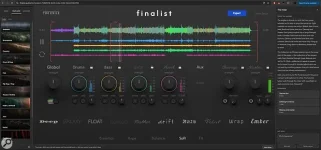
Finalist 2 accepts up to 64 stems and runs in Chrome or Edge, or as standalone Windows and macOS software. The practical workflow is simpler than a DAW session, but the result still depends heavily on what you feed it. Mixing a song with stems works best when the files already represent sensible musical groups, start together, and have enough level margin to survive summing.
In mixing and mastering, audio stems in music production are grouped submixes such as drums, bass, vocals, guitars, or synths rather than every individual source track. Stems are usually already mixed within their own group, but they are not necessarily mastered.
The Finalist 2 standalone mixing workflow sorts files from their names, analyzes the material, and maps its processing through genre-based presets. It does not need Reaktor, and mixing stems online in a supported desktop browser keeps the audio on your machine.
Leave enough headroom for the files to meet again. Several quiet-looking files can create a much hotter combined waveform, because stems can peak higher after summing. A limiter on every stem can also change the balance before Finalist gets a chance to work, especially while mixing drum stems with sharp transients or mixing vocals with stems that already contain dense bus compression.
Do not treat stem preparation as a chance to repair a broken production by flattening everything. If a vocal is painfully sibilant inside a vocal stem, or the kick and snare are fused into a drum stem with the wrong balance, Finalist receives that problem as one combined object. Stem mixing means giving the next stage broad control, not magically restoring source-level control that was removed during export.
The difference between stem mastering and mixing matters here. Mixing changes relationships between musical groups and can reshape their tone and dynamics, while stem mastering usually begins from a mix that is already close and gives the mastering stage limited access to grouped elements. Stem mastering offers more control than stereo mastering, but less surgical freedom than a full multitrack mix.
Finalist sits closer to an automated mixing environment because its engine analyzes hundreds of audio measurements and applies hand-designed processing including mid-side work, multiband dynamics, transient shaping, warmth, clipping, and limiting. Tim Exile says the system does not use AI. An alternative such as NOMZ StemMaster's offline full-stem workflow makes different automation choices, including track-level level and pan decisions, which is useful context when comparing tools that both work from separated audio.
Use Finalist's Versions feature when two settings are close, because small changes in strength or balance are easier to judge against the same material than from memory. Templates are more useful after you have a repeatable stem layout across an EP or album, not as a substitute for checking each song. A dense synth track and a sparse acoustic track can share names while needing very different processing.
Before export, check the loudest section, the quietest section, vocal entrances, bass-heavy moments, and transitions where several groups hit together. Stems do not need to be mastered before Finalist 2, and pre-limiting them can leave the final mixer less room to respond. Export only after the recombined mix holds together, since the master and grouped bounces are the actual deliverables rather than the prettiest-looking meters on any single file.
In mixing and mastering, audio stems in music production are grouped submixes such as drums, bass, vocals, guitars, or synths rather than every individual source track. Stems are usually already mixed within their own group, but they are not necessarily mastered.
The Finalist 2 standalone mixing workflow sorts files from their names, analyzes the material, and maps its processing through genre-based presets. It does not need Reaktor, and mixing stems online in a supported desktop browser keeps the audio on your machine.
Prepare the stems before Finalist touches them
The same preparation used when you send stems for mixing applies here. Export every group from the same timeline start, keep the sample rate consistent, use clear filenames, and avoid baking a final limiter into each file merely to make it loud. Project files and rendered stems carry different baggage, so audio exports are dependable precisely because the receiving mixer does not need your original plug-ins, routing, or instruments.Leave enough headroom for the files to meet again. Several quiet-looking files can create a much hotter combined waveform, because stems can peak higher after summing. A limiter on every stem can also change the balance before Finalist gets a chance to work, especially while mixing drum stems with sharp transients or mixing vocals with stems that already contain dense bus compression.
Do not treat stem preparation as a chance to repair a broken production by flattening everything. If a vocal is painfully sibilant inside a vocal stem, or the kick and snare are fused into a drum stem with the wrong balance, Finalist receives that problem as one combined object. Stem mixing means giving the next stage broad control, not magically restoring source-level control that was removed during export.
Finalist 2 is mixing, not source separation
Finalist 2 starts with stems you already have. It is not taking one finished stereo master and separating vocals, drums, bass, and instruments from it, so mixing stems with AI is a different workflow. Its grouped Drums, Bass, Back, and Front exports are new bounces made from the material you supplied, and those groups are designed to recombine with the master balance intact.The difference between stem mastering and mixing matters here. Mixing changes relationships between musical groups and can reshape their tone and dynamics, while stem mastering usually begins from a mix that is already close and gives the mastering stage limited access to grouped elements. Stem mastering offers more control than stereo mastering, but less surgical freedom than a full multitrack mix.
Finalist sits closer to an automated mixing environment because its engine analyzes hundreds of audio measurements and applies hand-designed processing including mid-side work, multiband dynamics, transient shaping, warmth, clipping, and limiting. Tim Exile says the system does not use AI. An alternative such as NOMZ StemMaster's offline full-stem workflow makes different automation choices, including track-level level and pan decisions, which is useful context when comparing tools that both work from separated audio.
Judge the recombined mix, not isolated files
Start with a preset that gets the hierarchy roughly right, then listen to the whole song before chasing individual stem tone. Mixing and mastering stems becomes messy when every group is optimized in solo, and the combined result loses punch, width, or vocal focus. Solo is useful for finding a problem, but the mix bus is where you decide whether the fix actually helped.Use Finalist's Versions feature when two settings are close, because small changes in strength or balance are easier to judge against the same material than from memory. Templates are more useful after you have a repeatable stem layout across an EP or album, not as a substitute for checking each song. A dense synth track and a sparse acoustic track can share names while needing very different processing.
Before export, check the loudest section, the quietest section, vocal entrances, bass-heavy moments, and transitions where several groups hit together. Stems do not need to be mastered before Finalist 2, and pre-limiting them can leave the final mixer less room to respond. Export only after the recombined mix holds together, since the master and grouped bounces are the actual deliverables rather than the prettiest-looking meters on any single file.