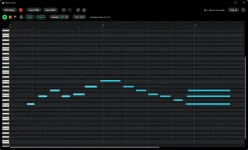
YBK Audio’s Instrument Player keeps the last five minutes of your playing in MIDI Replay, but it does not record or export audio.
The distinction matters the first time you pull back a phrase you thought you had lost. Instrument Player remembers the MIDI performance, so the useful stuff is the notes you played, their timing, and the performance data carried by MIDI rather than a finished recording of the synth coming through your speakers. You can clean the phrase up and keep working instead of trying to recreate it from memory.
It also changes what “capture” means inside the standalone VST3 instrument player. You do not arm a track before the idea happens because MIDI Replay is already holding the recent performance in memory. Once something worth keeping turns up, you can bring it into the piano roll, edit it, and export a standard .mid file.
This makes YBK Instrument Player MIDI capture useful in a specific way. Play a piano patch, miss the record button you would normally reach for in a DAW, and MIDI Replay can still give you the recent note performance to edit. Load the exported MIDI later with another instrument, and the same note data can drive a completely different sound.
The flip side is easy to miss. If the instrument itself produces a detailed texture, long release tails, modeled resonance, or some other sound that depends on its engine, none of that becomes recorded audio inside the .mid file. The performance survives, while the exact rendered sound does not.
The same rule applies to VST3 effects chained after the instrument. You may hear delay, compression, distortion, reverb, or another processor while you play, but the exported MIDI file is not an audio print of that effects chain. If you need the exact sound later, you still need the same setup available, or you need to render the result to audio somewhere else.
This is where MIDI Replay earns its space. A rough keyboard idea can be messy enough to annoy you but still good enough to keep. Pull it back, move a late note, tighten a few hits, duplicate a phrase, and the result remains editable MIDI rather than becoming a fixed performance you have to accept as played.
The five-minute window also encourages a different habit from normal recording. You can open an instrument, play without setting up a project, and decide afterward which passage deserved saving. Nothing in the workflow turns the app into a multitrack audio recorder, though, so it helps to think of Replay as a rolling performance memory rather than a replacement for recording a finished take.
This flexibility also explains why the sound can change dramatically after export. MIDI tells the receiving setup what musical events to perform, while the instrument you load determines how those events become audio. A soft synth patch, sampled piano, or physical-modeling instrument can all turn the same captured notes into very different results.
Saving the performance and saving the sound are therefore two separate jobs. Instrument Player handles the first one through MIDI Replay and standard MIDI export. For a sound you cannot easily rebuild, such as a heavily edited patch feeding a particular effects chain, the safe move is to preserve that setup and render audio before changing or removing anything.
Import works in the other direction too, because Instrument Player can load standard .mid files for playback and editing. You can bring note data back into the lightweight player, try it through one of your VST3 instruments, make piano-roll changes, and export it again without building a full DAW session around a small musical idea.
The distinction matters the first time you pull back a phrase you thought you had lost. Instrument Player remembers the MIDI performance, so the useful stuff is the notes you played, their timing, and the performance data carried by MIDI rather than a finished recording of the synth coming through your speakers. You can clean the phrase up and keep working instead of trying to recreate it from memory.
It also changes what “capture” means inside the standalone VST3 instrument player. You do not arm a track before the idea happens because MIDI Replay is already holding the recent performance in memory. Once something worth keeping turns up, you can bring it into the piano roll, edit it, and export a standard .mid file.
MIDI Replay stores the performance before the sound
A MIDI file is not a tiny WAV file with the sound somehow compressed inside it. It is much closer to symbolic MIDI performance data, where musical events describe what happened during a performance rather than storing the rendered waveform you heard. Pitch, note timing, duration, velocity, and other MIDI events can describe the playing while the VST3 instrument turns those instructions into sound.This makes YBK Instrument Player MIDI capture useful in a specific way. Play a piano patch, miss the record button you would normally reach for in a DAW, and MIDI Replay can still give you the recent note performance to edit. Load the exported MIDI later with another instrument, and the same note data can drive a completely different sound.
The flip side is easy to miss. If the instrument itself produces a detailed texture, long release tails, modeled resonance, or some other sound that depends on its engine, none of that becomes recorded audio inside the .mid file. The performance survives, while the exact rendered sound does not.
The same rule applies to VST3 effects chained after the instrument. You may hear delay, compression, distortion, reverb, or another processor while you play, but the exported MIDI file is not an audio print of that effects chain. If you need the exact sound later, you still need the same setup available, or you need to render the result to audio somewhere else.
The piano roll edits MIDI rather than a recording
Instrument Player gives recovered material a piano roll with a tempo grid, quantization, copy, paste, duplication, box selection, zoom, BPM controls, and a metronome. Those tools operate on the musical events you captured. Quantizing a note changes its timing on the grid, for example, instead of stretching or cutting a piece of recorded sound.This is where MIDI Replay earns its space. A rough keyboard idea can be messy enough to annoy you but still good enough to keep. Pull it back, move a late note, tighten a few hits, duplicate a phrase, and the result remains editable MIDI rather than becoming a fixed performance you have to accept as played.
The five-minute window also encourages a different habit from normal recording. You can open an instrument, play without setting up a project, and decide afterward which passage deserved saving. Nothing in the workflow turns the app into a multitrack audio recorder, though, so it helps to think of Replay as a rolling performance memory rather than a replacement for recording a finished take.
Exported MIDI stays flexible when it reaches a DAW
Exporting Instrument Player MIDI to a DAW keeps the part that is most useful for arrangement work. The .mid file can be brought into a MIDI-capable project and used as editable note data, so you can change the instrument, revise timing, alter velocities, or reshape the performance without first dealing with an audio file.This flexibility also explains why the sound can change dramatically after export. MIDI tells the receiving setup what musical events to perform, while the instrument you load determines how those events become audio. A soft synth patch, sampled piano, or physical-modeling instrument can all turn the same captured notes into very different results.
Saving the performance and saving the sound are therefore two separate jobs. Instrument Player handles the first one through MIDI Replay and standard MIDI export. For a sound you cannot easily rebuild, such as a heavily edited patch feeding a particular effects chain, the safe move is to preserve that setup and render audio before changing or removing anything.
Import works in the other direction too, because Instrument Player can load standard .mid files for playback and editing. You can bring note data back into the lightweight player, try it through one of your VST3 instruments, make piano-roll changes, and export it again without building a full DAW session around a small musical idea.