Logic Pro sends bed audio through the surround master processing chain, while object audio reaches the Dolby Atmos plug-in by a different route. Both paths meet at the renderer, but they do not pass through the same inserts on the way there.
The difference is easy to miss because Logic presents one surround master channel strip for the whole Atmos project. A plug-in sitting there can look like mix-bus processing, yet its position relative to the Dolby Atmos plug-in decides what it actually touches. Put it in the wrong slot and half the mix can quietly avoid it.
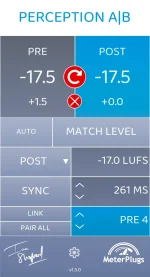
This matters when you build Perception AB 1.5 Atmos comparison routing around a Logic session. The useful question is not simply whether a processor supports immersive channels. You need to know which signals can physically reach the insert.
Object tracks take a more direct route. Their mono or stereo audio, along with the positioning metadata created by the 3D Object Panner, is delivered straight to the object inputs of the Atmos plug-in. Pre-render inserts on the surround master therefore never process those object signals.
The split reflects the object-based audio rendering model, where audio objects retain their own signals and positional metadata until a renderer turns the scene into output channels. Logic preserves this separation inside the session instead of collapsing every source into one conventional multichannel bus first.
You can hear the practical consequence with something as ordinary as master EQ. Place a broad tonal correction before the Atmos plug-in and every bed track receives it, while object tracks keep their original tone. A small high-shelf move can therefore change the apparent balance between the bed and floating objects even though the processor appears to sit on the project’s master strip.
Dynamics can cause an even stranger result. A limiter before the renderer reacts only to the combined bed signal, so loud objects do not drive its gain reduction and are not restrained by it. The bed can begin pumping underneath objects that remain untouched, which is very different from stereo mix-bus limiting.
This makes post-render slots useful for monitoring tools and certain checks, but they are a dangerous place to assume you are changing the Atmos deliverable. Logic’s ADM BWF export takes the Atmos master data before those downstream effects, so a processor after the renderer can alter what you hear without becoming part of the exported ADM master.
A conventional channel-based bounce behaves differently because it is created from the monitoring path. If you insert processing after the renderer and bounce the monitored output, the bounced file can include processing that the ADM export does not. Two files made from the same session can therefore sound different for a legitimate routing reason.
The trap gets worse when an engineer compares only the monitoring bounce against the session. A polished post-render chain can make the bounce feel finished, while the ADM master still contains the unprocessed Atmos bed and object data. Nothing has failed during export. The chain was simply never in the master path.
Moving the comparison after the renderer changes the question. You are now comparing the rendered monitoring output, which includes beds and objects together, but any post-render processing remains outside the exported ADM master. Useful for listening decisions, yes. Equivalent to processing the deliverable, no.
The safest habit is to trace one bed track and one object track through the exact insert position before trusting a master-level comparison. Follow where each signal enters the renderer, then decide whether you want to judge the pre-render bed, the complete rendered monitor path, or separate object processing upstream. Logic’s mixer looks compact, but its Atmos signal flow is not a single master bus.
The difference is easy to miss because Logic presents one surround master channel strip for the whole Atmos project. A plug-in sitting there can look like mix-bus processing, yet its position relative to the Dolby Atmos plug-in decides what it actually touches. Put it in the wrong slot and half the mix can quietly avoid it.
This matters when you build Perception AB 1.5 Atmos comparison routing around a Logic session. The useful question is not simply whether a processor supports immersive channels. You need to know which signals can physically reach the insert.
Logic keeps beds and objects separate before rendering
New tracks in a Logic Atmos project begin as bed tracks unless you change their output to an object. Bed tracks feed the project’s surround bus, which then enters the surround master channel strip and passes through any compatible plug-ins inserted before the Dolby Atmos plug-in.Object tracks take a more direct route. Their mono or stereo audio, along with the positioning metadata created by the 3D Object Panner, is delivered straight to the object inputs of the Atmos plug-in. Pre-render inserts on the surround master therefore never process those object signals.
The split reflects the object-based audio rendering model, where audio objects retain their own signals and positional metadata until a renderer turns the scene into output channels. Logic preserves this separation inside the session instead of collapsing every source into one conventional multichannel bus first.
You can hear the practical consequence with something as ordinary as master EQ. Place a broad tonal correction before the Atmos plug-in and every bed track receives it, while object tracks keep their original tone. A small high-shelf move can therefore change the apparent balance between the bed and floating objects even though the processor appears to sit on the project’s master strip.
Dynamics can cause an even stranger result. A limiter before the renderer reacts only to the combined bed signal, so loud objects do not drive its gain reduction and are not restrained by it. The bed can begin pumping underneath objects that remain untouched, which is very different from stereo mix-bus limiting.
Post-render processing belongs to monitoring, not the ADM master
The other side of the Atmos plug-in has a different job. Once Logic renders the bed and objects together, plug-ins inserted after the renderer operate on the rendered monitoring signal rather than on the underlying bed and object structure.This makes post-render slots useful for monitoring tools and certain checks, but they are a dangerous place to assume you are changing the Atmos deliverable. Logic’s ADM BWF export takes the Atmos master data before those downstream effects, so a processor after the renderer can alter what you hear without becoming part of the exported ADM master.
A conventional channel-based bounce behaves differently because it is created from the monitoring path. If you insert processing after the renderer and bounce the monitored output, the bounced file can include processing that the ADM export does not. Two files made from the same session can therefore sound different for a legitimate routing reason.
The trap gets worse when an engineer compares only the monitoring bounce against the session. A polished post-render chain can make the bounce feel finished, while the ADM master still contains the unprocessed Atmos bed and object data. Nothing has failed during export. The chain was simply never in the master path.
Insert placement decides what an A/B test actually compares
An A/B setup only means something when both states cover the intended signal population. In Logic, a comparison inserted before the Atmos renderer can evaluate bed processing very cleanly, but it cannot claim to represent the entire immersive mix if active objects bypass the same point.Moving the comparison after the renderer changes the question. You are now comparing the rendered monitoring output, which includes beds and objects together, but any post-render processing remains outside the exported ADM master. Useful for listening decisions, yes. Equivalent to processing the deliverable, no.
The safest habit is to trace one bed track and one object track through the exact insert position before trusting a master-level comparison. Follow where each signal enters the renderer, then decide whether you want to judge the pre-render bed, the complete rendered monitor path, or separate object processing upstream. Logic’s mixer looks compact, but its Atmos signal flow is not a single master bus.