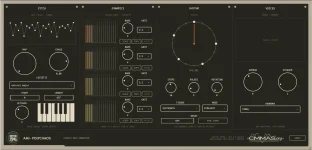
Logic Pro places MIDI plug-ins before the software instrument on an instrument channel strip, which is exactly where AMI-Polychaos belongs. AMI-Polychaos generates MIDI rather than audio, so loading it without an instrument underneath leaves you with note data and nothing producing sound.
Start with a Software Instrument track and load the synth, sampler, piano, or other sound source you actually want to hear. Open the MIDI FX slot above the Instrument slot, then load AMI-Polychaos there as an Audio Unit MIDI effect. The basic path is controller or MIDI region into AMI-Polychaos, then its generated notes into the instrument.
The routing choice follows directly from the AMI-Polychaos macOS release because Logic uses the AU MIDI effect build, not the VST3 version intended for other hosts. Once the plug-in is sitting above a working instrument, you can troubleshoot the musical side without wondering whether Logic is sending MIDI to the wrong place.
This becomes useful when you want to shape the output without disturbing the input gesture. A velocity processor after AMI-Polychaos can tame or exaggerate the generated dynamics while leaving the held chord alone. A note processor before it changes what the generator receives instead, which can produce a very different result from an apparently similar chain.
AMI-Polychaos also expects the transport to be running while you hold a note or chord. If your instrument plays normally when you bypass the MIDI effect but the generated parts disappear when it is active, check the transport, the held input, and the plug-in bypass state before changing anything more complicated. Small checks save a lot of random clicking.
Its musical behavior grew out of algorithmic composition research on symbolic musical data, but Logic still handles the output as ordinary MIDI events. Notes, timing, and velocity continue down the channel strip into whatever instrument sits below, which means you can swap the sound source without rebuilding the generator.
Placement matters here too. Put Record MIDI to Track Here immediately after AMI-Polychaos if you want its raw generated output. Place another MIDI processor before the recording point, and Logic captures the altered version instead, which is useful when a transposer, velocity processor, or other MIDI effect is part of the performance you want to keep.
Once the notes are recorded, you can edit timing, pitch, note length, and velocity in the Piano Roll without depending on the generator to recreate the same passage. This is the practical difference between auditioning a generative idea and turning one pass into arrangement material. You can cut a four-voice phrase apart, keep only a useful bar, or move selected notes to another instrument.
Logic also provides Internal MIDI In for routing MIDI output from one software instrument track into another. A separate receiving track can take processed MIDI from the AMI-Polychaos track and feed a different instrument, which is handy when you want the generator and the sound source separated in the project. It also gives you a cleaner place to record the generated notes while leaving the original control track untouched.
If AMI-Polychaos does not appear in the MIDI FX menu at all, Logic's Plug-in Manager is the sensible next stop because Logic uses it to manage third-party Audio Units. Verify the component is available and enabled before rebuilding the project or moving files around. Installation problems and routing problems look similar from the outside, but they need completely different fixes.
A good diagnostic chain stays deliberately boring while you test it. Use one Software Instrument track, one instance of AMI-Polychaos in MIDI FX, and one simple instrument below it, with no extra MIDI processors until the generated parts are audible. Add the clever stuff only after the signal path is working.
Start with a Software Instrument track and load the synth, sampler, piano, or other sound source you actually want to hear. Open the MIDI FX slot above the Instrument slot, then load AMI-Polychaos there as an Audio Unit MIDI effect. The basic path is controller or MIDI region into AMI-Polychaos, then its generated notes into the instrument.
The routing choice follows directly from the AMI-Polychaos macOS release because Logic uses the AU MIDI effect build, not the VST3 version intended for other hosts. Once the plug-in is sitting above a working instrument, you can troubleshoot the musical side without wondering whether Logic is sending MIDI to the wrong place.
The MIDI FX slot controls what the instrument receives
Logic processes MIDI effects in series before the instrument sees the notes, and the order matters more than it first appears. Put a Transposer before AMI-Polychaos, and you change the material feeding the generator. Put the same Transposer after it, and you change the notes AMI-Polychaos has already produced.This becomes useful when you want to shape the output without disturbing the input gesture. A velocity processor after AMI-Polychaos can tame or exaggerate the generated dynamics while leaving the held chord alone. A note processor before it changes what the generator receives instead, which can produce a very different result from an apparently similar chain.
AMI-Polychaos also expects the transport to be running while you hold a note or chord. If your instrument plays normally when you bypass the MIDI effect but the generated parts disappear when it is active, check the transport, the held input, and the plug-in bypass state before changing anything more complicated. Small checks save a lot of random clicking.
Its musical behavior grew out of algorithmic composition research on symbolic musical data, but Logic still handles the output as ordinary MIDI events. Notes, timing, and velocity continue down the channel strip into whatever instrument sits below, which means you can swap the sound source without rebuilding the generator.
Recording the generated notes makes editing easier
Logic can capture the processed output of a MIDI effect directly into a MIDI region. Use Record MIDI to Track Here after the last MIDI effect whose output you want to print, then record while AMI-Polychaos is generating. The resulting region contains the processed note data rather than only the notes you used to trigger the chain.Placement matters here too. Put Record MIDI to Track Here immediately after AMI-Polychaos if you want its raw generated output. Place another MIDI processor before the recording point, and Logic captures the altered version instead, which is useful when a transposer, velocity processor, or other MIDI effect is part of the performance you want to keep.
Once the notes are recorded, you can edit timing, pitch, note length, and velocity in the Piano Roll without depending on the generator to recreate the same passage. This is the practical difference between auditioning a generative idea and turning one pass into arrangement material. You can cut a four-voice phrase apart, keep only a useful bar, or move selected notes to another instrument.
Logic also provides Internal MIDI In for routing MIDI output from one software instrument track into another. A separate receiving track can take processed MIDI from the AMI-Polychaos track and feed a different instrument, which is handy when you want the generator and the sound source separated in the project. It also gives you a cleaner place to record the generated notes while leaving the original control track untouched.
Silent output usually comes down to one broken link
If AMI-Polychaos opens but you hear nothing, confirm there is a real software instrument in the Instrument slot below it. A MIDI generator cannot produce audible output by itself. Also make sure the track is receiving your keyboard or region, the plug-in is not bypassed, the transport is moving, and the triggering note remains held long enough for the generator to respond.If AMI-Polychaos does not appear in the MIDI FX menu at all, Logic's Plug-in Manager is the sensible next stop because Logic uses it to manage third-party Audio Units. Verify the component is available and enabled before rebuilding the project or moving files around. Installation problems and routing problems look similar from the outside, but they need completely different fixes.
A good diagnostic chain stays deliberately boring while you test it. Use one Software Instrument track, one instance of AMI-Polychaos in MIDI FX, and one simple instrument below it, with no extra MIDI processors until the generated parts are audible. Add the clever stuff only after the signal path is working.