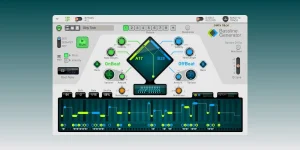
Bassline Generator can follow changing chords through Root Note CV, but transposing the root does not guarantee every generated note stays in key. The device builds its pitch movement as intervals around a root, so moving that root can carry the same interval shape into notes your song does not use. A groove can therefore follow every chord change and still throw one ugly note.
The clean setup is usually two jobs. Let Chord Sequencer or another source tell Bassline Generator where the root has moved, then let Scales & Chords deal with notes that fall outside the song's scale. Keeping those jobs separate is less confusing than expecting one cable to make the whole line harmonically correct.
The Bassline Generator groove shaping still decides the rhythm and interval character. Chord tracking only moves that material around. You keep the groove you liked instead of rebuilding the pattern every time the progression changes.
The catch is inside the generated intervals. A minor third above A gives you C, which fits A minor nicely. Move the same interval shape to C and you get E flat, even if the song is still using the notes of A minor. The root followed the chord correctly, but one interval landed outside the scale.
Put Scales & Chords after Bassline Generator when you want a fixed key to police those notes. Choose the song's key and scale, then turn the Chords function off. Incoming notes are kept inside the selected scale without turning the monophonic bassline into generated chords.
Scale correction is not the same as chord-tone correction. A note can belong to A minor and still rub against a particular chord in that key. You still need to listen against the progression instead of assuming an in-scale light means the bass note is automatically the best note for that moment.
This becomes useful with inversions. A C major chord voiced with E at the bottom can still send C as its root, so Bassline Generator can stay anchored to C rather than suddenly treating E as the harmonic center. If you actually want the bass to follow the inversion's lowest note, Root Note CV alone is not making that musical decision for you.
In tonal progressions, bass placement can change harmonic expectation, so root position is not automatically the right answer for every chord. A deliberate third or fifth in the bass can change how the harmony pulls. Root tracking is useful because it is predictable, not because every bassline should be a row of chord roots.
One small troubleshooting trap catches people here. Root Note CV transposition is not shown in Bassline Generator's note display. The pattern can sound correctly transposed while the visible pitch shape still looks unchanged, so trust the incoming CV and what you hear before assuming the cable failed.
You can still make the rhythm move with the diamond, Variators, and other generator controls. If you start hand-editing the pattern, locking pitch while changing rhythm is useful because Manual Pitch changes what the generator is allowed to rewrite. It keeps a simple root-following setup from becoming another round of accidental pitch edits.
Root-only is clean, not mandatory. It works well when the low end needs to state the harmonic movement plainly while rhythm supplies the personality. More melodic parts can use Root Note CV plus Scales & Chords instead, leaving room for intervals without letting transposition spray notes outside the chosen key.
CV wiring has one final boring gotcha. Bassline Generator patches do not store their CV connections, so saving the Player patch alone will not preserve the chord-following cable. Put the connected devices inside a Combinator and save the Combi when the routing itself needs to come back with the setup.
The clean setup is usually two jobs. Let Chord Sequencer or another source tell Bassline Generator where the root has moved, then let Scales & Chords deal with notes that fall outside the song's scale. Keeping those jobs separate is less confusing than expecting one cable to make the whole line harmonically correct.
The Bassline Generator groove shaping still decides the rhythm and interval character. Chord tracking only moves that material around. You keep the groove you liked instead of rebuilding the pattern every time the progression changes.
Chord roots and scale correction solve different problems
Root Note CV transposes the bassline from its current root. Connect Chord Sequencer's Root Note CV Out to Bassline Generator's Root Note CV In, and each selected chord can move the bass pattern with it. A C-rooted pattern can become A, F, or G based on the chord sequence without redrawing the notes.The catch is inside the generated intervals. A minor third above A gives you C, which fits A minor nicely. Move the same interval shape to C and you get E flat, even if the song is still using the notes of A minor. The root followed the chord correctly, but one interval landed outside the scale.
Put Scales & Chords after Bassline Generator when you want a fixed key to police those notes. Choose the song's key and scale, then turn the Chords function off. Incoming notes are kept inside the selected scale without turning the monophonic bassline into generated chords.
Scale correction is not the same as chord-tone correction. A note can belong to A minor and still rub against a particular chord in that key. You still need to listen against the progression instead of assuming an in-scale light means the bass note is automatically the best note for that moment.
Root Note CV follows the chord identity
Chord Sequencer's Root Note CV Out sends the root assigned to the selected chord. It does not simply grab whichever pitch happens to be lowest in the voicing. Chord Sequencer even lets you edit a chord's interpreted root without changing how the chord itself sounds.This becomes useful with inversions. A C major chord voiced with E at the bottom can still send C as its root, so Bassline Generator can stay anchored to C rather than suddenly treating E as the harmonic center. If you actually want the bass to follow the inversion's lowest note, Root Note CV alone is not making that musical decision for you.
In tonal progressions, bass placement can change harmonic expectation, so root position is not automatically the right answer for every chord. A deliberate third or fifth in the bass can change how the harmony pulls. Root tracking is useful because it is predictable, not because every bassline should be a row of chord roots.
One small troubleshooting trap catches people here. Root Note CV transposition is not shown in Bassline Generator's note display. The pattern can sound correctly transposed while the visible pitch shape still looks unchanged, so trust the incoming CV and what you hear before assuming the cable failed.
Root Note Only removes the interval problem
The Root Note Only patch takes the strict route. Its pitch curve stays on the root, Manual Pitch is active, and the Generator controls can still change the rhythm. Transpose the root across a progression, and there are no generated thirds, sixths, or sevenths waiting to fall outside the scale.You can still make the rhythm move with the diamond, Variators, and other generator controls. If you start hand-editing the pattern, locking pitch while changing rhythm is useful because Manual Pitch changes what the generator is allowed to rewrite. It keeps a simple root-following setup from becoming another round of accidental pitch edits.
Root-only is clean, not mandatory. It works well when the low end needs to state the harmonic movement plainly while rhythm supplies the personality. More melodic parts can use Root Note CV plus Scales & Chords instead, leaving room for intervals without letting transposition spray notes outside the chosen key.
CV wiring has one final boring gotcha. Bassline Generator patches do not store their CV connections, so saving the Player patch alone will not preserve the chord-following cable. Put the connected devices inside a Combinator and save the Combi when the routing itself needs to come back with the setup.