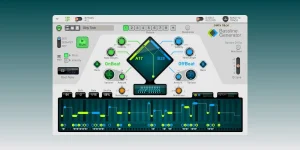
Bassline Generator sends a fresh Random CV value on each new note and holds the previous value through steps without notes. This behavior makes its random output much easier to tame than a free-running source that keeps changing regardless of the groove.
The useful bit is separation. The front-panel Randomize button changes Generator settings, while Random CV Outs create a separate modulation sequence without rewriting the bass pattern itself. You can keep the notes you already trust and let another part of the Rack move around them.
This turns the Bassline Generator CV connections into more than a row of spare jacks. They can make velocity, note length, filter movement, accents, slides, or a second instrument follow structure already present in the bassline.
Front-panel Randomize works differently because it changes the Generator parameters used to build the bassline. If you want to keep a groove intact, use Random CV as modulation instead of repeatedly rebuilding the source pattern. The earlier guide to keeping Bassline Generator edits while randomizing deals with the destructive side of that workflow.
Self-patching is where this gets useful fast. Connect a Random CV Out to Global Velocity Adjust and each new note can receive a different velocity offset. Patch it into Global Note Length Adjust instead, and the same random sequence changes duration. Neither modifier appears in the note display, so your ears may tell you something changed while the visible pattern looks untouched.
The same idea shows up in controlled randomness for modular synthesis, where randomness is constrained so it stays musically steerable instead of becoming an endless stream of unrelated values. Bassline Generator is simpler, but the practical lesson is similar. Random movement gets more useful when its timing and range are tied to something you already chose.
Picture a 16-step pattern with notes only on steps one, five, nine, and thirteen. Random CV changes four times across the cycle, not sixteen. Add more notes and the modulation becomes busier because note density is also controlling how often a new value appears.
This is handy for filter cutoff, resonance, effect amount, or another CV-friendly destination. A long rest can leave one modulation level hanging until the next bass note arrives, which often feels more connected to the phrase than an LFO wobbling away on its own.
Shift Sequence CV gives you a different type of movement. A bipolar control signal changes the offset of the bassline sequence itself rather than changing individual pitches. Use it carefully because moving the sequence changes where the groove sits in time, even though the stored notes and ties have not been rewritten.
Root Note CV is another structural input rather than a decorative modulation lane. It transposes the root from an external source, and the result is not shown in the note display. The changing-chords workflow is the better place to handle scale correction and chord tracking if the CV source is carrying harmony.
Tied Gate Out is more selective. It stays high on tied steps, so you can route it to an envelope or another CV-controlled destination and make slides behave differently from ordinary notes. A filter resonance bump on tied notes can give legato movement its own character without touching every attack.
Accent Gate Out is even stricter because it fires only for notes with velocity above 110. Once you know the threshold, velocity becomes more than loudness. Push selected notes past 110 and they can trigger an extra envelope, noise burst, effect change, or other accent-specific event elsewhere in the Rack.
None of these connections are stored inside an ordinary Bassline Generator patch. Put the connected devices in a Combinator and save the Combi when the CV wiring matters to the sound; otherwise, reopening a Player patch later can bring back the pattern without the network that made it move.
The useful bit is separation. The front-panel Randomize button changes Generator settings, while Random CV Outs create a separate modulation sequence without rewriting the bass pattern itself. You can keep the notes you already trust and let another part of the Rack move around them.
This turns the Bassline Generator CV connections into more than a row of spare jacks. They can make velocity, note length, filter movement, accents, slides, or a second instrument follow structure already present in the bassline.
Random CV is not the same as Randomize
Random CV comes from two outputs, one bipolar and one unipolar. Both follow a random sequence with the same length as the current pattern, and New Seed creates another sequence. The random sequence is stored per Pattern, so changing patterns can also switch to a different repeatable set of modulation values.Front-panel Randomize works differently because it changes the Generator parameters used to build the bassline. If you want to keep a groove intact, use Random CV as modulation instead of repeatedly rebuilding the source pattern. The earlier guide to keeping Bassline Generator edits while randomizing deals with the destructive side of that workflow.
Self-patching is where this gets useful fast. Connect a Random CV Out to Global Velocity Adjust and each new note can receive a different velocity offset. Patch it into Global Note Length Adjust instead, and the same random sequence changes duration. Neither modifier appears in the note display, so your ears may tell you something changed while the visible pattern looks untouched.
The same idea shows up in controlled randomness for modular synthesis, where randomness is constrained so it stays musically steerable instead of becoming an endless stream of unrelated values. Bassline Generator is simpler, but the practical lesson is similar. Random movement gets more useful when its timing and range are tied to something you already chose.
Rests hold the previous random value
Random CV does not spit out a fresh number on every pattern step. A new value is sent when a new note occurs, and any steps without notes keep the previous CV value. Sparse rhythms therefore create slower modulation changes without needing another clock divider or a second sequencer.Picture a 16-step pattern with notes only on steps one, five, nine, and thirteen. Random CV changes four times across the cycle, not sixteen. Add more notes and the modulation becomes busier because note density is also controlling how often a new value appears.
This is handy for filter cutoff, resonance, effect amount, or another CV-friendly destination. A long rest can leave one modulation level hanging until the next bass note arrives, which often feels more connected to the phrase than an LFO wobbling away on its own.
Shift Sequence CV gives you a different type of movement. A bipolar control signal changes the offset of the bassline sequence itself rather than changing individual pitches. Use it carefully because moving the sequence changes where the groove sits in time, even though the stored notes and ties have not been rewritten.
Root Note CV is another structural input rather than a decorative modulation lane. It transposes the root from an external source, and the result is not shown in the note display. The changing-chords workflow is the better place to handle scale correction and chord tracking if the CV source is carrying harmony.
Accent and tie gates turn the pattern into control data
Gate and Note CV can make Bassline Generator control an additional instrument directly. Gate Out follows note events and includes velocity, while Note CV represents the current pattern pitch. The second instrument can therefore shadow the bassline without needing a duplicate MIDI clip.Tied Gate Out is more selective. It stays high on tied steps, so you can route it to an envelope or another CV-controlled destination and make slides behave differently from ordinary notes. A filter resonance bump on tied notes can give legato movement its own character without touching every attack.
Accent Gate Out is even stricter because it fires only for notes with velocity above 110. Once you know the threshold, velocity becomes more than loudness. Push selected notes past 110 and they can trigger an extra envelope, noise burst, effect change, or other accent-specific event elsewhere in the Rack.
None of these connections are stored inside an ordinary Bassline Generator patch. Put the connected devices in a Combinator and save the Combi when the CV wiring matters to the sound; otherwise, reopening a Player patch later can bring back the pattern without the network that made it move.