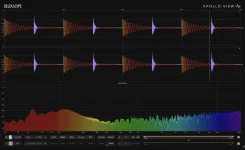
DeltaScope maps phase correlation across time and can link the reading to a selected frequency range instead of showing only one global value. A normal correlation meter can dip negative for a moment and recover before you register where the change happened.
The useful part of DeltaScope’s time-based phase display is not another warning light. It gives the warning a location, which matters when one snare hit, synth note, reverb splash, or automated widener causes the stereo relationship to go sideways for half a second.
Most correlation explainers teach the same scale, with +1 for highly similar channels, 0 for weak linear similarity, and -1 for opposing signals. Useful baseline. It still leaves you hunting through the arrangement when the meter looks healthy most of the time.
A timeline makes the event visible in context. DeltaScope can draw vertical correlation bars along the waveform, with gold showing reinforcement and red showing cancellation, or use a continuous heat-fill view. You can line the suspicious patch up with the exact musical event instead of waiting for a meter needle to misbehave again.
Brief negative correlation is not automatically a repair order. Stereo ambience, decorrelated effects, double tracking, and intentionally wide textures can create short negative excursions while the important musical content still survives a mono fold-down. The useful question is what changed at that moment and whether you can hear an actual loss.
Transient problems are where this approach earns its keep. A chorus might behave fine through a verse but hit an awkward modulation position on one sustained note. A stereo delay can be harmless on sparse material, then combine badly when both sides fill up at the same time.
DeltaScope can link its correlation display to the main and sidechain band filters, letting you narrow the analysis to the range you actually care about. Filter around the low end, mids, or top, and the timeline updates around that region instead of letting unrelated frequencies dominate the picture.
Frequency dependence is not a cosmetic analyzer trick. Frequency-dependent interchannel correlation changes with program material, so one broadband number can hide a local problem when strongly correlated energy elsewhere pulls the total reading toward a safer-looking value.
A useful test is to start full range, find a red or weakly correlated moment, then narrow the band while leaving playback on the same section. If the warning disappears when the lows are removed, the problem is probably living lower down. If it survives only in the highs, you may be looking at ambience, cymbals, width processing, or another upper-frequency stereo layer.
The timeline becomes more practical when you connect it to changes in the session. Bypass one widener, chorus, micro-delay, polarity flip, or stereo effect and replay the same few seconds. If the red patch disappears at the same musical moment, you have a much cleaner lead than a vague sense that the master feels strange in mono.
Automation deserves the same treatment. Width controls, effect sends, panning moves, and modulation depth can all change the left-right relationship during a song, so checking only a static loop can miss the exact section that breaks. Run the part where the arrangement is busiest and let the correlation history show where the behavior actually shifts.
Once you find the moment, use the band filter to narrow the range and then listen to the stereo-to-mono change at the same playback position. The timeline tells you when to investigate, the filtered view tells you where in frequency to look, and your ears decide whether the cancellation matters enough to change the mix.
The useful part of DeltaScope’s time-based phase display is not another warning light. It gives the warning a location, which matters when one snare hit, synth note, reverb splash, or automated widener causes the stereo relationship to go sideways for half a second.
Most correlation explainers teach the same scale, with +1 for highly similar channels, 0 for weak linear similarity, and -1 for opposing signals. Useful baseline. It still leaves you hunting through the arrangement when the meter looks healthy most of the time.
A single correlation value can hide the bad second
Correlation changes as the audio changes. A static pad can sit comfortably positive, then an automated delay can push one chord into negative territory before the next chord snaps back. Average the whole passage mentally and the problem becomes easy to miss.A timeline makes the event visible in context. DeltaScope can draw vertical correlation bars along the waveform, with gold showing reinforcement and red showing cancellation, or use a continuous heat-fill view. You can line the suspicious patch up with the exact musical event instead of waiting for a meter needle to misbehave again.
Brief negative correlation is not automatically a repair order. Stereo ambience, decorrelated effects, double tracking, and intentionally wide textures can create short negative excursions while the important musical content still survives a mono fold-down. The useful question is what changed at that moment and whether you can hear an actual loss.
Transient problems are where this approach earns its keep. A chorus might behave fine through a verse but hit an awkward modulation position on one sustained note. A stereo delay can be harmless on sparse material, then combine badly when both sides fill up at the same time.
Band filtering exposes where the relationship breaks
One full-range correlation value mixes every frequency into the same reading. A bright reverb tail can be decorrelated while the bass remains solid, or a low synth layer can fight itself underneath perfectly stable percussion. Those are very different jobs even if the overall meter lands on a similar number.DeltaScope can link its correlation display to the main and sidechain band filters, letting you narrow the analysis to the range you actually care about. Filter around the low end, mids, or top, and the timeline updates around that region instead of letting unrelated frequencies dominate the picture.
Frequency dependence is not a cosmetic analyzer trick. Frequency-dependent interchannel correlation changes with program material, so one broadband number can hide a local problem when strongly correlated energy elsewhere pulls the total reading toward a safer-looking value.
A useful test is to start full range, find a red or weakly correlated moment, then narrow the band while leaving playback on the same section. If the warning disappears when the lows are removed, the problem is probably living lower down. If it survives only in the highs, you may be looking at ambience, cymbals, width processing, or another upper-frequency stereo layer.
The timeline works best as a locator, not a score
Correlation is descriptive, not a quality grade. A narrow mono bass can sit close to +1 and still sound awful, while a deliberately spacious reverb can spend time near zero without hurting the mix. Chasing the highest possible number would flatten perfectly useful stereo information.The timeline becomes more practical when you connect it to changes in the session. Bypass one widener, chorus, micro-delay, polarity flip, or stereo effect and replay the same few seconds. If the red patch disappears at the same musical moment, you have a much cleaner lead than a vague sense that the master feels strange in mono.
Automation deserves the same treatment. Width controls, effect sends, panning moves, and modulation depth can all change the left-right relationship during a song, so checking only a static loop can miss the exact section that breaks. Run the part where the arrangement is busiest and let the correlation history show where the behavior actually shifts.
Once you find the moment, use the band filter to narrow the range and then listen to the stereo-to-mono change at the same playback position. The timeline tells you when to investigate, the filtered view tells you where in frequency to look, and your ears decide whether the cancellation matters enough to change the mix.