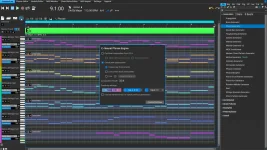
RapidComposer 6.2 adds color-coded edge zones and cursor shapes that show whether a resize will scale, repeat, or change a generator's length. The change tackles a small editing action that can produce three very different musical results.
Dragging a phrase edge is not simply making a MIDI block longer. RapidComposer can stretch the timing inside a phrase or repeat and crop its material. It can also change the working length of a phrase generator, depending on where you drag.
The RapidComposer 6.2 phrase resizing controls expose those choices before the mouse moves. Version 6.2 marks the relevant areas on both edges and changes the cursor. You can see the intended operation instead of recalling a modifier key from memory.
Shrinking works in the same family of behavior. Notes move closer together, and their durations shorten with the phrase, which changes the speed of the musical idea without asking you to edit every event individually. A rhythm can therefore keep its internal proportions while occupying a different amount of timeline.
The official guide published earlier in 2026 documents Shift-drag for scaling and Ctrl-drag for repeating or cropping. A plain edge drag scales normal phrases or sets generator length. Version 6.2 adds visible target zones and cursor feedback, so the intended result is no longer hidden behind a shortcut you have to remember.
Scale is easy to confuse with ordinary trimming because many sequencers let you shorten a clip without changing the events inside it. RapidComposer is doing more when Scale is active. Moving the boundary can recalculate the phrase's internal timing, so a careless resize can turn a tight figure into a much slower one.
A one-bar ostinato makes the difference obvious. Scale it to two bars and its notes take twice as long to travel through the pattern. Repeat it to two bars, and you hear the original one-bar idea twice at the same internal rate.
This is also where phrase scaling and repetition can be combined rather than treated as permanent modes. RapidComposer allows several resize operations one after another, including scaling a phrase first and then repeating the newly scaled notes. You can reshape the timing once, then use the altered result as the unit that repeats.
Older RapidComposer material can muddy this workflow. Previous guides described a Phrase Resize menu with Scale, Repeat, Sustain, and Regenerate, while later versions simplified resizing around edge drags and modifier keys. If an old tutorial tells you to choose Sustain or keep a resize mode selected, its instructions may not match the current interface.
Very old advice about the left edge can be misleading too. Earlier development builds used left-edge behavior for masking the beginning of a phrase, but that system was removed during the version 5 redesign. Current RapidComposer lets the left and right edges resize the phrase, and 6.2 gives both sides visual feedback.
Scaling and generator-length changes are not interchangeable. Scaling treats existing note timing as material to be proportionally resized, whereas changing generator length changes the span the generator is asked to work with. A rule-driven arpeggio or accompaniment can therefore respond to a longer region as generated material instead of behaving like recorded MIDI pulled wider.
Older documentation called the generator-specific resize operation Regenerate and described the resized length becoming the generator's phrase length. Current documentation uses the plainer Set Generator Length wording, and 6.2 puts that wording into the visual resize feedback. Search results containing both terms are describing different generations of the same workflow rather than two current buttons you must find.
The edge cues matter most when normal phrases and generators sit beside each other on the same track. An identical-looking drag can scale one phrase and alter another phrase generator's working length. Checking the cursor before moving the boundary prevents a subtle edit from becoming a different musical operation.
Dragging a phrase edge is not simply making a MIDI block longer. RapidComposer can stretch the timing inside a phrase or repeat and crop its material. It can also change the working length of a phrase generator, depending on where you drag.
The RapidComposer 6.2 phrase resizing controls expose those choices before the mouse moves. Version 6.2 marks the relevant areas on both edges and changes the cursor. You can see the intended operation instead of recalling a modifier key from memory.
Scaling changes the timing inside the phrase
Scale changes note positions and note lengths in proportion to the new phrase size. Stretch a two-bar phrase to four bars, and the events spread across the longer span rather than leaving the original two bars intact and copying them.Shrinking works in the same family of behavior. Notes move closer together, and their durations shorten with the phrase, which changes the speed of the musical idea without asking you to edit every event individually. A rhythm can therefore keep its internal proportions while occupying a different amount of timeline.
The official guide published earlier in 2026 documents Shift-drag for scaling and Ctrl-drag for repeating or cropping. A plain edge drag scales normal phrases or sets generator length. Version 6.2 adds visible target zones and cursor feedback, so the intended result is no longer hidden behind a shortcut you have to remember.
Scale is easy to confuse with ordinary trimming because many sequencers let you shorten a clip without changing the events inside it. RapidComposer is doing more when Scale is active. Moving the boundary can recalculate the phrase's internal timing, so a careless resize can turn a tight figure into a much slower one.
Repeat and crop preserve the phrase's timing
Ctrl-drag uses the repeat or crop behavior. Extending the edge repeats phrase material from the beginning instead of stretching the notes. Shortening it crops the repeated material while preserving the phrase's internal spacing.A one-bar ostinato makes the difference obvious. Scale it to two bars and its notes take twice as long to travel through the pattern. Repeat it to two bars, and you hear the original one-bar idea twice at the same internal rate.
This is also where phrase scaling and repetition can be combined rather than treated as permanent modes. RapidComposer allows several resize operations one after another, including scaling a phrase first and then repeating the newly scaled notes. You can reshape the timing once, then use the altered result as the unit that repeats.
Older RapidComposer material can muddy this workflow. Previous guides described a Phrase Resize menu with Scale, Repeat, Sustain, and Regenerate, while later versions simplified resizing around edge drags and modifier keys. If an old tutorial tells you to choose Sustain or keep a resize mode selected, its instructions may not match the current interface.
Very old advice about the left edge can be misleading too. Earlier development builds used left-edge behavior for masking the beginning of a phrase, but that system was removed during the version 5 redesign. Current RapidComposer lets the left and right edges resize the phrase, and 6.2 gives both sides visual feedback.
Generator length is not ordinary stretching
Phrase generators need their own resize logic because their notes come from generator rules rather than a fixed performance alone. Dragging a generator edge without Shift or Ctrl sets the generator length, while the same unmodified action on a normal phrase performs scaling.Scaling and generator-length changes are not interchangeable. Scaling treats existing note timing as material to be proportionally resized, whereas changing generator length changes the span the generator is asked to work with. A rule-driven arpeggio or accompaniment can therefore respond to a longer region as generated material instead of behaving like recorded MIDI pulled wider.
Older documentation called the generator-specific resize operation Regenerate and described the resized length becoming the generator's phrase length. Current documentation uses the plainer Set Generator Length wording, and 6.2 puts that wording into the visual resize feedback. Search results containing both terms are describing different generations of the same workflow rather than two current buttons you must find.
The edge cues matter most when normal phrases and generators sit beside each other on the same track. An identical-looking drag can scale one phrase and alter another phrase generator's working length. Checking the cursor before moving the boundary prevents a subtle edit from becoming a different musical operation.