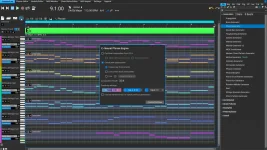
RapidComposer 6.2 adds a recording-position display and real-time note display while you record MIDI inside the Phrase Editor. Both changes address a basic problem in live capture because you can now see where the take is and which notes are actually arriving.
The Phrase Editor is built for working on one phrase at a time, whether you draw notes or play them from a MIDI keyboard. Its scale, chord, and tempo settings are independent from the main composition, so recording there is a controlled phrase-design job rather than a direct recording pass across the whole arrangement.
Once the take exists, you can save the phrase, place it on the clipboard, or apply changes back to a phrase already opened from the composition. The RapidComposer 6.2 Phrase Editor changes make the capture stage easier to read without changing that underlying workflow.
This matters when a MIDI setup is only partly working. A keyboard can appear connected while note input is missing, filtered, mapped into an unexpected register, or arriving differently from what you intended. Visible MIDI input feedback gives you something concrete to check before you finish a take and start editing the wrong problem.
The position display is useful for a different reason. Phrase recording is bounded by the Phrase Editor's own length and tempo settings, so knowing where you are inside that local timeline helps when you are trying to land an entrance, leave space at the end, or repeat a short rhythmic figure cleanly.
Those local settings deserve attention before recording. Changing the Phrase Editor tempo does not change the composition tempo, and its selected scale and chord do not automatically mirror the master track either. A phrase can therefore feel correct while you record it, then behave differently after you return it to a composition with another harmonic context.
Align Recorded Phrase To Beats does something narrower. Instead of rebuilding individual intervals, it analyzes note timing and applies a small offset to the whole phrase so its notes sit closer to the beat grid. The distinction matters because shifting a complete performance is not the same operation as recalculating its internal spacing.
A third option can add a Quantize controller automatically after MIDI recording. The available settings run from no added controller through divisions including quarter, eighth, sixteenth, thirty-second, and sixty-fourth notes. RapidComposer can also add Quantize to the track later, so recording does not force you to commit to one grid during the take.
These tools solve different timing problems. Beat-interval adjustment is aimed at tempo mismatch, alignment deals with the phrase's overall placement against beats, and Quantize controls how note timing is constrained afterward. Turning everything on by habit can erase distinctions you may have wanted to keep.
A loosely played melody is a good example. If its overall entrance is late, aligning the phrase may be enough, while stronger quantization could flatten small timing differences between notes. If the performance was captured against the wrong tempo assumption, moving the whole phrase will not repair the spacing between events.
The separation is useful when you are building reusable material. A bass figure, melodic fragment, or chord pattern can be recorded in isolation without forcing the surrounding arrangement to become part of the take. Relative-note mapping can then determine how the phrase responds when you use it under other chords or scales.
The 6.2 display changes make this isolated workflow less opaque. You can watch notes arrive, follow the recording position, and catch an obvious input failure before it becomes a cleanup session. RapidComposer still leaves the musical judgment with you, especially when deciding whether timing correction improves a phrase or scrubs away the performance you meant to capture.
Phrase Editor recording also remains distinct from the new Record button added to MIDI Mutator in the same 6.2 release. They sit in different workflows, so the presence of a new Mutator recording control does not replace the Phrase Editor's MIDI capture path or its dedicated timing options.
The Phrase Editor is built for working on one phrase at a time, whether you draw notes or play them from a MIDI keyboard. Its scale, chord, and tempo settings are independent from the main composition, so recording there is a controlled phrase-design job rather than a direct recording pass across the whole arrangement.
Once the take exists, you can save the phrase, place it on the clipboard, or apply changes back to a phrase already opened from the composition. The RapidComposer 6.2 Phrase Editor changes make the capture stage easier to read without changing that underlying workflow.
Live note feedback exposes input problems immediately
Before 6.2, recording could leave more room for doubt about what RapidComposer was receiving while you played. The new real-time note display gives you visible feedback during the take, while the recording-position display shows progress through the phrase instead of leaving timing to your ears alone.This matters when a MIDI setup is only partly working. A keyboard can appear connected while note input is missing, filtered, mapped into an unexpected register, or arriving differently from what you intended. Visible MIDI input feedback gives you something concrete to check before you finish a take and start editing the wrong problem.
The position display is useful for a different reason. Phrase recording is bounded by the Phrase Editor's own length and tempo settings, so knowing where you are inside that local timeline helps when you are trying to land an entrance, leave space at the end, or repeat a short rhythmic figure cleanly.
Those local settings deserve attention before recording. Changing the Phrase Editor tempo does not change the composition tempo, and its selected scale and chord do not automatically mirror the master track either. A phrase can therefore feel correct while you record it, then behave differently after you return it to a composition with another harmonic context.
Recording cleanup can alter timing in three ways
RapidComposer also has MIDI Recording settings that can process a performance after capture. Detect and Adjust Beat Intervals analyzes recorded notes when the phrase was played at a different tempo from the composition BPM, then recalculates note positions and lengths to conform to the main tempo.Align Recorded Phrase To Beats does something narrower. Instead of rebuilding individual intervals, it analyzes note timing and applies a small offset to the whole phrase so its notes sit closer to the beat grid. The distinction matters because shifting a complete performance is not the same operation as recalculating its internal spacing.
A third option can add a Quantize controller automatically after MIDI recording. The available settings run from no added controller through divisions including quarter, eighth, sixteenth, thirty-second, and sixty-fourth notes. RapidComposer can also add Quantize to the track later, so recording does not force you to commit to one grid during the take.
These tools solve different timing problems. Beat-interval adjustment is aimed at tempo mismatch, alignment deals with the phrase's overall placement against beats, and Quantize controls how note timing is constrained afterward. Turning everything on by habit can erase distinctions you may have wanted to keep.
A loosely played melody is a good example. If its overall entrance is late, aligning the phrase may be enough, while stronger quantization could flatten small timing differences between notes. If the performance was captured against the wrong tempo assumption, moving the whole phrase will not repair the spacing between events.
Phrase Editor recording stays separate from arrangement recording
Recording in the Phrase Editor is best understood as phrase construction. RapidComposer lets you focus on one musical object, test it under chosen chord and scale settings, then decide whether to save it, copy it, or return the edited result to the composition.The separation is useful when you are building reusable material. A bass figure, melodic fragment, or chord pattern can be recorded in isolation without forcing the surrounding arrangement to become part of the take. Relative-note mapping can then determine how the phrase responds when you use it under other chords or scales.
The 6.2 display changes make this isolated workflow less opaque. You can watch notes arrive, follow the recording position, and catch an obvious input failure before it becomes a cleanup session. RapidComposer still leaves the musical judgment with you, especially when deciding whether timing correction improves a phrase or scrubs away the performance you meant to capture.
Phrase Editor recording also remains distinct from the new Record button added to MIDI Mutator in the same 6.2 release. They sit in different workflows, so the presence of a new Mutator recording control does not replace the Phrase Editor's MIDI capture path or its dedicated timing options.