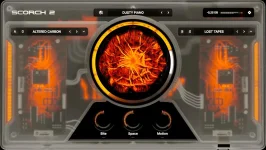
Scorch 2 gives its Chaos knob access to nearly every parameter, while Randomize builds new patches from curated source combinations. They can both make a sound change fast, but they are not two versions of the same button. One reshapes what is already happening, and the other gives you a different starting point.
The distinction matters once you stop browsing presets and actually try to finish a beat. Randomize is useful when the patch itself is wrong for the part, while Chaos makes more sense when the basic tone works but feels too polite, static, or familiar.
Sauceware also puts Bite, Space, and Motion beside Chaos on the front panel. Those three macros give you quick control over saturation, delay, and reverb, and modulation speed without forcing you into the deeper sampler and effects pages.
Research on controlled synthesizer variation has explored a similar design problem from a different technical angle, balancing novelty against consistency when creating new preset variations. Scorch 2 is not documented as using the method from that paper, but the underlying production problem is recognizable. Pure randomness can produce novelty very easily and useful novelty much less reliably.
Chaos works closer to the sound you already chose. Sauceware describes it as moving pitch, modulation, character, and potentially almost any parameter from one central control, so turning it does not require you to abandon the patch and start over.
A simple working rule follows from those roles. Hit Randomize when the source combination is boring, too bright, too soft, or simply wrong for the record, then reach for Chaos once the new patch has an identity worth pushing. Reversing that order can leave you spending time mangling a sound you never liked in the first place.
Space governs delay and reverb. More Space can widen the impression of a patch and extend its tail, but it can also eat the gaps that make a rap arrangement breathe. A sparse bell or key may tolerate a long wash, while a busy pluck can become cloudy surprisingly fast.
Motion controls the speed of Scorch 2's modulation sources rather than acting as another generic intensity knob. The difference is easy to miss. Raising Motion can make an already animated patch move faster without automatically asking for more saturation or more ambience at the same time.
Together, those macros turn the Scorch 2 sound variation controls into something more deliberate than one giant randomizer. Chaos can push several parts of the sound at once, then Bite, Space, and Motion let you pull three musically obvious dimensions back into place.
Chaos is also more interesting when you treat it as movement rather than a one-time setting. A restrained change across four or eight bars can make a held texture evolve without adding another instrument, especially when Motion is kept slow enough for the movement to read as part of the sound rather than nervous wobble.
The deeper sampler page is there when the front panel lands near the target but not on it. Scorch 2 has two sampler engines, separate filters and envelopes, plus three LFOs and three additional envelopes that can be routed into sampler and effect parameters. Front-panel variation gets you somewhere quickly, while those controls let you fix the exact part that still bothers you.
Randomize is best treated as a source decision, not a magic finishing command. Chaos is the performance move, and Bite, Space, and Motion are the correction tools you can reach for before opening the hood. Keeping those jobs separate makes experimentation faster because each control answers a different kind of dissatisfaction with the sound.
The distinction matters once you stop browsing presets and actually try to finish a beat. Randomize is useful when the patch itself is wrong for the part, while Chaos makes more sense when the basic tone works but feels too polite, static, or familiar.
Sauceware also puts Bite, Space, and Motion beside Chaos on the front panel. Those three macros give you quick control over saturation, delay, and reverb, and modulation speed without forcing you into the deeper sampler and effects pages.
Randomize changes the patch before Chaos changes its behavior
Scorch 2's Randomize function is designed around curated source combinations rather than unrestricted noise. Pressing it can therefore replace the ingredients of the patch without pretending that every possible parameter combination deserves to be heard. It is a broader move than simply nudging one sound away from its preset settings.Research on controlled synthesizer variation has explored a similar design problem from a different technical angle, balancing novelty against consistency when creating new preset variations. Scorch 2 is not documented as using the method from that paper, but the underlying production problem is recognizable. Pure randomness can produce novelty very easily and useful novelty much less reliably.
Chaos works closer to the sound you already chose. Sauceware describes it as moving pitch, modulation, character, and potentially almost any parameter from one central control, so turning it does not require you to abandon the patch and start over.
A simple working rule follows from those roles. Hit Randomize when the source combination is boring, too bright, too soft, or simply wrong for the record, then reach for Chaos once the new patch has an identity worth pushing. Reversing that order can leave you spending time mangling a sound you never liked in the first place.
Bite Space and Motion keep the front panel under control
Bite controls saturation, which makes it the quickest way to push more edge into the sound without opening the effects page. It is useful when Chaos finds an interesting variation but the result has lost some aggression or feels too clean beside the drums.Space governs delay and reverb. More Space can widen the impression of a patch and extend its tail, but it can also eat the gaps that make a rap arrangement breathe. A sparse bell or key may tolerate a long wash, while a busy pluck can become cloudy surprisingly fast.
Motion controls the speed of Scorch 2's modulation sources rather than acting as another generic intensity knob. The difference is easy to miss. Raising Motion can make an already animated patch move faster without automatically asking for more saturation or more ambience at the same time.
Together, those macros turn the Scorch 2 sound variation controls into something more deliberate than one giant randomizer. Chaos can push several parts of the sound at once, then Bite, Space, and Motion let you pull three musically obvious dimensions back into place.
Automation makes Randomize useful beyond preset browsing
Sauceware lists preset randomization as fully automatable in a DAW. DAW automation opens a different workflow from clicking Randomize repeatedly at the start of a session, because the host can address the function while the arrangement is running. You still have to judge the result, but the control does not have to live only in the preset-search phase.Chaos is also more interesting when you treat it as movement rather than a one-time setting. A restrained change across four or eight bars can make a held texture evolve without adding another instrument, especially when Motion is kept slow enough for the movement to read as part of the sound rather than nervous wobble.
The deeper sampler page is there when the front panel lands near the target but not on it. Scorch 2 has two sampler engines, separate filters and envelopes, plus three LFOs and three additional envelopes that can be routed into sampler and effect parameters. Front-panel variation gets you somewhere quickly, while those controls let you fix the exact part that still bothers you.
Randomize is best treated as a source decision, not a magic finishing command. Chaos is the performance move, and Bite, Space, and Motion are the correction tools you can reach for before opening the hood. Keeping those jobs separate makes experimentation faster because each control answers a different kind of dissatisfaction with the sound.