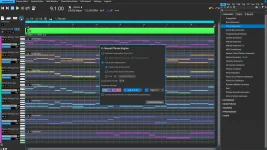
RapidComposer 6.2 added eight Scene buttons that store and recall selected settings during Live Mode playback, including tempo, scale, track mutes, and expressions. Each scene is a saved performance state, not another chunk of music waiting to be launched.
Live Mode already lets you trigger bars, chords, structural lines, or full parts from assigned keys. Scenes sit beside that system and remember selected settings around the performance, so a section trigger can choose what plays while a scene can restore the conditions you want around it.
Tempo, scale, track mute states, and expressions are among the settings RapidComposer 6.2 can recall. A scene can therefore represent a quieter arrangement, a fuller entrance, or another harmonic state without requiring you to rebuild those changes by hand every time the passage comes around.
The distinction from Live Mode key assignment is easy to miss. Key assignment divides the composition into playable units such as bars, chord sections, structural lines, or entire parts, while scenes remember settings. One deals with musical content and the other deals with the state surrounding that content.
Consider a composition where a structural line already launches the chorus. You may still want several tracks muted during the first pass, then restore them later with different expression values. A scene can hold those choices while the chorus remains the same chorus.
The RapidComposer 6.2 Live Mode controls also sit alongside per-track speed, transposition, and timing controls already available in Live Mode. Keeping these concepts separate matters because changing a trigger assignment is not the same job as recalling a saved scene.
Suppose you want one scene to handle track mutes while leaving the current tempo alone. Saving only the settings needed for that job keeps later tempo changes intact when the scene returns. The same approach works when you want an expression change without replacing the scale you are currently using.
Broad snapshots are tempting because they feel safe during setup. In practice, they can make a live system harder to reason about because recalling one state may replace more than you intended. Smaller scene responsibilities make it easier to remember what each button will actually do under pressure.
Eight slots also force useful discipline. You can reserve scenes for distinct performance states instead of storing tiny variations that differ by one mute or one expression value. A compact scene set is easier to operate from memory than eight nearly identical states with unclear boundaries.
Scene recall does not replace RapidComposer's timing controls for triggered composition sections. Live Playback Mode still provides options such as quantized triggering, release timing, repeated playback, and the choice between playing a full bar or playing only while a key is held. Those controls govern when triggered material starts, continues, or stops.
Separating timing from state recall gives you a cleaner mental model during performance. A section can remain quantized to the beat grid while scene changes handle settings such as mutes, scale, tempo, or expression independently. You do not need to turn every arrangement change into another trigger key.
The history matters because scenes are most valuable when they belong to a specific piece rather than a single rehearsal session. Rebuilding eight performance states after reopening a project would defeat much of the reason for saving them in the first place.
A song can therefore keep its own scene logic alongside its Live Mode setup. One composition may use scenes mainly for track mute combinations, while another may rely on scale, tempo, and expression changes. Reopening the file should bring those saved Live states back rather than leaving the scene buttons as temporary session controls.
Live Playback Mode itself remains a Full Edition feature. Anyone working in the Light Edition can still use RapidComposer's core composition tools, but the scene workflow depends on the Full Edition's real-time Live Mode. If scenes are central to a performance setup, edition choice is therefore a functional limitation rather than a cosmetic one.
Live Mode already lets you trigger bars, chords, structural lines, or full parts from assigned keys. Scenes sit beside that system and remember selected settings around the performance, so a section trigger can choose what plays while a scene can restore the conditions you want around it.
Scenes recall settings without replacing song sections
Saving a scene is deliberately selective. Right-click the Save button, and RapidComposer lets you choose which settings belong to that scene instead of forcing one giant snapshot of everything happening in Live Mode.Tempo, scale, track mute states, and expressions are among the settings RapidComposer 6.2 can recall. A scene can therefore represent a quieter arrangement, a fuller entrance, or another harmonic state without requiring you to rebuild those changes by hand every time the passage comes around.
The distinction from Live Mode key assignment is easy to miss. Key assignment divides the composition into playable units such as bars, chord sections, structural lines, or entire parts, while scenes remember settings. One deals with musical content and the other deals with the state surrounding that content.
Consider a composition where a structural line already launches the chorus. You may still want several tracks muted during the first pass, then restore them later with different expression values. A scene can hold those choices while the chorus remains the same chorus.
The RapidComposer 6.2 Live Mode controls also sit alongside per-track speed, transposition, and timing controls already available in Live Mode. Keeping these concepts separate matters because changing a trigger assignment is not the same job as recalling a saved scene.
Selective recall keeps a live setup predictable
The useful part of scene saving is not merely having eight slots. It is the ability to decide what each slot is allowed to restore. Selective scene recall means a performance state can stay narrow instead of bulldozing unrelated choices you made seconds earlier.Suppose you want one scene to handle track mutes while leaving the current tempo alone. Saving only the settings needed for that job keeps later tempo changes intact when the scene returns. The same approach works when you want an expression change without replacing the scale you are currently using.
Broad snapshots are tempting because they feel safe during setup. In practice, they can make a live system harder to reason about because recalling one state may replace more than you intended. Smaller scene responsibilities make it easier to remember what each button will actually do under pressure.
Eight slots also force useful discipline. You can reserve scenes for distinct performance states instead of storing tiny variations that differ by one mute or one expression value. A compact scene set is easier to operate from memory than eight nearly identical states with unclear boundaries.
Scene recall does not replace RapidComposer's timing controls for triggered composition sections. Live Playback Mode still provides options such as quantized triggering, release timing, repeated playback, and the choice between playing a full bar or playing only while a key is held. Those controls govern when triggered material starts, continues, or stops.
Separating timing from state recall gives you a cleaner mental model during performance. A section can remain quantized to the beat grid while scene changes handle settings such as mutes, scale, tempo, or expression independently. You do not need to turn every arrangement change into another trigger key.
Saved scenes survive reopening the composition
Scene persistence had a real problem during the 6.2 beta cycle. Scenes were introduced in the 6.2b2 build, then the following beta fixed an issue where Live scenes failed to restore after reloading a composition. The final 6.2 release also includes a fix for Live Mode settings that were not being saved correctly with the composition.The history matters because scenes are most valuable when they belong to a specific piece rather than a single rehearsal session. Rebuilding eight performance states after reopening a project would defeat much of the reason for saving them in the first place.
A song can therefore keep its own scene logic alongside its Live Mode setup. One composition may use scenes mainly for track mute combinations, while another may rely on scale, tempo, and expression changes. Reopening the file should bring those saved Live states back rather than leaving the scene buttons as temporary session controls.
Live Playback Mode itself remains a Full Edition feature. Anyone working in the Light Edition can still use RapidComposer's core composition tools, but the scene workflow depends on the Full Edition's real-time Live Mode. If scenes are central to a performance setup, edition choice is therefore a functional limitation rather than a cosmetic one.