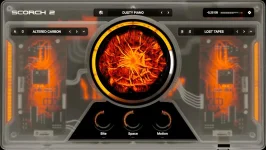
Spawn generates eight MIDI-based starting ideas from choices such as genre, mood, and key, while Scorch 2 starts with a fixed 475-preset sound library. Both can help when a session feels empty, but they attack the problem from opposite ends. Spawn begins with composition, while Scorch 2 begins with an instrument and lets you shape it.
The overlap is real enough to make the choice confusing. Both work inside a DAW, both deal with chords, melody, and bass, and both let you move MIDI into the host for further editing. Their shared vocabulary hides a much bigger difference in how you reach the first usable idea.
Scorch 2 does not use the same approach. Its MIDI section relies on pre-made blocks arranged around a chord grid and harmony system, while the instrument itself supplies the sound. You are browsing and combining prepared musical material rather than asking a cloud-hosted model for a new batch of MIDI.
The distinction changes the kind of creative friction each plugin removes. Spawn is more useful when your problem is not knowing what to play. Scorch 2 is more useful when you already have some direction and need a playable sound, a progression framework, or a fast way to push a patch somewhere less obvious.
Research on human-AI music co-creation found that musicians working with generative systems often needed ways to steer, decompose, and curate machine output rather than simply accept a finished result. Spawn fits that hands-on model better than a one-click song generator because its MIDI can be edited, split into parts, regenerated, or handed to different instruments.
Spawn has its own sounds and three instrument layers, but its stronger trick is allowing outside instruments to take over those roles. You can load third-party plugins for the chord, melody, or bass layer, which makes Spawn less of a closed sound source and more of a composition environment that can drive the instruments you already own.
Sauceware's support material goes a step further and explicitly describes using Scorch inside Spawn. One layer could run Scorch for bass while other layers use completely different plugins. In that setup, Spawn creates or manages the musical parts while Scorch 2’s role as a sound-design instrument stays intact.
This is where buying both starts to make practical sense. Spawn does not have to replace Scorch 2, and Scorch 2 does not need to imitate Spawn's generative system. One can decide what notes exist while the other decides what one of those parts actually sounds like.
Scorch 2 has a lighter online dependency. Internet access is required for installation and activation, but its published requirements do not say that ordinary preset use, sound design, or MIDI-block browsing requires a continuing connection. A producer working on an offline studio machine therefore faces a different limitation with each product.
Export is another dividing line. Spawn can export separate MIDI or audio parts and also supports external hardware MIDI routing, which suits a workflow built around moving generated material elsewhere. Scorch 2 focuses on individual MIDI channels inside its chord, melody, and bass system, while keeping its deepest editing tools attached to the sampler itself.
If the blank piano roll is the main problem, Spawn reaches further because it creates fresh MIDI from a selected musical direction. If the notes are already there but the sound still feels anonymous, Scorch 2 offers the deeper instrument. Producers who regularly have both problems can stack them without forcing either plugin into the other's job.
The overlap is real enough to make the choice confusing. Both work inside a DAW, both deal with chords, melody, and bass, and both let you move MIDI into the host for further editing. Their shared vocabulary hides a much bigger difference in how you reach the first usable idea.
Spawn is built to generate the musical starting point
Spawn asks you to choose a genre, mood, and key, then generates eight variations containing melody, chords, and bass. The notes remain editable, and you can regenerate when the first batch misses. It is aimed at the moment before you have a progression, motif, or bass movement worth developing.Scorch 2 does not use the same approach. Its MIDI section relies on pre-made blocks arranged around a chord grid and harmony system, while the instrument itself supplies the sound. You are browsing and combining prepared musical material rather than asking a cloud-hosted model for a new batch of MIDI.
The distinction changes the kind of creative friction each plugin removes. Spawn is more useful when your problem is not knowing what to play. Scorch 2 is more useful when you already have some direction and need a playable sound, a progression framework, or a fast way to push a patch somewhere less obvious.
Research on human-AI music co-creation found that musicians working with generative systems often needed ways to steer, decompose, and curate machine output rather than simply accept a finished result. Spawn fits that hands-on model better than a one-click song generator because its MIDI can be edited, split into parts, regenerated, or handed to different instruments.
Scorch 2 gives you more control over the instrument itself
Scorch 2 puts far more attention on the sound engine. Each patch can use two sampler engines with separate filters and envelopes, plus additional LFOs, envelopes, effects, macros, and the central Chaos control. The instrument is designed for producers who want to keep digging after a preset sounds promising.Spawn has its own sounds and three instrument layers, but its stronger trick is allowing outside instruments to take over those roles. You can load third-party plugins for the chord, melody, or bass layer, which makes Spawn less of a closed sound source and more of a composition environment that can drive the instruments you already own.
Sauceware's support material goes a step further and explicitly describes using Scorch inside Spawn. One layer could run Scorch for bass while other layers use completely different plugins. In that setup, Spawn creates or manages the musical parts while Scorch 2’s role as a sound-design instrument stays intact.
This is where buying both starts to make practical sense. Spawn does not have to replace Scorch 2, and Scorch 2 does not need to imitate Spawn's generative system. One can decide what notes exist while the other decides what one of those parts actually sounds like.
Internet access separates their everyday workflows
Spawn needs an internet connection whenever you generate new MIDI because its AI generation runs in the cloud. Sauceware says the plugin can still operate offline as a regular instrument, so losing a connection does not make every part of Spawn useless. It does remove the feature that most clearly separates Spawn from a conventional instrument.Scorch 2 has a lighter online dependency. Internet access is required for installation and activation, but its published requirements do not say that ordinary preset use, sound design, or MIDI-block browsing requires a continuing connection. A producer working on an offline studio machine therefore faces a different limitation with each product.
Export is another dividing line. Spawn can export separate MIDI or audio parts and also supports external hardware MIDI routing, which suits a workflow built around moving generated material elsewhere. Scorch 2 focuses on individual MIDI channels inside its chord, melody, and bass system, while keeping its deepest editing tools attached to the sampler itself.
If the blank piano roll is the main problem, Spawn reaches further because it creates fresh MIDI from a selected musical direction. If the notes are already there but the sound still feels anonymous, Scorch 2 offers the deeper instrument. Producers who regularly have both problems can stack them without forcing either plugin into the other's job.