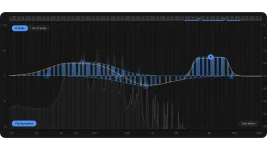
Scaler EQ Pro Live Mode creates an EQ band for each incoming MIDI note, with velocity and ADSR controlling its strength and timing. Instead of parking a bell at one frequency and automating it by hand, you can feed the effect notes from a keyboard or a programmed MIDI part and let those notes decide where the live bands appear.
Chords are where the idea gets properly different from normal EQ automation. Live Band works polyphonically, so several notes can create several active bands at once rather than forcing one filter to chase a single frequency. For existing owners, Live Mode is a big part of the Scaler EQ Pro upgrade decision because the original plugin already handled key detection, musical bands, dynamic EQ, and scale switching.
The feature sits beside the wider Scaler EQ Pro processing toolkit rather than replacing the normal bands. You can still make ordinary static corrections, then use MIDI only where movement actually helps the sound. A fixed EQ remains the cleaner choice when the problem never moves.
One note can produce one moving target, while a chord can light up several note positions together. A held pad part can therefore produce broad harmonic motion without drawing a pile of automation lanes. A short rhythmic MIDI pattern can make the EQ pulse around changing notes while the audio underneath keeps playing normally.
The useful bit is repeatability. Playing a controller live gives you human variation, while programmed MIDI gives you the same filter movement every pass. You can edit the MIDI rhythm, voicing, and velocities without redrawing frequency automation, which makes the effect easier to revise once the arrangement changes.
The audio still matters more than the MIDI. A note can tell Scaler EQ Pro where to place a band, but the processor can only reshape energy that exists around the affected frequencies. Feeding it a dense synth, vocal stack, or harmonically rich loop gives those moving bands more material to grab than a sparse source with little energy near the triggered notes.
ADSR handles the timing. Attack controls how quickly the EQ movement arrives, decay and sustain shape what happens while the note remains active, and release controls how the move falls away afterward. Longer settings can smear the movement across notes, while tighter settings keep the response closer to the MIDI rhythm.
This matters with chords. Several bands arriving hard at the same instant can turn a subtle musical lift into an obvious resonant effect, especially on harmonically busy material. Pulling velocities down or slowing the envelope can leave the chord shape intact without making every triggered frequency jump out of the mix.
The opposite approach works for sound design. Short MIDI notes, uneven velocities, and sharper envelopes can turn the live bands into rhythmic spectral movement without requiring a separate sequenced filter effect. Program the pattern first, then judge the result against the full track instead of staring at the moving curve.
Performance Solo goes further by letting the plugin output follow the MIDI performance. The distinction is small on a feature list and much bigger in use. One mode helps inspect the affected frequency content, while the other makes the MIDI performance itself a more dominant part of what passes through.
Neither mode fixes a poor MIDI pattern. If every chord triggers too many strong bands, soloing simply makes the problem easier to hear. Strip the MIDI back, reduce velocity, shorten the envelope, or use fewer simultaneous notes until the EQ movement supports the source instead of turning the spectrum into a keyboard display.
Chords are where the idea gets properly different from normal EQ automation. Live Band works polyphonically, so several notes can create several active bands at once rather than forcing one filter to chase a single frequency. For existing owners, Live Mode is a big part of the Scaler EQ Pro upgrade decision because the original plugin already handled key detection, musical bands, dynamic EQ, and scale switching.
The feature sits beside the wider Scaler EQ Pro processing toolkit rather than replacing the normal bands. You can still make ordinary static corrections, then use MIDI only where movement actually helps the sound. A fixed EQ remains the cleaner choice when the problem never moves.
Live Mode follows notes instead of fixed frequencies
A normal parametric EQ thinks in center frequency, gain, and bandwidth. Scaler's musical processing adds key and scale information, and its note-aware audio processing patent describes gain functions whose frequency positions depend on musical notes in the selected key. Live Mode pushes that idea into performance by letting incoming MIDI decide which note-related bands become active at a given moment.One note can produce one moving target, while a chord can light up several note positions together. A held pad part can therefore produce broad harmonic motion without drawing a pile of automation lanes. A short rhythmic MIDI pattern can make the EQ pulse around changing notes while the audio underneath keeps playing normally.
The useful bit is repeatability. Playing a controller live gives you human variation, while programmed MIDI gives you the same filter movement every pass. You can edit the MIDI rhythm, voicing, and velocities without redrawing frequency automation, which makes the effect easier to revise once the arrangement changes.
The audio still matters more than the MIDI. A note can tell Scaler EQ Pro where to place a band, but the processor can only reshape energy that exists around the affected frequencies. Feeding it a dense synth, vocal stack, or harmonically rich loop gives those moving bands more material to grab than a sparse source with little energy near the triggered notes.
Velocity and ADSR stop the bands behaving like switches
Velocity controls how strongly the Live processing boosts or cuts, so every note does not need to hit the EQ with the same force. A softly programmed note can make a small tonal nudge, while a harder note can push the same musical position further. Velocity becomes part of the mix move instead of merely describing an instrument performance.ADSR handles the timing. Attack controls how quickly the EQ movement arrives, decay and sustain shape what happens while the note remains active, and release controls how the move falls away afterward. Longer settings can smear the movement across notes, while tighter settings keep the response closer to the MIDI rhythm.
This matters with chords. Several bands arriving hard at the same instant can turn a subtle musical lift into an obvious resonant effect, especially on harmonically busy material. Pulling velocities down or slowing the envelope can leave the chord shape intact without making every triggered frequency jump out of the mix.
The opposite approach works for sound design. Short MIDI notes, uneven velocities, and sharper envelopes can turn the live bands into rhythmic spectral movement without requiring a separate sequenced filter effect. Program the pattern first, then judge the result against the full track instead of staring at the moving curve.
The two solo modes answer different monitoring problems
Live Band Solo isolates the frequencies currently being affected by Live Mode. It is useful when you need to hear what the moving bands are actually grabbing, particularly when several notes are firing together, and the full mix makes the change hard to identify.Performance Solo goes further by letting the plugin output follow the MIDI performance. The distinction is small on a feature list and much bigger in use. One mode helps inspect the affected frequency content, while the other makes the MIDI performance itself a more dominant part of what passes through.
Neither mode fixes a poor MIDI pattern. If every chord triggers too many strong bands, soloing simply makes the problem easier to hear. Strip the MIDI back, reduce velocity, shorten the envelope, or use fewer simultaneous notes until the EQ movement supports the source instead of turning the spectrum into a keyboard display.