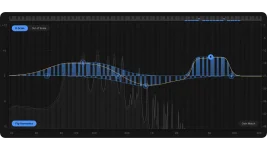
Scaler EQ Pro Harmonic Peak filters can boost frequencies belonging to a selected key and scale while reducing frequencies outside it. The important part is what the plugin means by a musical frequency, because it is not checking whether a performance contains a wrong note.
A Harmonic Peak band still works on the audio level. Scaler EQ Pro builds a frequency-dependent gain shape from the selected musical notes, then applies that shape inside the part of the spectrum you choose. Scaler EQ Pro's Harmonic Peak system can therefore make several related frequency areas move together instead of treating the band as one ordinary bell.
Scaler's musical filter starts from different information. The patented note-aware audio processing system receives a key and scale, identifies the notes belonging to them, and generates a gain function whose response depends on whether frequencies correspond to notes inside or outside that selection. Frequency range and gain still matter, but the selected harmony changes the shape being applied.
This is why one Harmonic Peak band can produce several visible peaks and dips. A scale contains several notes, and those notes occupy different frequencies across the spectrum, so the processing does not have to collapse into one center point. You are defining a region where a group of musically related frequencies gets treated according to the scale.
The filter does not retune audio. It changes amplitude at selected frequencies, which means a badly played note stays badly played. Pitch correction would need to move or reconstruct pitch information, while Harmonic Peak EQ leaves the frequencies where they are and changes how strongly parts of the spectrum come through.
Out-of-key content deserves a bit of care because the label sounds more dramatic than the processing really is. A snare, distorted guitar, vocal, sampled break, or noisy synth can contain energy spread across plenty of frequencies that do not line up neatly with the song's scale. Reducing some of that energy changes the source's tone and harmonic emphasis rather than magically fixing the arrangement.
Broadband material makes this easier to hear. A deep harmonic cut can remove selected tonal components while leaving much of the transient and general texture alone, which is why the effect can feel smaller than the EQ graph looks. Bypass becomes useful here because a crowded display can make a surgical-looking move seem more important than it sounds.
The rebuilt Pro filters are meant to blend more naturally into neighboring notes than the original implementation. Harmonic Peak processing was already central to version one, so the Scaler EQ Pro upgrade comparison matters if you are trying to separate the new filter engine from the musical EQ concept you already owned.
This is useful when a frequency relationship is only annoying on louder moments. A static out-of-key cut keeps reducing the chosen areas throughout the passage, while dynamic processing can hold back until the detector crosses its threshold. The job is still level-dependent EQ, not note detection changing every time the melody moves.
Live Mode handles the moving-note job differently. Incoming MIDI decides which note-related bands become active, with velocity and ADSR shaping their strength and timing, so the Scaler EQ Pro Live Mode workflow is the better fit when the EQ needs to follow a performance instead of one selected scale.
Wrong key selection can still wreck the whole premise. Automatic detection is convenient, but music with modulation, ambiguous harmony, borrowed notes, or a section that changes tonal center may need manual scale choices or one of the three stored key slots. A Harmonic Peak curve is only musically informed by the scale information you give it, so checking the keyboard display and listening in context matters more than trusting the label on the detected key.
A Harmonic Peak band still works on the audio level. Scaler EQ Pro builds a frequency-dependent gain shape from the selected musical notes, then applies that shape inside the part of the spectrum you choose. Scaler EQ Pro's Harmonic Peak system can therefore make several related frequency areas move together instead of treating the band as one ordinary bell.
Harmonic Peak starts with notes, not a normal bell
A conventional peak filter gives you a center frequency, gain, and bandwidth. Move the center to 1 kHz and the EQ curve is still fundamentally organized around 1 kHz, regardless of whether the song is in C major, F minor, or no clear key at all.Scaler's musical filter starts from different information. The patented note-aware audio processing system receives a key and scale, identifies the notes belonging to them, and generates a gain function whose response depends on whether frequencies correspond to notes inside or outside that selection. Frequency range and gain still matter, but the selected harmony changes the shape being applied.
This is why one Harmonic Peak band can produce several visible peaks and dips. A scale contains several notes, and those notes occupy different frequencies across the spectrum, so the processing does not have to collapse into one center point. You are defining a region where a group of musically related frequencies gets treated according to the scale.
The filter does not retune audio. It changes amplitude at selected frequencies, which means a badly played note stays badly played. Pitch correction would need to move or reconstruct pitch information, while Harmonic Peak EQ leaves the frequencies where they are and changes how strongly parts of the spectrum come through.
In-key and out-of-key cuts change tone, not composition
The default idea is simple enough. In-key frequency areas can receive preferential boost while out-of-key areas can receive preferential reduction, and the behavior can be reversed when you want the opposite result. Scaler also lets you add or remove individual notes from the active scale, so the target does not have to remain a textbook seven-note scale.Out-of-key content deserves a bit of care because the label sounds more dramatic than the processing really is. A snare, distorted guitar, vocal, sampled break, or noisy synth can contain energy spread across plenty of frequencies that do not line up neatly with the song's scale. Reducing some of that energy changes the source's tone and harmonic emphasis rather than magically fixing the arrangement.
Broadband material makes this easier to hear. A deep harmonic cut can remove selected tonal components while leaving much of the transient and general texture alone, which is why the effect can feel smaller than the EQ graph looks. Bypass becomes useful here because a crowded display can make a surgical-looking move seem more important than it sounds.
The rebuilt Pro filters are meant to blend more naturally into neighboring notes than the original implementation. Harmonic Peak processing was already central to version one, so the Scaler EQ Pro upgrade comparison matters if you are trying to separate the new filter engine from the musical EQ concept you already owned.
Dynamic Harmonic Peaks react without becoming pitch tracking
Any Harmonic Peak band can also run dynamically. Threshold, ratio, attack, and release controls decide when the selected note-related regions compress or expand, so the musical frequency pattern can stay in place while its gain movement reacts to the signal level.This is useful when a frequency relationship is only annoying on louder moments. A static out-of-key cut keeps reducing the chosen areas throughout the passage, while dynamic processing can hold back until the detector crosses its threshold. The job is still level-dependent EQ, not note detection changing every time the melody moves.
Live Mode handles the moving-note job differently. Incoming MIDI decides which note-related bands become active, with velocity and ADSR shaping their strength and timing, so the Scaler EQ Pro Live Mode workflow is the better fit when the EQ needs to follow a performance instead of one selected scale.
Wrong key selection can still wreck the whole premise. Automatic detection is convenient, but music with modulation, ambiguous harmony, borrowed notes, or a section that changes tonal center may need manual scale choices or one of the three stored key slots. A Harmonic Peak curve is only musically informed by the scale information you give it, so checking the keyboard display and listening in context matters more than trusting the label on the detected key.