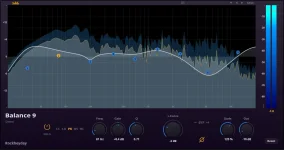
Balance 9 lets you change the overall EQ scale from 0 to 200 percent without rebuilding the individual bands you already shaped. It sounds like a convenience control, but it is more useful as a quick test of whether your whole curve has gone too far.
The Balance 9 global EQ scaling control sits beside a separate output gain control, which is an important distinction. One changes the strength of the tonal work you have done, while the other changes the level leaving the plug-in.
A finished curve can have the right idea and still be overcooked. Maybe the low mids really did need a cut and the top really did need a lift, but every move ended up a little larger than it needed to be.
Global scale keeps the overall shape tied together while you change its intensity. Similar controls in Pro-Q 4, bx_digital V3, and other EQs exist for the same basic reason. You can ask for more or less of the curve without rebuilding the balance between its gain moves.
Start at the setting you thought was finished, then back the scale off noticeably. Do not hunt for a magic percentage. Listen for whether the mix suddenly gets more open, less pinched, less bright, or less hollow while the original tonal correction is still doing useful work.
Push the scale above your normal setting for a moment too. Exaggeration can expose a bad relationship faster than another ten minutes of tiny edits. If the vocal suddenly gets nasal or the snare loses body, one part of the curve may already be sitting close to the edge.
The useful bit is not choosing the exaggerated version. It is finding out which direction makes the curve fall apart. A curve that still makes musical sense when pushed harder is usually behaving differently from one where a single band becomes ugly almost immediately.
Go back to the offending band instead. Balance 9's isolated solo comparison is useful here because you can check the local move before deciding how hard the entire curve should work. Fix the frequency or Q first, then return to the global control.
Broad mastering moves deserve even more restraint. Goldmidi's discussion of small mix-bus EQ moves shows how quickly a tiny shelf can get mixed up with monitoring level and gain differences. Scaling the whole curve makes those small moves move together, so a careless adjustment can change more of the master than it feels like on screen.
Cuts and boosts also change perceived loudness in frequency-dependent ways. Equal-loudness measurements across frequency are a useful reminder that your ear does not treat every part of the spectrum equally at every level. A brighter or fuller version can feel more impressive before you have decided whether the tonal balance is actually better.
Level-match the processed and bypassed states closely enough that louder is not quietly winning the argument. Peak meters alone are not always a perfect guide to perceived level, but they can still flag obvious changes while your ears settle the final comparison.
A practical pass is pretty simple. Build the curve, scale it down, return to the original, push it slightly harder, then level-match and compare again. Keep the version where the tonal problem is fixed without the mix sounding smaller, sharper, or strangely hyped.
If one setting keeps winning only when it is louder, the EQ decision is not settled yet. If the lower scale keeps the useful correction while removing the sense of processing, the original curve was probably doing more work than the song needed.
The Balance 9 global EQ scaling control sits beside a separate output gain control, which is an important distinction. One changes the strength of the tonal work you have done, while the other changes the level leaving the plug-in.
A finished curve can have the right idea and still be overcooked. Maybe the low mids really did need a cut and the top really did need a lift, but every move ended up a little larger than it needed to be.
Global scaling tests the whole curve at once
Dragging every band down by hand is a bad comparison because the relationships between the moves start changing. One bell ends up reduced more than another, a shelf gets forgotten, and suddenly you are comparing a new curve rather than a gentler version of the old one.Global scale keeps the overall shape tied together while you change its intensity. Similar controls in Pro-Q 4, bx_digital V3, and other EQs exist for the same basic reason. You can ask for more or less of the curve without rebuilding the balance between its gain moves.
Start at the setting you thought was finished, then back the scale off noticeably. Do not hunt for a magic percentage. Listen for whether the mix suddenly gets more open, less pinched, less bright, or less hollow while the original tonal correction is still doing useful work.
Push the scale above your normal setting for a moment too. Exaggeration can expose a bad relationship faster than another ten minutes of tiny edits. If the vocal suddenly gets nasal or the snare loses body, one part of the curve may already be sitting close to the edge.
The useful bit is not choosing the exaggerated version. It is finding out which direction makes the curve fall apart. A curve that still makes musical sense when pushed harder is usually behaving differently from one where a single band becomes ugly almost immediately.
Scaling cannot rescue the wrong band
Global scale only helps when the basic relationships are sensible. If one band is at the wrong frequency, too narrow, or solving a problem that never mattered, reducing the whole curve just hides the mistake along with everything else.Go back to the offending band instead. Balance 9's isolated solo comparison is useful here because you can check the local move before deciding how hard the entire curve should work. Fix the frequency or Q first, then return to the global control.
Broad mastering moves deserve even more restraint. Goldmidi's discussion of small mix-bus EQ moves shows how quickly a tiny shelf can get mixed up with monitoring level and gain differences. Scaling the whole curve makes those small moves move together, so a careless adjustment can change more of the master than it feels like on screen.
Cuts and boosts also change perceived loudness in frequency-dependent ways. Equal-loudness measurements across frequency are a useful reminder that your ear does not treat every part of the spectrum equally at every level. A brighter or fuller version can feel more impressive before you have decided whether the tonal balance is actually better.
Output level still needs its own check
Balance 9 provides separate output gain from minus 12 to plus 12 dB, so use it as a separate judgment tool rather than treating global scale like a volume knob. Increasing the strength of several boosts can raise overall energy, while stronger cuts can pull it down. Either change can tilt a bypass comparison before the EQ itself gets a fair hearing.Level-match the processed and bypassed states closely enough that louder is not quietly winning the argument. Peak meters alone are not always a perfect guide to perceived level, but they can still flag obvious changes while your ears settle the final comparison.
A practical pass is pretty simple. Build the curve, scale it down, return to the original, push it slightly harder, then level-match and compare again. Keep the version where the tonal problem is fixed without the mix sounding smaller, sharper, or strangely hyped.
If one setting keeps winning only when it is louder, the EQ decision is not settled yet. If the lower scale keeps the useful correction while removing the sense of processing, the original curve was probably doing more work than the song needed.