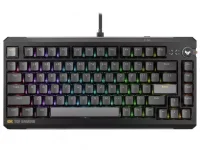
ASUS gives both the TUF Gaming K4 Magnetic and ROG Azoth 96 HE 8000Hz polling, but their layouts and connections diverge sharply. Shared speed figures make them look closer on a spec sheet than they feel on a desk.
The compact TUF magnetic keyboard design is a wired 75% board measuring 324mm across, with arrow keys, navigation controls, and a volume dial kept within a relatively narrow footprint. The Azoth 96 HE stretches to 382mm because it preserves a numpad and more of the full-size working layout.
Both use magnetic switches, adjustable actuation, hot-swap support, per-key RGB, gasket mounting, and 8000Hz reporting. Those similarities describe their performance class. The more useful buying split comes from where you put your mouse, whether you need a numpad, how many devices you use, and how much onboard control you want.
For low-sensitivity shooters, that space can matter because broad mouse movements often run toward the keyboard edge. Office work creates a different reason to care. For right-handed mouse use without a numeric keypad, keeping the pointing hand closer to the keyboard can reduce the outward reach demanded by a wider standard layout.
The Azoth makes a deliberate trade. Its 96% arrangement keeps the number pad while compressing the dead space normally found in a full-size keyboard, so spreadsheet work, numeric entry, shortcuts, and games that lean on extra keys remain practical without taking on a conventional full-size shell.
You lose that dedicated number block on the K4. You gain a cleaner left-hand gaming footprint and more lateral mouse space, while still keeping arrows and basic navigation keys. Someone who spends the day entering numbers may notice the omission every hour. Someone who rarely touches a numpad may prefer never carrying its width.
The Azoth 96 HE supports wired USB, 2.4GHz ROG SpeedNova wireless, and Bluetooth 5. ASUS also specifies up to 8000Hz reporting over its 2.4GHz connection, while Bluetooth gives the board a lower-power route for ordinary device switching rather than competitive polling.
Multi-device use is where the Azoth changes the daily routine. ASUS says it can connect across as many as five devices, so one board can move between a gaming PC, laptop, tablet, or another compatible machine without repeatedly shifting cables.
Cable management sounds trivial until the same keyboard serves a desktop and a work machine. The K4 keeps the path simple and predictable because one detachable cable handles everything. The Azoth instead gives you a fast wireless gaming link plus Bluetooth for the devices where maximum polling rate matters less.
Neither approach becomes inherently faster just because one is wireless. Both advertise 8000Hz reporting in their fastest modes, but the Azoth reaches that figure over both USB and 2.4GHz while the K4's published 8000Hz specification belongs to its wired USB connection.
The K4 stays simpler. Its dedicated volume dial handles the obvious everyday adjustment, and a physical RT control can toggle Rapid Trigger with a short press or Speed Tap with a longer hold without making you open configuration software first.
Actuation ranges differ slightly too. ASUS rates the K4 from 0.1mm to 3.3mm and the Azoth from 0.1mm to 3.5mm, with both offering 0.01mm setting increments. The extra 0.2mm on the Azoth matters mainly if you deliberately prefer a deeper trigger rather than the shallow settings normally associated with magnetic gaming boards.
Their hot-swap systems should not be treated as one shared ASUS switch pool. The Azoth uses ROG HFX V2 magnetic switches, while ASUS says the K4 supports most center-magnet designs and specifically excludes side-magnet ROG HE Platform switches. Buying replacement switches for one board therefore does not guarantee they belong in the other.
Internal damping follows the same pattern of similar goals with different implementation. ASUS lists five damping layers in the K4 and six in the Azoth, both under gasket-mounted assemblies. Layer count by itself cannot prove which keyboard sounds better because the switch, plate, case, keycap, and tuning choices still shape the final acoustics.
On the K4, the physical controls keep its most gaming-focused adjustments close at hand. The Azoth uses its OLED, three-way knob, wireless modes, and denser 96% layout to put more of the desk workflow directly on the keyboard.
The compact TUF magnetic keyboard design is a wired 75% board measuring 324mm across, with arrow keys, navigation controls, and a volume dial kept within a relatively narrow footprint. The Azoth 96 HE stretches to 382mm because it preserves a numpad and more of the full-size working layout.
Both use magnetic switches, adjustable actuation, hot-swap support, per-key RGB, gasket mounting, and 8000Hz reporting. Those similarities describe their performance class. The more useful buying split comes from where you put your mouse, whether you need a numpad, how many devices you use, and how much onboard control you want.
The layout choice changes more than the key count
The K4 is 58mm narrower than the Azoth 96 HE according to ASUS's published dimensions. It is also 20mm deeper front to back, so the smaller layout does not win every dimension, but the reduced width leaves noticeably more horizontal room beside the keyboard.For low-sensitivity shooters, that space can matter because broad mouse movements often run toward the keyboard edge. Office work creates a different reason to care. For right-handed mouse use without a numeric keypad, keeping the pointing hand closer to the keyboard can reduce the outward reach demanded by a wider standard layout.
The Azoth makes a deliberate trade. Its 96% arrangement keeps the number pad while compressing the dead space normally found in a full-size keyboard, so spreadsheet work, numeric entry, shortcuts, and games that lean on extra keys remain practical without taking on a conventional full-size shell.
You lose that dedicated number block on the K4. You gain a cleaner left-hand gaming footprint and more lateral mouse space, while still keeping arrows and basic navigation keys. Someone who spends the day entering numbers may notice the omission every hour. Someone who rarely touches a numpad may prefer never carrying its width.
The Azoth pays for freedom from the cable
Connectivity creates the clearest functional gap. The K4 uses a detachable braided USB-A to USB-C cable and reports at up to 8000Hz over that wired connection.The Azoth 96 HE supports wired USB, 2.4GHz ROG SpeedNova wireless, and Bluetooth 5. ASUS also specifies up to 8000Hz reporting over its 2.4GHz connection, while Bluetooth gives the board a lower-power route for ordinary device switching rather than competitive polling.
Multi-device use is where the Azoth changes the daily routine. ASUS says it can connect across as many as five devices, so one board can move between a gaming PC, laptop, tablet, or another compatible machine without repeatedly shifting cables.
Cable management sounds trivial until the same keyboard serves a desktop and a work machine. The K4 keeps the path simple and predictable because one detachable cable handles everything. The Azoth instead gives you a fast wireless gaming link plus Bluetooth for the devices where maximum polling rate matters less.
Neither approach becomes inherently faster just because one is wireless. Both advertise 8000Hz reporting in their fastest modes, but the Azoth reaches that figure over both USB and 2.4GHz while the K4's published 8000Hz specification belongs to its wired USB connection.
Extra hardware changes the way each board is used
The Azoth carries more interface hardware around its keys. A full-color OLED touchscreen and three-way knob can surface settings and system information directly on the board, while the package also includes a detachable silicone wrist rest and a wireless dongle extender.The K4 stays simpler. Its dedicated volume dial handles the obvious everyday adjustment, and a physical RT control can toggle Rapid Trigger with a short press or Speed Tap with a longer hold without making you open configuration software first.
Actuation ranges differ slightly too. ASUS rates the K4 from 0.1mm to 3.3mm and the Azoth from 0.1mm to 3.5mm, with both offering 0.01mm setting increments. The extra 0.2mm on the Azoth matters mainly if you deliberately prefer a deeper trigger rather than the shallow settings normally associated with magnetic gaming boards.
Their hot-swap systems should not be treated as one shared ASUS switch pool. The Azoth uses ROG HFX V2 magnetic switches, while ASUS says the K4 supports most center-magnet designs and specifically excludes side-magnet ROG HE Platform switches. Buying replacement switches for one board therefore does not guarantee they belong in the other.
Internal damping follows the same pattern of similar goals with different implementation. ASUS lists five damping layers in the K4 and six in the Azoth, both under gasket-mounted assemblies. Layer count by itself cannot prove which keyboard sounds better because the switch, plate, case, keycap, and tuning choices still shape the final acoustics.
On the K4, the physical controls keep its most gaming-focused adjustments close at hand. The Azoth uses its OLED, three-way knob, wireless modes, and denser 96% layout to put more of the desk workflow directly on the keyboard.