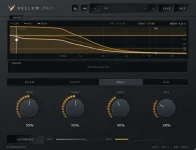
Vellum Pro ships with seven source engines, and CarbonDSP says each one remaps how the reverb controls respond to different materials. Voice, Drums, Bass & Low, Guitar & Keys, Strings & Orchestral, Bus & Glue, and Design are therefore more than labels beside the same processor.
The distinction matters because Vellum Pro also has four spaces called Room, Plate, Hall, and Air. A space chooses the broad reverb character, while the source engine changes how you reach useful behavior for the material feeding it.
You can keep Room selected and move from drums to bass without simply loading a second room algorithm. Vellum Pro’s seven source engines change the response of the controls underneath that space, so identical-looking front-panel choices are not guaranteed to describe an identical result.
This makes Drums different from a preset called Big Drums. The engine is still useful after you move every visible control away from its starting position, because the drum-oriented mapping remains active while you build the sound yourself.
The same logic applies to Bass & Low. Low-frequency material creates different practical problems from a vocal or string section, so a useful control range for one source does not have to be the useful range for another. CarbonDSP’s approach lets the interface stay familiar without pretending every source benefits from identical parameter behavior.
Four spaces and seven engines also create two separate decisions. Room versus Plate changes the kind of space you are building, while Voice versus Drums changes how the available controls behave for the thing entering it. Treating those choices as interchangeable throws away much of the point.
This is easy to miss because “automatic” reverb tools can mean something broader. In input-aware intelligent audio effects, features extracted from incoming audio can directly control processing parameters, creating a system that continually responds to what the signal is doing.
Vellum Pro’s AUTO function is more restrained. It helps with the initial classification, then leaves the actual choice with you. A guitar recording with heavy low tuning might be suggested one way, yet you can deliberately keep another engine if its control behavior fits the mix better.
The distinction becomes important on buses. A stem containing drums, bass, and synths does not have one tidy instrument identity, so an automatic classifier cannot know your production goal from spectral content alone. Bus & Glue gives you a deliberate starting point for grouped material instead of pretending classification and mixing judgment are the same task.
You might choose it for printed effects, resampled textures, extreme ambience, or a sound that has already been processed beyond an obvious source identity. The reason is not that Design automatically makes stranger reverb. It removes the source-specific constraints that normally keep the controls inside more practical ranges.
Source engines also make preset comparison less straightforward than it first appears. Two presets can share the same Room space yet behave differently because their engine choices establish different control mappings before the stored parameter values are applied.
For actual mixing, this means the engine choice deserves attention before tiny knob adjustments. If a decay or size control feels unusually hard to place, changing from Voice to Guitar & Keys or from Drums to Bus & Glue can alter the useful working range without forcing you into a different Room, Plate, Hall, or Air character.
AUTO can get you near the intended category, but it remains a suggestion. The more revealing move is to compare engines while holding the space and broad settings steady, because the differences you hear then come from the source-specific mapping rather than a completely different reverb design.
The distinction matters because Vellum Pro also has four spaces called Room, Plate, Hall, and Air. A space chooses the broad reverb character, while the source engine changes how you reach useful behavior for the material feeding it.
You can keep Room selected and move from drums to bass without simply loading a second room algorithm. Vellum Pro’s seven source engines change the response of the controls underneath that space, so identical-looking front-panel choices are not guaranteed to describe an identical result.
Source engines sit between presets and automation
A preset recalls a finished collection of parameter choices. A source engine works one level deeper because it changes the way those controls are mapped for a category of material before you decide exactly how much size, decay, ducking, or tone you want.This makes Drums different from a preset called Big Drums. The engine is still useful after you move every visible control away from its starting position, because the drum-oriented mapping remains active while you build the sound yourself.
The same logic applies to Bass & Low. Low-frequency material creates different practical problems from a vocal or string section, so a useful control range for one source does not have to be the useful range for another. CarbonDSP’s approach lets the interface stay familiar without pretending every source benefits from identical parameter behavior.
Four spaces and seven engines also create two separate decisions. Room versus Plate changes the kind of space you are building, while Voice versus Drums changes how the available controls behave for the thing entering it. Treating those choices as interchangeable throws away much of the point.
AUTO recommends an engine without changing it
Vellum Pro can listen to incoming audio and suggest one of its source engines. It does not switch the engine automatically, and it does not keep jumping between classifications while the track plays.This is easy to miss because “automatic” reverb tools can mean something broader. In input-aware intelligent audio effects, features extracted from incoming audio can directly control processing parameters, creating a system that continually responds to what the signal is doing.
Vellum Pro’s AUTO function is more restrained. It helps with the initial classification, then leaves the actual choice with you. A guitar recording with heavy low tuning might be suggested one way, yet you can deliberately keep another engine if its control behavior fits the mix better.
The distinction becomes important on buses. A stem containing drums, bass, and synths does not have one tidy instrument identity, so an automatic classifier cannot know your production goal from spectral content alone. Bus & Glue gives you a deliberate starting point for grouped material instead of pretending classification and mixing judgment are the same task.
Design mode removes the normal source limits
Design exists for moments when the source categories are no longer useful boundaries. CarbonDSP describes it as the mode with every limit lifted, which makes it the odd member of the seven because it is not tied to vocals, drums, bass, or another ordinary recording role.You might choose it for printed effects, resampled textures, extreme ambience, or a sound that has already been processed beyond an obvious source identity. The reason is not that Design automatically makes stranger reverb. It removes the source-specific constraints that normally keep the controls inside more practical ranges.
Source engines also make preset comparison less straightforward than it first appears. Two presets can share the same Room space yet behave differently because their engine choices establish different control mappings before the stored parameter values are applied.
For actual mixing, this means the engine choice deserves attention before tiny knob adjustments. If a decay or size control feels unusually hard to place, changing from Voice to Guitar & Keys or from Drums to Bus & Glue can alter the useful working range without forcing you into a different Room, Plate, Hall, or Air character.
AUTO can get you near the intended category, but it remains a suggestion. The more revealing move is to compare engines while holding the space and broad settings steady, because the differences you hear then come from the source-specific mapping rather than a completely different reverb design.