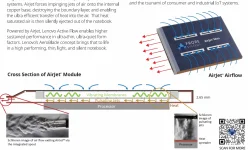
Frore’s SnowGoose2 development kit contains four AirJet Mini G2 modules, two drive boards, and the cables needed to connect them. The kit lets engineers build and test cooling systems; it does not provide a fitted replacement for your laptop’s fan. No laptop-specific mounting assembly is listed.
The layout inside Lenovo’s fan-free AeroBlade concept belongs to a purpose-built machine. Getting similar hardware into your existing laptop means working around its motherboard, finding room for the controls, and building a thermal connection to the processor.
The electrical connections deserve attention before any screwdriver comes out. Frore documents connections to dedicated drive boards, using cables and optional flex connectors, but gives no instructions for using a laptop fan socket.
A retrofit has to accommodate those boards and their wiring alongside the cooling modules. Space you free by removing a fan might be the wrong shape. You would need to check the complete layout, including cable routes and nearby connectors, before assuming the new hardware fits under the cover.
The original SnowGoose kit makes the development work particularly clear, with a separate testbed for measuring thermal performance, backpressure, and noise. Its driver board offers 50, 75, and 100 percent operating levels, allowing engineers to evaluate the cooler before integrating it into a device.
The percentages refer to AirJet operating levels, and Frore does not equate them with a laptop’s fan-speed settings. Useful settings for testing individual cooling modules. Matching the cooler’s behavior to the laptop’s thermal requirements would remain a separate part of the installation, even with the modules connected and operating.
The build included a 0.7mm vapor chamber alongside the 2.8mm AirJet modules. Its job is to move heat between the processor and cooler, so the space it occupies is part of the installation too. Neither measurement alone tells you how much room the complete assembly needs once mounted inside a laptop.
A solid-state upgrade tailored to your laptop therefore needs more than an empty patch beside the motherboard. The processor must transfer its heat into the cooling assembly, with the contact surfaces and mounting arrangement designed for that particular layout.
AirJet’s internal jets remove heat from an integrated copper plate. Dropping a module into the space vacated by a fan does not establish the required thermal connection. The position of the old fan might suit an air outlet while being awkward for the new heat-transfer assembly.
Frore built its MacBook retrofit independently, without Apple’s collaboration. A different MacBook generation or Windows laptop would need its own compatibility assessment, regardless of how well the demonstrated machine performed.
For a Jetson project, a matched PAK can remove the job of arranging loose modules and a separate driver board. A laptop owner still has to establish whether the mounting geometry and processor contact position work inside a completely different enclosure.
Packaging changes the dimensions, too. Frore describes AirJet PAK assemblies as thin as 6.5mm, whereas the Mini G2 cooling module measures 2.65mm thick. Comparing your available space only with the smaller number ignores the difference between a component and an integrated assembly.
PAK units can regulate their operation using their own temperature sensing, without relying on temperature sensors in the host device. You should not assume every AirJet installation requires new motherboard firmware just to operate the cooler.
Autonomous control still leaves the physical installation to solve. The assembly needs a suitable power supply and a route for its exhaust to leave the enclosure. Local temperature sensing cannot create an air outlet or make an unsuitable power connection compatible.
For a proposed conversion, the useful evidence would show the complete assembly installed with the bottom cover attached and the intended air passages unobstructed. An exposed cooler running on a workbench does not establish whether the same arrangement can discharge heated air from a closed laptop.
The layout inside Lenovo’s fan-free AeroBlade concept belongs to a purpose-built machine. Getting similar hardware into your existing laptop means working around its motherboard, finding room for the controls, and building a thermal connection to the processor.
The development kit leaves the fitting to you
SnowGoose2 targets engineers evaluating AirJet for prototypes and future commercial products. Frore asks prospective users to discuss their application when requesting a kit. Having an old laptop with a noisy fan does not establish compatibility.The electrical connections deserve attention before any screwdriver comes out. Frore documents connections to dedicated drive boards, using cables and optional flex connectors, but gives no instructions for using a laptop fan socket.
A retrofit has to accommodate those boards and their wiring alongside the cooling modules. Space you free by removing a fan might be the wrong shape. You would need to check the complete layout, including cable routes and nearby connectors, before assuming the new hardware fits under the cover.
The original SnowGoose kit makes the development work particularly clear, with a separate testbed for measuring thermal performance, backpressure, and noise. Its driver board offers 50, 75, and 100 percent operating levels, allowing engineers to evaluate the cooler before integrating it into a device.
The percentages refer to AirJet operating levels, and Frore does not equate them with a laptop’s fan-speed settings. Useful settings for testing individual cooling modules. Matching the cooler’s behavior to the laptop’s thermal requirements would remain a separate part of the installation, even with the modules connected and operating.
A thin module still needs a thermal assembly
Frore’s documented MacBook Air conversion used three AirJet Minis and a design prepared by its thermal engineers. The installation also required a driver board, which makes the cooling modules’ advertised dimensions only part of the space calculation.The build included a 0.7mm vapor chamber alongside the 2.8mm AirJet modules. Its job is to move heat between the processor and cooler, so the space it occupies is part of the installation too. Neither measurement alone tells you how much room the complete assembly needs once mounted inside a laptop.
A solid-state upgrade tailored to your laptop therefore needs more than an empty patch beside the motherboard. The processor must transfer its heat into the cooling assembly, with the contact surfaces and mounting arrangement designed for that particular layout.
AirJet’s internal jets remove heat from an integrated copper plate. Dropping a module into the space vacated by a fan does not establish the required thermal connection. The position of the old fan might suit an air outlet while being awkward for the new heat-transfer assembly.
Frore built its MacBook retrofit independently, without Apple’s collaboration. A different MacBook generation or Windows laptop would need its own compatibility assessment, regardless of how well the demonstrated machine performed.
Plug-and-play AirJet hardware has a specific host
Frore also makes AirJet PAK assemblies that combine cooling modules with their drive circuitry. These are advertised as plug-and-play products for computing modules such as NVIDIA Jetson Orin. Here, the cooling modules and their controls have already been packaged for a defined platform.For a Jetson project, a matched PAK can remove the job of arranging loose modules and a separate driver board. A laptop owner still has to establish whether the mounting geometry and processor contact position work inside a completely different enclosure.
Packaging changes the dimensions, too. Frore describes AirJet PAK assemblies as thin as 6.5mm, whereas the Mini G2 cooling module measures 2.65mm thick. Comparing your available space only with the smaller number ignores the difference between a component and an integrated assembly.
PAK units can regulate their operation using their own temperature sensing, without relying on temperature sensors in the host device. You should not assume every AirJet installation requires new motherboard firmware just to operate the cooler.
Autonomous control still leaves the physical installation to solve. The assembly needs a suitable power supply and a route for its exhaust to leave the enclosure. Local temperature sensing cannot create an air outlet or make an unsuitable power connection compatible.
For a proposed conversion, the useful evidence would show the complete assembly installed with the bottom cover attached and the intended air passages unobstructed. An exposed cooler running on a workbench does not establish whether the same arrangement can discharge heated air from a closed laptop.