Audiofile Engineering has launched SoundEdit for Mac and refreshed Fidelia across Apple devices. The new editor can turn audio files into playable instruments, while the player gets better library tools and remote access.
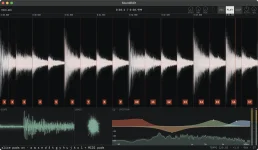
SoundEdit 1.1 goes well beyond cutting and trimming clips. A loaded sample can be played with several notes at once through MIDI or computer keys. Each voice gets a filter and envelope, while sliced drum loops can be played from pads.
Effects are built into the workflow as well. Eight Live Audio Unit slots let users process sounds, and the settings stay with the file. That saves the hassle of rebuilding an effect setup each time a project gets reopened.
The new Library feature lets users browse audio straight from any folder without moving files into a separate database. SoundEdit Pro takes it further by checking each sample for tempo, pitch, key, loudness, and sound type. Those details can then help narrow a search.
Recording has a few handy options. Users can grab audio from the whole Mac, a single app, or an input device. Punch-ins can land at zero crossings to reduce clicks. And a feature called Ingredients lets one sound sit over another with exact frame alignment, while both remain editable.
For hardware users, SoundEdit can swap kits and patches with Teenage Engineering's EP series, OP-1 field, and OP-XY through USB. It also handles beat grids, transient points, MIDI clock sync, stretching, pitch changes, and formant preservation.
Batch work gets serious attention. Whole folders can be converted, renamed, resampled, trimmed, or brought to set loudness levels with a true-peak limit. Fresh files are made rather than replacing the source material. Edit steps also remain available across sessions through saved recipes.
There's an optional AI link, though users have to enable it first. Through an MCP server, Claude or another compatible client can edit the audio currently open in SoundEdit. The feature stays disabled unless someone switches it on in Settings.
File support is broad. SoundEdit can read WAV, AIFF, CAF, MP3, M4A, AAC, and FLAC. Export choices cover those common audio types, along with ALAC, at 16, 24, or 32 bits.
Fidelia 2.13 brings a different set of changes to Mac playback. Watched folders can keep a music collection current, while DR, R128, and ReplayGain data become sortable fields. Its optional AI server also lets Claude and Codex find and play tracks without exposing their file paths.
The Mac player keeps bit-exact, gapless output through USB DACs, with three isolated Audio Unit effect slots. It can handle sound files with up to 9.1.6 channels and display separate peak and RMS readings for each channel.
On iPhone and iPad, Fidelia 2.1 adds Bridge. That lets the mobile app play music from a Mac library through a home network or VPN. Slower links can use lighter audio copies, and the remote collection can appear in CarPlay. AUv3 effects and USB DAC playback remain supported.
SoundEdit needs macOS 14 or later. Its full license costs $99.99, with SoundEdit Pro adding $49.99. Both offer separate 14-day trials, and the base app can be downloaded for free to try.
Fidelia for Mac also costs $99.99, with network playback priced at another $49.99. The iPhone and iPad version needs iOS or iPadOS 17 or later, with a $29.99 unlock and a $24.99 network add-on. Both have free trial downloads for 14 days.
SoundEdit 1.1 goes well beyond cutting and trimming clips. A loaded sample can be played with several notes at once through MIDI or computer keys. Each voice gets a filter and envelope, while sliced drum loops can be played from pads.
Effects are built into the workflow as well. Eight Live Audio Unit slots let users process sounds, and the settings stay with the file. That saves the hassle of rebuilding an effect setup each time a project gets reopened.
The new Library feature lets users browse audio straight from any folder without moving files into a separate database. SoundEdit Pro takes it further by checking each sample for tempo, pitch, key, loudness, and sound type. Those details can then help narrow a search.
Recording has a few handy options. Users can grab audio from the whole Mac, a single app, or an input device. Punch-ins can land at zero crossings to reduce clicks. And a feature called Ingredients lets one sound sit over another with exact frame alignment, while both remain editable.
For hardware users, SoundEdit can swap kits and patches with Teenage Engineering's EP series, OP-1 field, and OP-XY through USB. It also handles beat grids, transient points, MIDI clock sync, stretching, pitch changes, and formant preservation.
Batch work gets serious attention. Whole folders can be converted, renamed, resampled, trimmed, or brought to set loudness levels with a true-peak limit. Fresh files are made rather than replacing the source material. Edit steps also remain available across sessions through saved recipes.
There's an optional AI link, though users have to enable it first. Through an MCP server, Claude or another compatible client can edit the audio currently open in SoundEdit. The feature stays disabled unless someone switches it on in Settings.
File support is broad. SoundEdit can read WAV, AIFF, CAF, MP3, M4A, AAC, and FLAC. Export choices cover those common audio types, along with ALAC, at 16, 24, or 32 bits.
Fidelia 2.13 brings a different set of changes to Mac playback. Watched folders can keep a music collection current, while DR, R128, and ReplayGain data become sortable fields. Its optional AI server also lets Claude and Codex find and play tracks without exposing their file paths.
The Mac player keeps bit-exact, gapless output through USB DACs, with three isolated Audio Unit effect slots. It can handle sound files with up to 9.1.6 channels and display separate peak and RMS readings for each channel.
On iPhone and iPad, Fidelia 2.1 adds Bridge. That lets the mobile app play music from a Mac library through a home network or VPN. Slower links can use lighter audio copies, and the remote collection can appear in CarPlay. AUv3 effects and USB DAC playback remain supported.
SoundEdit needs macOS 14 or later. Its full license costs $99.99, with SoundEdit Pro adding $49.99. Both offer separate 14-day trials, and the base app can be downloaded for free to try.
Fidelia for Mac also costs $99.99, with network playback priced at another $49.99. The iPhone and iPad version needs iOS or iPadOS 17 or later, with a $29.99 unlock and a $24.99 network add-on. Both have free trial downloads for 14 days.