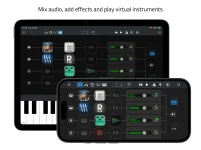
AUM supports unlimited channels and effect slots within device limits, while Sessions Nano fixes its mixer at eight channels and 16 audio effects. Both can host AUv3 instruments and effects, route MIDI, record audio, follow Ableton Link, and work with external hardware. The overlap is real, but the working style is not.
Nano puts hard edges around the session so you can build a playable rig without spending much time designing the host itself. Sessions Nano’s compact AUv3 host gives you four MIDI generators, two internal MIDI buses, four backing-track stems, and a mixer sized for a phone or tablet.
AUM leaves far more of the structure up to you. Its channels, busses, sends, MIDI matrix, hardware I/O, file players, and recording paths can be combined in ways Nano does not document. More freedom also means more decisions.
MIDI is similarly open. AUM’s MIDI matrix can connect external devices, hosted plug-ins, virtual MIDI endpoints, and other available destinations, while its internal routing can send different sources to different instruments. This is open-ended audio and MIDI routing rather than a pair of predefined generator buses.
Nano takes the opposite approach. Its two MIDI buses carry data from up to four hosted MIDI generators to multiple virtual instruments, which works well for shared layers and simple independent parts. A rig that needs three unrelated generator paths at once reaches a structural limit before the iPad itself necessarily runs out of power.
AUM also includes built-in filters, EQ, dynamics, stereo processing, file players, and support for older connection systems such as Inter-App Audio and Audiobus. Nano’s published feature set centers on AUv3 hosting and allows up to 16 audio effects, but it does not advertise a comparable built-in processing library. You may therefore rely more heavily on third-party AUv3 effects inside Nano.
The simpler design can be an advantage on stage. Eight channels are easier to scan than a session with nested busses, multiple sends, and several MIDI destinations. If your setup already fits Nano’s boundaries, extra routing flexibility can become work you never needed.
AUM approaches recording more like a flexible mixer. Individual channels can be record-enabled and written as separate files, while a bus can be used when you want to capture a combined mix. Recording can start and end on synchronization boundaries, which is useful when you need files with clean musical lengths.
Those are not interchangeable strengths. Nano’s rolling capture is useful when the valuable event happened before you pressed anything, while AUM’s per-channel recording is better suited to separating sources for later editing or mixing. Nano’s current documentation does not describe an equivalent system for arming several mixer channels and writing each one to its own file.
Backing-track handling follows the same pattern. Nano provides a dedicated four-stem workflow that can route those stems through the mixer for effects. AUM uses FilePlayer nodes as channel sources, where files can be looped, synchronized, processed, routed, and recorded through the same broader channel architecture.
Controller depth is another dividing line. AUM documents MIDI control for mixer controls and parameters exposed by hosted plug-ins, along with session loading and transport actions. Nano documents MIDI Learn for host duties such as volume, pan, mute, effect bypass, transport, and tempo, without claiming universal mapping of arbitrary AUv3 parameters.
Price reflects the narrower scope. Nano currently unlocks for $9.99 after a free three-day trial, while AUM is $24.99 in the US App Store. The difference matters less than the cost of choosing a host whose boundaries conflict with the rig you already own.
A setup built around a few instruments, simple layers, backing stems, and quick recovery recording can stay comfortably inside Nano. A session needing several independent MIDI routes, elaborate bus structures, plug-in parameter mapping, or simultaneous separate-track recording already depends on capabilities AUM explicitly documents.
Nano puts hard edges around the session so you can build a playable rig without spending much time designing the host itself. Sessions Nano’s compact AUv3 host gives you four MIDI generators, two internal MIDI buses, four backing-track stems, and a mixer sized for a phone or tablet.
AUM leaves far more of the structure up to you. Its channels, busses, sends, MIDI matrix, hardware I/O, file players, and recording paths can be combined in ways Nano does not document. More freedom also means more decisions.
AUM rewards complex routing while Nano limits the map
AUM separates audio strips from MIDI strips and lets you keep adding channels until the device runs out of practical resources. Audio can move through internal busses, subgroups, effect sends, hardware outputs, or additional processing channels. The same session can contain several routing layers without forcing everything through one fixed mixer design.MIDI is similarly open. AUM’s MIDI matrix can connect external devices, hosted plug-ins, virtual MIDI endpoints, and other available destinations, while its internal routing can send different sources to different instruments. This is open-ended audio and MIDI routing rather than a pair of predefined generator buses.
Nano takes the opposite approach. Its two MIDI buses carry data from up to four hosted MIDI generators to multiple virtual instruments, which works well for shared layers and simple independent parts. A rig that needs three unrelated generator paths at once reaches a structural limit before the iPad itself necessarily runs out of power.
AUM also includes built-in filters, EQ, dynamics, stereo processing, file players, and support for older connection systems such as Inter-App Audio and Audiobus. Nano’s published feature set centers on AUv3 hosting and allows up to 16 audio effects, but it does not advertise a comparable built-in processing library. You may therefore rely more heavily on third-party AUv3 effects inside Nano.
The simpler design can be an advantage on stage. Eight channels are easier to scan than a session with nested busses, multiple sends, and several MIDI destinations. If your setup already fits Nano’s boundaries, extra routing flexibility can become work you never needed.
Recording reveals a deeper difference in priorities
Nano continuously keeps the last five minutes of a performance available for playback or saving. You do not need to arm a recorder before an unexpected phrase happens. Manual recording can also run directly to disk without a fixed duration limit.AUM approaches recording more like a flexible mixer. Individual channels can be record-enabled and written as separate files, while a bus can be used when you want to capture a combined mix. Recording can start and end on synchronization boundaries, which is useful when you need files with clean musical lengths.
Those are not interchangeable strengths. Nano’s rolling capture is useful when the valuable event happened before you pressed anything, while AUM’s per-channel recording is better suited to separating sources for later editing or mixing. Nano’s current documentation does not describe an equivalent system for arming several mixer channels and writing each one to its own file.
Backing-track handling follows the same pattern. Nano provides a dedicated four-stem workflow that can route those stems through the mixer for effects. AUM uses FilePlayer nodes as channel sources, where files can be looped, synchronized, processed, routed, and recorded through the same broader channel architecture.
Older hardware and deeper control can decide first
The operating-system gap can settle the choice before routing matters. Sessions Nano requires iOS or iPadOS 26.0 or later, while AUM currently supports iOS and iPadOS 12.0 or later. An older dedicated music device may run AUM normally while being unable to install Nano at all.Controller depth is another dividing line. AUM documents MIDI control for mixer controls and parameters exposed by hosted plug-ins, along with session loading and transport actions. Nano documents MIDI Learn for host duties such as volume, pan, mute, effect bypass, transport, and tempo, without claiming universal mapping of arbitrary AUv3 parameters.
Price reflects the narrower scope. Nano currently unlocks for $9.99 after a free three-day trial, while AUM is $24.99 in the US App Store. The difference matters less than the cost of choosing a host whose boundaries conflict with the rig you already own.
A setup built around a few instruments, simple layers, backing stems, and quick recovery recording can stay comfortably inside Nano. A session needing several independent MIDI routes, elaborate bus structures, plug-in parameter mapping, or simultaneous separate-track recording already depends on capabilities AUM explicitly documents.